The release will include following new and updated modules which can be used to implement various service provider use cases:
A new module class called 'ServiceDatabase' which handles differentiated services and subscriptions:
- <ServiceDatabase INTERNAL> stores service definitions and subscription data within in-memory.
- <ServiceDatabase SQL> stores service definitions and subscription data within SQL database.
Existing <SessionDatabase INTERNAL> and <SessionDatabase SQL> modules have been updated to work seamlessly with new <ServiceDatabase> modules for RADIUS accounting based quota control.
A new generic <AuthBy HOTSPOT> module which combines <ServiceDatabase>, <SessionDatabase>, an authenticating <AuthBy>, and possible <AuthBy DYNAUTH> (RADIUS Dynamic Authorization) for sending CoA/DM e.g. after a successful authentication or when a quota has been depleted, into a working solution which can be used with captive portals (for example MikroTik) and network access controllers supporting RADIUS. Beside Hotspot use-case, the same solution can also be used to implement a quota control for fixed-line access or cellular APN.
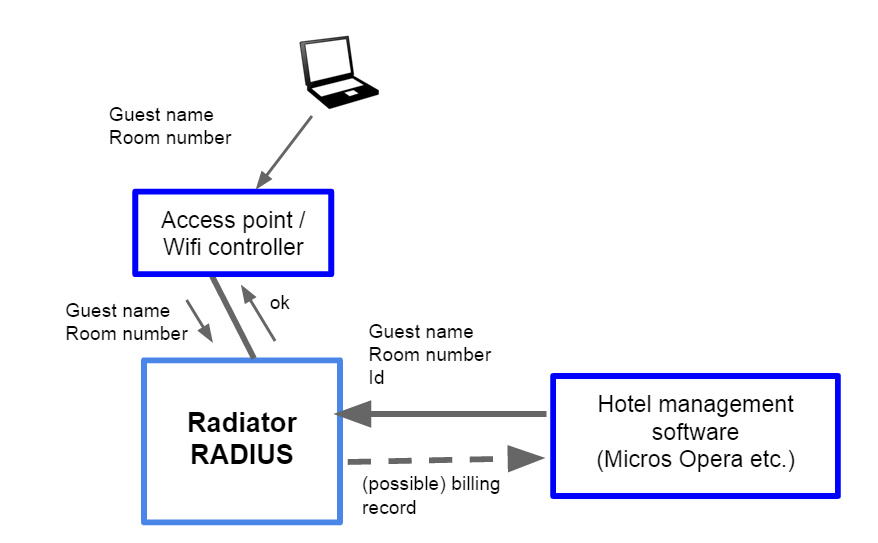
A new <AuthBy HOTSPOTFIDELIO> module based on <AuthBy HOTSPOT> which uses Radiator Fidelio/Opera PMS integration for authenticating and billing guests. Note that <AuthBy HOTSPOTFIDELIO> obsoletes previous <AuthBy FIDELIOHOTSPOT> module.
 |
| Implementing a guest network access with Radiator using Fidelio/Opera PMS integration. |
Examples
To demonstrate how new <AuthBy HOTSPOT> and <AuthBy HOTSPOTFIDELIO> combine these new features, see a following configuration examples of new Radiator Hotspot functionality:Example 1. Using in-memory <ServiceDatabase INTERNAL> and <SessionDatabase INTERNAL> with <AuthBy HOTSPOT> and <AuthBy FILE>
# See goodies/hotspot.cfg for a full example config

...

### Service and Session databases ###

# ServiceDatabase INTERNAL for Services and Subscriptions
<ServiceDatabase INTERNAL>
  Identifier ServiceDatabase-INTERNAL

  # Service definitions
  # Service 1: free, 1 hour, 50M data, no policers  Service name:free price:0 prepaidTime:1h prepaidQuota:50M replyItems:"OSC-AVPAIR=Test1,OSC-AVPAIR=Test2"
  # Service 2: price 1000 cents, 1 day, 100M data, 100M/10M policers
  Service name:premium price:1000 prepaidTime:24h prepaidQuota:100M prepaidUpRate:10M prepaidDownRate:100M

  # Service 3: price 2000 cents, 1 day, 1G data, 100M/100M policers
  Service name:gold price:2000 prepaidTime:24h prepaidQuota:1G prepaidUpRate:100M prepaidDownRate:100M
</ServiceDatabase>

# SessionDatabase INTERNAL for Sessions
<SessionDatabase INTERNAL>
  Identifier SessionDatabase-INTERNAL
</SessionDatabase>

...

### AuthBy Modules ###

# Authenticate Hotspot users with AuthBy FILE
<AuthBy FILE>
  Identifier AuthBy-FILE

  Filename %D/users
  NoDefault
</AuthBy>

<AuthBy HOTSPOT>
  Identifier AuthBy-HOTSPOT

  # Authenticate Hotspot users with AuthBy FILE
  AuthBy AuthBy-FILE

  # Use ServiceDatabase-INTERNAL for services and subscriptions
  ServiceDatabase ServiceDatabase-INTERNAL

  # Lookup a subscription based on username (%1) and Calling-Station-Id MAC address
  SubscriptionId %1-%{Calling-Station-Id}

  # Use SessionDatabase-INTERNAL for sessions
  SessionDatabase SessionDatabase-INTERNAL

  # Lookup a session based on username (%1) and Calling-Station-Id MAC address
  SessionId %1-%{Calling-Station-Id}
  # Empty SessionAttribute
  SessionAttribute

  # If RADIUS accounting will be used for quota monitoring,
  # create a new session upon a successful authentication
  #PreProvisionSession

  # Alternatively, reply with remaining time quota
  #UsageMonitoring
  # and remaining data quota
  #ReplyWithDataQuota
  #DataLimitAttribute Mikrotik-Total-Limit
  #DataLimitGigawordsAttribute Mikrotik-Total-Limit-Gigawords

  # Use service 'free' as a default service
  DefaultService free
  ServiceAttribute OSC-Service-Identifier
  #ServiceAttributePrefix Service=
</AuthBy>

# AuthBy DyNAUTH for creating DM/CoA requests for exceeded sessions
<AuthBy DYNAUTH>
  Identifier AuthBy-DYNAUTH

  SessionDatabase SessionDatabase-INTERNAL

  # Send Change-Filter-Request (CoA) to NAS UDP port 3799
  #RequestType Change-Filter-Request
  # Send Disconnect-Request (DM) to NAS UDP port 3799
  RequestType Disconnect-Request
  DynAuthPort 3799

  # Do not try to lookup a session again
  NoSessionMapping

  # Send CoA/DM to IP address within NAS-IP-Address RADIUS attribute
  NasAddrAttribute NAS-IP-Address

  # Identify user session by User-Name, Acct-Session-Id and NAS-Port
  DynAuthAttribute User-Name
  DynAuthAttribute Acct-Session-Id
  DynAuthAttribute NAS-Port
</AuthBy>

# AuthBy RADIUSBYATTR for sending out DM/CoA requests for exceeded sessions
<AuthBy RADIUSBYATTR>
  Identifier AuthBy-RADIUSBYATTR
</AuthBy>

### Request Handlers ###

# Accounting Handler
<Handler Request-Type=Accounting-Request>
  Identifier Accounting-Handler

  # Acknowledge Accounting-Request immediately
  AccountingAccepted

  AuthByPolicy ContinueUntilRejectOrChallenge

  # Handle RADIUS accounting
  AuthBy AuthBy-HOTSPOT
  # Send DM/CoA request for exceeded session
  AuthBy AuthBy-DYNAUTH
</Handler>

# Outgoing DM/CoA Handler
<Handler DynAuthRequest=1>
  Identifier Handler-DYNAUTH

  AuthBy AuthBy-RADIUSBYATTR
</Handler>

# Default Handler
<Handler>
  Identifier Default-Handler

  # Handle RADIUS authentication
  AuthBy AuthBy-HOTSPOT

  RejectHasReason
</Handler>
# See goodies/hotspot-fidelio.cfg for a full example config
#
# Requires SQL definitions from goodies/hotspot.sql and goodies/hotspot-fidelio.sql
# See goodies/README.hotspot-fidelio for more information
#

...

### Service and Session databases ###

# ServiceDatabase SQL for Services and Subscriptions
<ServiceDatabase SQL>
  Identifier ServiceDatabase-SQL

  # Details of how to contact the service and subscription database
  DBSource   dbi:SQLite:dbname=hotspot.db
  #DBSource   dbi:mysql:hotspot
  DBUsername mikem
  DBAuth     fred
</ServiceDatabase>

# SessionDatabase SQL for Sessions
<SessionDatabase SQL>
  Identifier SessionDatabase-SQL

  # Details of how to contact the session database
  DBSource   dbi:SQLite:dbname=hotspot.db
  #DBSource   dbi:mysql:hotspot
  DBUsername mikem
  DBAuth     fred

  # Modified SQL queries/statements for a new session database schema (goodies/hotspot.sql)
  CountQuery SELECT nas_id, nas_port, id, ipv4 FROM SESSIONS WHERE user_name=%0
  ClearNasQuery DELETE FROM SESSIONS WHERE nas_id='%0'
  AddQuery
  DeleteQuery
  ClearNasSessionQuery
</SessionDatabase>

...

### AuthBy Modules ###

<AuthBy HOTSPOTFIDELIO>
  Identifier AuthBy-HOTSPOTFIDELIO

  # Use ServiceDatabase-SQL for services and subscriptions
  ServiceDatabase ServiceDatabase-SQL
  # Lookup a subscription based on username (%1), Fidelio PMS    Guest Number (%2) and Calling-Station-Id MAC address
  SubscriptionId %1-%2-%{Calling-Station-Id}

  # Use SessionDatabase-SQL for sessions
  SessionDatabase SessionDatabase-SQL
  # Lookup a session based on username (%1), Class (%3) and    Calling-Station-Id MAC address
  SessionId %1-%3-%{Calling-Station-Id}
  # Empty SessionAttribute
  SessionAttribute

  # If RADIUS accounting will be used for quota monitoring,
  # create a new session upon a successful authentication
  PreProvisionSession

  # Alternatively, reply with remaining time quota
  #UsageMonitoring
  # and remaining data quota
  #ReplyWithDataQuota
  #DataLimitAttribute Mikrotik-Total-Limit
  #DataLimitGigawordsAttribute Mikrotik-Total-Limit-Gigawords

  # Details of how to contact the Fidelio posting database
  # See AuthSQL for details
  DBSource   dbi:SQLite:dbname=hotspot.db
  #DBSource   dbi:mysql:hotspot
  DBUsername mikem
  DBAuth     fred

  # Fidelio PMS interface
  Protocol tcp
  Port 5010
  Host localhost

  # Validity time in seconds of plan purchased
  # Default 86400 seconds (1 day)
  BlockDuration 86400

  # Default price for plan
  # Price in database overrides this value
  BlockPrice 900

  # ServiceAttribute defines the RADIUS attribute that is
  # used select the desired prepaid service or plan. On
  # Mikrotik login page you can create a menu as shown
  # below to display the different purchase
  # options. Note: "name=radius0-9048" is OSC-AVPAIR.
  #  <tr><td>Service:</td><td>
  #  <select name="radius0-9048">
  #  <option value="Mikrotik-Service=free">best effort (free)  </option>
  #  <option value="Mikrotik-Service=premium">premium ($5)</option>
  #  </select></td></tr>
  ServiceAttribute OSC-AVPAIR

  # If it is possible that there are multiple instances
  # of the ServiceAttribute in the request, you can use
  # an optional prefix to choose the correct instance.
  ServiceAttributePrefix Mikrotik-Service=

  # By default upgrade or renewal of the current plan is
  # automatically processed and charged. With this option
  # you can ask the guest to confirm the charge first.
  # With Mikrotik you can show the message to the guest
  # by including
  #  $(if error)<br /><div style="color: #FF8080; font-size: 14px">$(error)</div><br>$(endif)
  # on the Mikrotik login page
  #ConfirmUpgradeOrRenew
  #ConfirmationMessage "You are going to upgrade or renew your plan, please login again to confirm the charge"

  # This one uses the last part of the guest name (case sensitive) as the
  # password. This is usually the guest surname
  UserPasswordHook sub {my @n = split(/\s/, $_[1]->{'GN'}); return $n[$#n];}

  # Need this to ensure the Guest Number is included in the postings
  # Required when there are multiple guests per room
  #PostingExtraFields G#,%4

  # You can add extra attributes in the reply here if you wish
  # to set limits or controls over access
  #AddToReply Mikrotik-Recv-Limit-Gigawords=1,Mikrotik-Xmit-Limit-Gigawords=1
</AuthBy>

# AuthBy DyNAUTH for creating DM/CoA requests for exceeded sessions
<AuthBy DYNAUTH>
  Identifier AuthBy-DYNAUTH

  SessionDatabase SessionDatabase-SQL

  # Send Change-Filter-Request (CoA) to NAS UDP port 1700
  #RequestType Change-Filter-Request
  # Send Disconnect-Request (DM) to NAS UDP port 1700
  RequestType Disconnect-Request
  DynAuthPort 1700

  # Do not try to lookup a session again
  NoSessionMapping

  # Send CoA/DM to IP address within NAS-IP-Address RADIUS attribute
  NasAddrAttribute NAS-IP-Address

  # Identify user session by User-Name, Acct-Session-Id and NAS-Port
  DynAuthAttribute User-Name
  DynAuthAttribute Acct-Session-Id
  DynAuthAttribute NAS-Port
</AuthBy>

# AuthBy RADIUSBYATTR for sending out DM/CoA requests for exceeded sessions
<AuthBy RADIUSBYATTR>
  Identifier AuthBy-RADIUSBYATTR
</AuthBy>

### Request Handlers ###

# Accounting Handler
<Handler Request-Type=Accounting-Request>
  Identifier Accounting-Handler

  # Acknowledge Accounting-Request immediately
  AccountingAccepted

  AuthByPolicy ContinueUntilRejectOrChallenge

  # Handle RADIUS accounting
  AuthBy AuthBy-HOTSPOTFIDELIO
  # Send DM/CoA request for exceeded session
  AuthBy AuthBy-DYNAUTH
</Handler>

# Outgoing DM/CoA Handler
<Handler DynAuthRequest=1>
  Identifier Handler-DYNAUTH

  AuthBy AuthBy-RADIUSBYATTR
</Handler>

# Default Handler
<Handler>
  Identifier Default-Handler

  # Use SessionDatabase-SQL
  SessionDatabase SessionDatabase-SQL
  # Don't try to delete a session before authentication
  SessionDatabaseOptions NoDeleteBeforeAuthentication

  # Handle RADIUS authentication
  AuthBy AuthBy-HOTSPOTFIDELIO

  RejectHasReason
</Handler>