Showing posts with label authentication. Show all posts

Thursday, December 5, 2024

Radiator for Libraries - Enable connection for patrons without extra provisioning

In recent years, libraries have evolved from venues where people come to pick up books into community places for people to read, study, work and much more. As most of these activities require reliable internet access, there is no denying that providing stable connectivity is becoming a requirement for modern libraries.

Hence why more and more libraries are looking at efficient and secure ways to enable connectivity for their patrons, while ensuring that that connection is not used for malicious business. Having an open Wi-Fi broadcasted across the library facilities is not the way to, and provisioning separate credentials for internet connection for all users visiting the library is a big hassle.

Radiator has got you covered. Radiator AAA server seamlessly integrates with existing Library management system (LMS, also known as Integrated library system, ILS) providing patrons connectivity utilising the credentials from LMS, used for lending books.

How does it work?

The key to library Wi-Fi authentication with Radiator lies on 3M™ Standard Interchange Protocol 2.0, known as the SIP2 protocol. The SIP2 protocol provides an interface between a library’s management system and library automation devices. This is the same protocol used for automated self-check devices for loaning and returning library books, and the parameters that can be used for self-lending can also be used for Wi-Fi access.

Radiator authenticates patrons based on their existing patron credential, for example library card number and PIN code. This means libraries do not need to provision and store separate Wi-Fi credentials for patrons. The basic version of this configuration is very simple and Radiator’s scripts handle the communication with the library system. Essentially, in the library system’s view, Radiator is a self-service loaning device among the others.

This integration also enables further functionality. Radiator can be configured to do that if the patron has outstanding fines or fees that exceed an agreed threshold, their Wi-Fi access will be declined upon login. This is done by Radiator’s scripts and is a toggleable option within the Radiator configuration file. The access can be tied to patron status or other patron information, for example age restriction can be applied.

Swift commercial process, flexible testing

Radiator is priced based on the number of servers, which makes a single library deployment very cost-effective. Radiator’s flexible evaluation licences allow you to set up a test system and see the solution working before making any commitments.

If you are interested in deploying a secure, robust and affordable solution for your library connectivity, please contact our sales team at sales@radiatorsoftware.com

Monday, September 18, 2023

Replacing Juniper SBR in mobile APN authentication with Radiator

Like we have written before in our blog, Radiator AAA Server Software is currently being used in many projects to replace Juniper’s Steel-Belted RADIUS that is now reaching the end of support. Of course at the same time, many FTTH service providers, ISPs and mobile operators are always searching for new options when they prepare their network infrastructure for the future.

One specific use case where we have seen a lot of demand for Radiator is the RADIUS authentication needed in mobile networks. In mobile networks, RADIUS protocol is used when there are private, organization-specific APN (Access Point Name) network paths in use. For example, critical communications such as emergency services often require this kind of network segmentation to secure their operations.

In VoLTE/4G networks, PGW/GGSN components in mobile networks make RADIUS queries to RADIUS server (such as our Radiator), and RADIUS server then authenticates and authorizes the end user to a specific APN network path - that can for example be an enterprise-related private network.

What we have been recently doing with many customers is the replacement of RADIUS servers and the related business logic in mobile networks. These have been done both with Radiator AAA Server Software and with the consultation of our technical team. At the same time, these projects are often combined with different accounting use cases, storing of CDR records etc.

When preparing for the future and taking the course to 5G networks, either RADIUS or Diameter interfaces will be used for similar use cases. Radiator, with extensive support of different TLS-based EAP methods, is of course prepared for this use case with 5G networks as well.

Would you like to know more?

In case you are looking for a future-proof RADIUS and Diameter server for your mobile network, we are happy to provide more info - and discuss your use case. Just reach out to us at sales@radiatorsoftware.com and we can discuss further.

Monday, December 12, 2022

Offline TOTP implementation with Radiator AAA Server and Windows Server

Recently, we have had multiple customer cases in the need of offline TOTP (time-based one-time password) implementations. Both private enterprises and public institutions working on different fields have discovered an increasing need for offline multi-factor authentication to protect their critical infrastructure. These use cases include for example power companies, transport infrastructure and other use cases that are used in private networks, and where secure authentication is essential at all times.

Many of these customers use Windows Server and Microsoft SQL server in their implementations, so we wanted to share how Radiator AAA Server Software can be used with them when implementing an offline TOTP solution. And as clarified below, given the flexibility of Radiator, other platforms can be used as well⁠—do not hesitate to contact us with your own specific use case in your own infrastructure.

How it is done

We have had a working example in the Radiator goodies directory that can be leveraged to individual needs:

totp.cfg and totp.sql
Sample configuration file for Radiator, showing how to authenticate using TOTP (RFC 6238) one-time-passwords. The sample MySQL database schema provides test users, with and without a PIN.

generate-totp.pl
Supporting script for generating secret values for TOTP and printing them in different text formats and as QR code images.

The existing example is using SQL definitions specific to MySQL and MariaDB database servers. As Radiator is flexible, the same functionality can be achieved on any supported OS and with any database. Here we show how to set up a similar system with Windows Server 2012 to 2022 and Microsoft SQL Server 2012 to 2022, with Radiator AAA Server Software (current version 4.26). The new Windows-specific configuration shown here will also be included in the goodies of the oncoming release of Radiator soon.

To start with, we expect the system with Windows Server is already installed and hardened as needed. Also, installing Microsoft SQL Server and Microsoft SQL Server Management Studio is out of scope of this post. You can try this TOTP setup out also on a standard desktop Windows version and free SQL Server Express (https://www.microsoft.com/en-us/sql-server/sql-server-downloads).

After the prerequisites are met, the next step is to download and install the rest of the needed software packages:

ODBC Driver for SQL Server
https://learn.microsoft.com/en-us/sql/connect/odbc/download-odbc-driver-for-sql-server

Radiator AAA Server Software, Radiator Windows MSI installer
https://radiatorsoftware.com/products/radiator/

After creating a new ODBC data source (be sure to select a 64-bit driver on 64-bit environments), you can test if the DSN is available to Radiator by running a small test script. Start the command shell with correct environment settings by selecting Radiator configuration from the Start menu and then clicking Perl command line. Save and run the following script on the server. The script lists all DSNs it finds, and if you see the newly created DSN, everything is OK.

# List available data sources
#
# Example run:
# C:\> perl list_datasources.pl
# - dbi:ODBC:<datasourcename1>
# - dbi:ODBC:<datasourcename2>

use strict;
use DBI;
my @dsns = DBI->data_sources('ODBC');
foreach my $d (@dsns)
{
  print "- $d\n";
}

If you want to generate TOTP secrets with generate-totp.pl you also need to install the following new modules. The command cpanm makes it easy if you're connected to the internet:

cpanm MIME::Base32
and
cpanm Imager::QRCode

You can also download the modules manually (check for the latest versions), for example:
https://cpan.metacpan.org/authors/id/R/RE/REHSACK/MIME-Base32-1.303.tar.gz
https://cpan.metacpan.org/authors/id/K/KU/KURIHARA/Imager-QRCode-0.035.tar.gz
and install them from local files like:

cpanm MIME-Base32-1.303.tar.gz
cpanm Imager-QRCode-0.035.tar.gz
Create the database and grant the needed privileges to the user (SELECT and UPDATE). Here's the table definition with SQL Server specific field types. The definition is stripped from comments for brevity, and some fields are optional. Please see goodies for full details.
CREATE TABLE totpkeys
(
  id              INT NOT NULL IDENTITY(1,1),
  active          BIT DEFAULT 0,
  created         DATETIME NOT NULL,
  accessed        DATETIME NOT NULL,
  username        VARCHAR(100) UNIQUE NOT NULL,
  tokenId         TEXT,
  pin             TEXT,
  secret          VARCHAR(130) UNIQUE NOT NULL,
  digits          INT DEFAULT 6,
  bad_logins      INT DEFAULT 0,
  last_timestep   INT,
  algorithm       TEXT NOT NULL,
  timestep        INT DEFAULT 30,
  timestep_origin INT DEFAULT 0,
  PRIMARY KEY (id)
);
Insert some example data ( we use 6-digit codes for broader compatibility, and here's only some of the records):
INSERT INTO totpkeys VALUES (1, GETUTCDATE(), GETUTCDATE(), 'mikem', NULL, NULL,
    '3132333435363738393031323334353637383930', 6, 0, NULL, 'SHA1', 30, 0);
INSERT INTO totpkeys VALUES (1, GETUTCDATE(), GETUTCDATE(), 'mikem512', NULL, NULL,
    '31323334353637383930313233343536373839303132333435363738393031323334353637383930313233343536373839303132333435363738393031323334',
    6, 0, NULL, 'SHA512', 30, 0);
INSERT INTO totpkeys VALUES (1, GETUTCDATE(), GETUTCDATE(), 'fred', NULL, 'fred',
    '1111111111111111111111111111111111111111', 6, 0, NULL, 'SHA1', 30, 0);
Then we make modifications to the example TOTP configuration. Change the DBSource name (DSN) and credentials as needed in the <AuthBy SQLTOTP> block. Also, AuthSelect and UpdateQuery are modified with SQL Server syntax:
<AuthBy SQLTOTP>
  DBSource    dbi:ODBC:totp
  DBUsername  totp
  DBAuth      fred

  AuthSelect SELECT secret, active, pin, digits, bad_logins, DATEDIFF(s, '1970-01-01', accessed), \
                    last_timestep, algorithm, timestep, timestep_origin FROM totpkeys WHERE username=?
  AuthSelectParam %0

  UpdateQuery UPDATE totpkeys SET accessed=GETUTCDATE(), bad_logins=?, last_timestep=? WHERE username=?
  UpdateQueryParam %0
  UpdateQueryParam %2
  UpdateQueryParam %1
</AuthBy>
Update the configuration otherwise as needed (ie. make sure paths are correct to your setup, etc.), and set Trace 4 to see the interesting information during testing. (Re)start the Radiator server process to make sure the new configuration will be used, and then you can try your new setup. Importing the keys to your TOTP application can be done with the help of generate-totp.pl script. If you use the predefined examples, you can get the QR codes by running it like
C:\Radiator>perl generate-totp.pl -accountname "mikem" -issuer "Organisation" \
    -algorithm SHA1 -hex_secret "3132333435363738393031323334353637383930" -digits 6 \
    -image_format gif -qrcode_file \temp\mikem.gif

TOTP key to insert into Radiator database: 3132333435363738393031323334353637383930
TOTP key in BASE32 for client: GEZD GNBV GY3T QOJQ GEZD GNBV GY3T QOJQ
Writing QR code file \temp\mikem.gif
otpauth://totp/Radiator:mikem?secret=GEZDGNBVGY3TQOJQGEZDGNBVGY3TQOJQ&issuer=Radiator&
algorithm=SHA1&digits=8&period=30

You can also create new keys by leaving out the -hex_secret parameter and insert the generated hex string into the database.

Then use your preferred method to display the generated QR code image (MS Paint or web browser are fine) and scan the key into your TOTP application. Microsoft and Google have their authenticators available for mobile devices, and Apple's mobile devices have the feature built-in. There's also a free alternative FreeOTP with an open source codebase: https://github.com/freeotp.

After getting your authenticator app set up you're ready for your first TOTP authentication using radpwtst on command line. Replace the password with your time-based response:

perl radpwtst -noacct -user mikem -password 751352
Or if static PIN is used, here PIN "fred" is prefixed to TOTP one-time-password:
perl radpwtst -noacct -user fred -password fred755224

If everything goes as expected you'll see the Access-Accept response on radpwtst's output, and also on the Radiator server's log. And if something fails, the log can be used to pin-point the problem.
This example is just basic password authentication (PAP). You can now change and expand the configuration to enable more elaborate TOTP RADIUS authentication to your devices or software as needed.

Would you like to know more?

If you want to know more how offline TOTP can be implemented for your use case and solution with Radiator, please do not hesitate to contact us. We can always be reached via email at info@radiatorsoftware.com

Wednesday, August 10, 2022

Cisco ACS is reaching end of life - Radiator has got you covered

As announced already some time ago, Cisco will no longer support either the hardware or the software of their Access Control System (Cisco ACS) product line. If your network administration still runs Cisco ACS, it’s time to take action and upgrade it into a product with a clear future for updates and support. Radiator AAA Server software, often referred to as the Swiss Army Knife of AAA Servers, can pick up from there.

As mentioned in a previous Radiator Cookbook post in 2018, Radiator AAA Server Software offers TACACS+ support and can be integrated with existing hardware to replace current solution’s TACACS+ and RADIUS functionalities. This means that Radiator can replace the authentication functions Cisco ACS did in your previous system. All that is required is an external database for user credentials that Radiator integrates to.


Radiator is actively developed, with multiple updates per year, so continuous support for your solution is given. And most importantly, Radiator’s support team consists of experienced professionals who have developed and actively develop Radiator AAA, so your support requests are always handled by capable RADIUS and TACACS+ experts.

These same professionals will be handling the transition work from ACS to Radiator AAA, if you so wish. Our technical team consists of experienced seniors with vast experience in enterprise, ISP, CSP and other AAA solution integrations and have done these transition projects even before the EOL was announced.

Radiator, being a flexible AAA Server with TACACS+ support, can replace ACS’s TACACS+ and RADIUS functions. Radiator does not have the built-in database, but rather integrates to a customer’s existing database. If need be, we are happy this database solution through our partner. The flexibility of Radiator also includes multi-vendor support for NAS devices. This means that changing NAS devices will not be troubled by vendor lock-in.

Want to know more?

If you want to know more about Radiator AAA Server software as the flexible and supported replacement for Cisco ACS, do not hesitate to contact our sales team sales(at)radiatorsoftware.com.

Thursday, July 14, 2022

Radiator supports EAP-TLS 1.3

One of the most used authentication methods for Radiator users is EAP-TLS. It is widely supported among wireless vendors and the support for EAP-TLS is needed for different certifications for wireless authentication. Radiator has supported different versions of EAP-TLS from the start. As we want to be in the forefront of industry standards, we are happy to announce that Radiator now supports EAP-TLS 1.3 - our team has also been involved in the standardisation work for EAP-TLS and other TLS-based EAP methods.

What is new in EAP-TLS 1.3?

The key feature in EAP-TLS 1.3 is increased privacy and security. Like the RFC document says “TLS 1.3 is in large part a complete remodeling of the TLS handshake protocol including a different message flow, different handshake messages, different key schedule, different cipher suites, different resumption mechanism, different privacy protection, and different record padding.” This new remodeled TLS handshake protocol ensures faster TLS connections as well as patches previous security errors TLS 1.2 had.

Especially important in this new version for EAP-TLS is that no information about the underlying peer identity is disclosed. In other words this means that with EAP-TLS 1.3 the certificate of the user is delivered encrypted. In previous versions of EAP-TLS the client certificate was delivered without encryption, providing a possibility of tracking the users. This has been an issue for some users of EAP-TLS discouraging its deployment. To increase the security of your organization, Radiator configuration allows you to enable EAP-TLS 1.3 for devices that support it, while the earlier versions of EAP-TLS are still available for older devices. Radiator AAA Server Software and its modules are actively developed and updated to support state-of-the-art AAA security features. With the most recent Radiator SIM Pack patch, Radiator now supports IMSI Privacy as well - as one of the few AAA software vendors. So, in short, Radiator is committed to stay in the frontlines of all AAA security features at all times.

Would you like to know more?

While the support for TLS v1.3 in some operating systems varies, the Radiator implementation of TLS v1.3 and EAP-TLS is currently available in the testing branch of Radiator, but will be included in the next stable release as well. If ou are interested please test and give us feedback about the implementation.

If you want to know more about Radiator and EAP-TLS 1.3, please do not hesitate to contact our sales team at info(a)radiatorsoftware.com. For full list of Radiator technical features, you can also visit the Radiator AAA Server Software product page.

Wednesday, June 22, 2022

Radiator FAQ page out now!

You have asked, and we have answered. In the past years working with Radiator AAA, we have encountered hundreds of interesting questions in support e-mails and calls, RFPs and in other inquiries. We have collected some of the more frequently asked questions onto a FAQ page, which has recently been published. Go check it out at https://faq.radiatorsoftware.com!

What topics are covered?

The FAQ page contains answers to great variety of questions about Radiator AAA Server Software. Currently the FAQ covers our core product, Radiator AAA Server Software. At the first stage, the FAQ page focuses on Radiator AAA Server Software, our core product. We will gradually push updates and expand the FAQ based on feedback and the needs of our audience, to include our modules and general questions about Radiator Software as a company.

What if my question is not in the FAQ?

If you do not find the question that is on your mind on the FAQ page, however, please do not hesitate to contact us via e-mail to info (at) radiatorsoftware.com.

Tuesday, May 24, 2022

More flexibility to authentication with Ut interface and Radiator GBA/BSF Pack

One of the carrier products in our Radiator product line is the Radiator GBA/BSF Pack. The main use case for this product has been providing the authentication for VoLTE supplementary services in carrier networks and Radiator GBA/BSF Pack has been in this use for many years. 

In addition to self-provisioning VoLTE supplementary services (call forwarding, call barring, knocking, etc.) the same GBA/BSF functionalities can be used for proxying authentication to different services as well - such as Rich Communication Services or different services for IoT devices, for example.

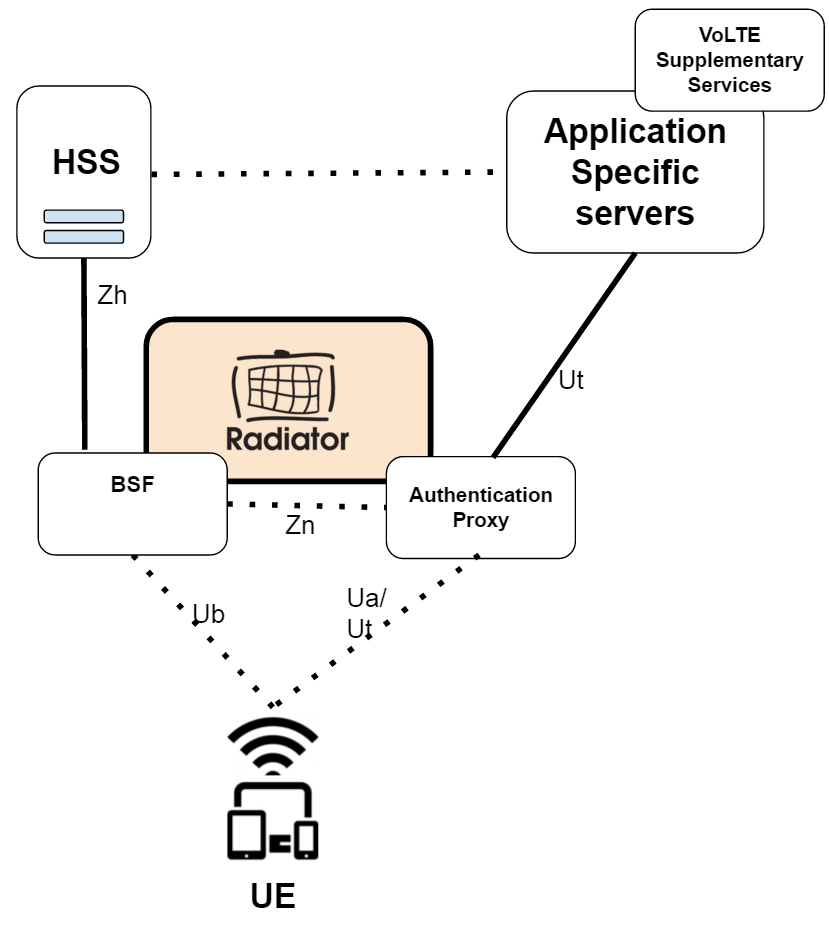
The main functionality in GBA/BSF is that after the initial authentication, end user authentication can be proxied directly to Application Specific servers via Ut interface. The basic architecture is shown on the diagram below.


The Ut interface and authentication proxying can also be used for example in secure IoT authentication for different products, such as IoT devices that need to be authorised and authenticated. In this use case as well, the IoT device is supplied with SIM/eSIM that authenticates with carrier HSS. After the initial authentication, the later authentications can be proxied using the Authentication Proxy provided by Radiator GBA/BSF Pack.  

Radiator provides flexibility when working with Ut interface

For Ut interface, there is a wide range of different vendor specific implementations from device manufacturers. This causes differences in user equipment behaviour across vendors.

This is where Radiator GBA/BSF shows its strengths: wide interoperability accommodating different user equipment within the same systems makes our Radiator GBA/BSF easy to integrate to different network environments. Radiator GBA/BSF’s implementation allows tweaking the configuration when unexpected behaviour is encountered and adjust accordingly.

This focus to accommodate multiple vendor-specific implementations is what we have been doing in recent releases of Radiator GBA/BSF Pack - latest release in April 2022: providing more interoperability based on real observed behaviour of the devices. In this development work, the feedback from our live carrier customer has been extremely valuable.

Would you like to know more?

If you would like to know more about Radiator GBA/BSF and how it can be used in your use case, please contact our team at info(a)radiatorsoftware.com


Wednesday, April 6, 2022

Radiator Auth.Fi: Self-service, Passwordless Guest Access

 As a part of our Radiator Auth.Fi - Wi-Fi Authentication Service we provide self-service, passwordless guest access for Wi-Fi networks. With this service you can limit the use of your guest network to those users willing to validate their network access with email address or phone number. Compared to unauthenticated guest networks, the authenticated guest networks reduce network abuse  cases and overuse of network resources.

We have designed the guest network access validation to be easy and secure enough for the end-user without any hassle with passwords or need to reauthenticate. As the network access validation is done as a self-service, no vouchers are provided and needed reducing the work needed to support guest users in accessing the network - the authentication and authorization is connected to the user to the MAC address of the user device.

How does it work?

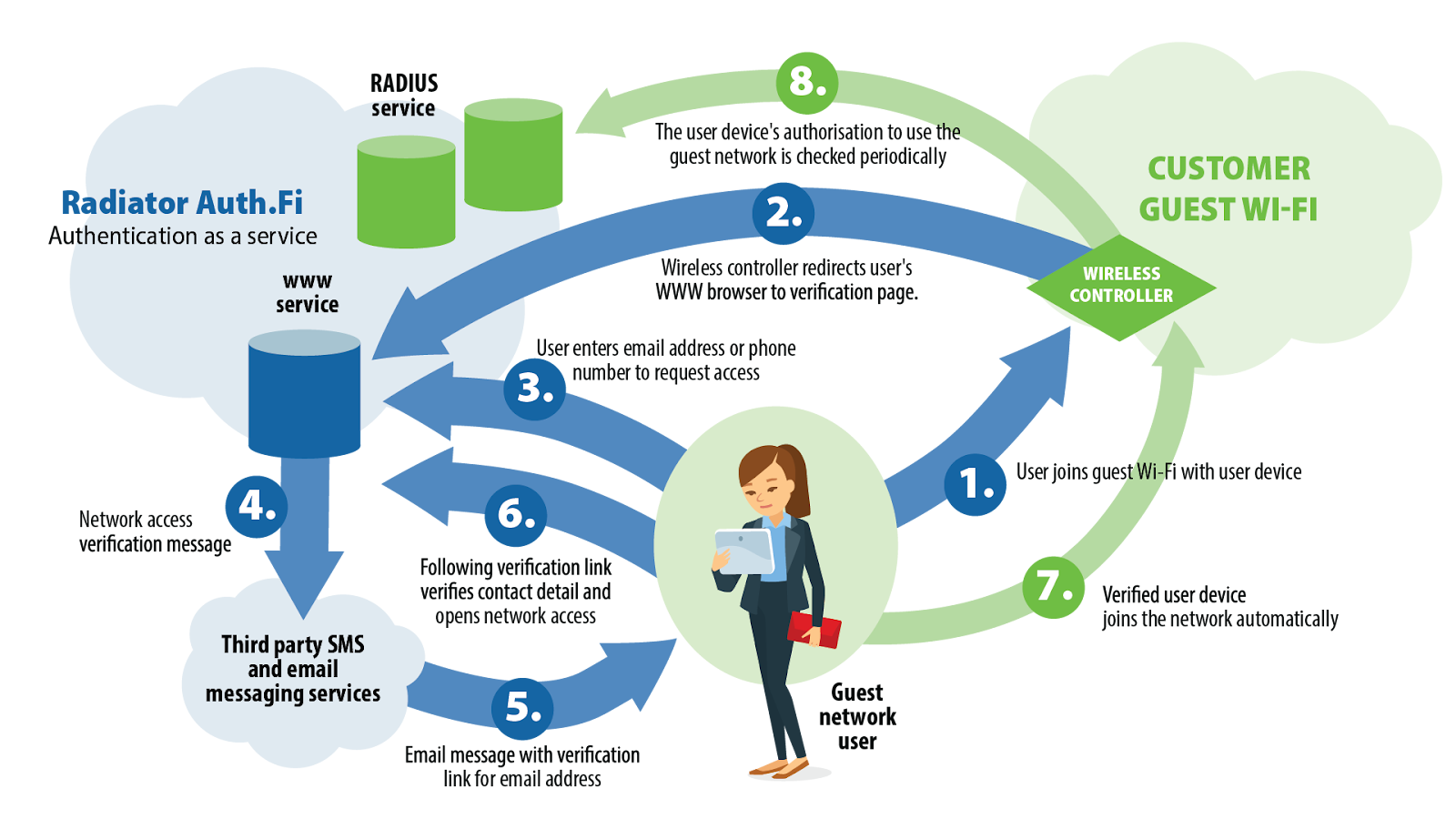
As seen from the picture below, the authentication and access process follows a few steps, after which the guest can join to the Wi-Fi network automatically - but still as an authenticated user. The steps are as follows:

  1. Guest user connects to the Wi-Fi network operated by your organization
  2. The user device of the guest user notices that authentication is needed before browsing and the user's WWW browser is redirected to the authentication page operated by Radiator Auth.Fi.
  3. Guest user chooses the method for authentication and inserts either email address or telephone number for authentication.
  4. Radiator Auth.Fi service sends the authentication verification message to the guest user to email or SMS messaging service.
  5. Email message (or optionally SMS) containing verification link is sent to the guest user 
  6. Following the verification link guest user verifies contact information and network access is authenticated with Radiator Auth.Fi
  7. Guest user can now use guest Wi-Fi network and the device joins network automatically
  8. Guest user can now use the guest Wi-Fi network for a limited time (for example 24 hours - based on your company policies) without the need for reauthentication. The authorisation of the user device to the network is checked periodically during allowed time.

Would you like to know more?

For more info about Radiator Auth.fi Wi-Fi Authentication Service, please contact our sales team at sales(a)radiatorsoftware.com or via contact form.

We are happy to discuss your use case and how Radiator Auth.fi may suit your needs. Commercially, Radiator Auth.fi is based on a flexible, pay-as-you-go subscription model that allows you scale the commercial model of the service based on your business needs. At the same time, we provide several feature options for the Radiator Auth.fi - this use case of providing guest access being one of them.

Wednesday, March 2, 2022

In-flight Connectivity with Radiator

For many of our customers we have been implementing WiFi roaming for different use cases: for example, carriers offloading traffic from their mobile network to WiFi hotspots or for providing VoWiFi (Voice over WiFi) calling to their customers.

One case for Radiator is to implement in-flight connectivity for airline carriers, providing authentication to onboard WiFi that is connected by other means (such as satellite connection) to the internet.

In this scenario, Radiator provides the necessary interfaces for WiFi roaming when subscribers of mobile operators are using their phones during the flight. With smooth WiFi roaming provided by Radiator AAA Server Software, end user devices can connect automatically to the in-flight WiFi network, and continue their use based on the roaming policy agreements between mobile operators and in-flight network operators.

Some of the benefits for this kind of solution are:

  • For the airline carrier: More value for service as a provider of smoothly connected onboard WiFi as a part of their in-flight services.
  • For the end user: Better user experience when connecting to onboard WiFi.
  • For the mobile operator: New product opportunities for mobile operator roaming with airline onboard WiFi.
  • For the onboard Wi-Fi technology provider: A flexible product with Radiator that provides connectivity to carrier networks via different interfaces.


At the same time, the solution with Radiator AAA server can of course be used in cruise ships and platforms where a smoothly run, commercial onboard WiFi is needed. 

How does it work?

On the technical side, Radiator AAA Server, combined with Radiator SIM Pack, is used to provide EAP-SIM, EAP-AKA and EAP-AKA’ authentication and connectivity to different HSS / HLR systems used by different roaming partner carriers and mobile operators. In these cases, the flexibility of Radiator helps to connect to various different systems needed via multiple interfaces.

With this configuration, in addition to handling the authentication traffic, Radiator AAA Server also proxies the accounting traffic to policy enforcement or traffic monitoring solutions that can then use it to provide access to end users, based on their data plan or subscriber profile. The following diagram shows Radiator as part of the architecture for in-flight connectivity.


Radiator provides EAP-SIM / EAP-AKA / EAP-AKA’ authentication and connecting to roaming partners HSS / HLR. 
 

Would you like to know more?

For commercial contact and more in-depth technical discussion, please do not hesitate to contact our sales team at sales(a)radiatorsotware.com . We are happy to discuss about your requirements, suitable license and configuration assistance needed for your service.


Thursday, March 7, 2019

Connect your organization to govroam with Radiator

Recently, we have been implementing solutions for our customers that want to join govroam. With govroam, for example UK public-sector staff can roam in Wi-Fi networks in different locations - in a similar way that eduroam works in academic sector internationally.

As Radiator has strong background in eduroam and in other federated wifi networks, our solutions are a very good fit with govroam as well. We already have good experiences working, for example, with NHS organizations in the UK.

In couple of recent cases, Radiator provides the govroam compliant solution for user authentication and proxying. With Radiator, this has solved a a challenge for customers especially when using Windows AD / Windows NPS in their environment. While working with these cases, we have tailored couple of solutions that helps the organizations to be compliant with govroam specifications.

Also, Radiator can be run on Windows and Linux platforms, and in the cloud as well. In govroam cases, installations have been made to many different environments.

What Radiator Software offers

In our govroam use cases, we have developed two solutions for different types of organizations. The packs include both Radiator licenses as well as the support service for Radiator products:

  • Radiator Govroam Federation Support Pack
    • Solution for organisations that want to create a regional root service that is connected to govroam
  • Radiator Govroam Support Pack
    • Solution for individual organisations that will connect to regional root service connected to govroam. In this solution, Radiator is used as a RADIUS proxy providing the needed configuration in order to comply to govroam specifications.

For more info, please contact our sales team at sales@radiatorsoftware.com . We are happy to have a call about your govroam needs in order to provide a suitable solution for your own organization.

Monday, February 19, 2018

Working together: Radiator AAA Server and Authus Network Security Solution

Our partners use Radiator® widely in their own solutions. Here we introduce you Authus network security solution, provided by our partner company HenZ ICT.

Authus uses Radiator AAA Server for fast, reliable, and stable authentication. Like Authus, Radiator is platform-independent, which makes the combined solution flexible to integrate into different environments. Radiator performs the initial authentication within Authus network security solution.

Architecture of Radiator and Authus working together

After the initial authentication, Network Access Engine determines whether a client is permitted access to the network and with which type of profile. The decisions are based on the Authus Validation Rules. The profile defines which VLAN (Virtual LAN) the client gets access.

Furthermore, Authus includes Reporting Engine, which uses a database to store AAA (Authentication, Authorisation, Accounting) information. Based on this data, dashboards show the status and operation of the Authus system. Authus offers also other functionalities for support purposes, such as trace functionality and dashboards on transaction level.

Key benefits for the customer

The combined solution, where Radiator and Authus are interoperating, provides multiple key benefits, such as:

  • Better network security
  • Low cost of network management
  • High degree of flexibility for your infrastructure
  • Better reporting for your network


Would you like to know more?

If you are interested to know more about use of Radiator with Authus or the combined solution, please do not hesitate to contact our Radiator sales team at info@radiatorsoftware.com. Also, you can contact Authus team at info@henz.nl.

Monday, January 15, 2018

Radiator use case: Secure authentication to network devices in corporate network

Radiator AAA Server Software has countless use cases in enterprises. This blog text introduces you a specific use case of real life: authentication of network administrators who configure and maintain corporate network infrastructure. This requires extra security that Radiator is able to provide.


In the example use case, the admins log in to Broadband Network Gateways (BNG) with TACACS+ protocol using their own authentication credentials and passwords. For essential network equipment, a secure two-factor authentication (2FA) is used. Radiator supports a wide range of interfaces for these kinds of authentication use cases. Our customers are free to choose the interfaces and protocols that suit to their own needs.

LDAP user database provides the first factor authentication in the example use case. The second factor is handled by Duo Security.

With AuthBy DUO module, you can configure Radiator to integrate with Duo Security API, which in this case provides the second phase of authentication with Duo Security’s phone application. After the authentication has been confirmed by the application, Radiator will grant access to the network.

Using different 2FA solutions

In addition to TACACS+ protocol, Radiator supports wide range of different authentication protocols that you can use – including RADIUS. It is also possible to use different methods for the first factor authentication and second factor authentication. Radiator supports a number of interfaces suitable for the second factor authentication, and we already have use cases with several different solutions. These interfaces are included in Radiator licences.

If you have any needs for two-factor authentication in your own network, please contact our team at info@radiatorsoftware.com. We are happy to share our experience and help you with your own project.

Updated 6th of February 2018:

You can also learn more about the technical architecture from our earlier post: Secure your network and services with Radiator two-factor authentication.

Tuesday, July 25, 2017

Recent logging and management updates in Radiator

In recent Radiator releases 4.18 and 4.19 we have implemented numerous logging and management updates. These enhancements provide more tools for diagnostics and management of your network and possible authentication issues. In Radiator release 4.19, the enhancements include:
  • Unfinished EAP authentications are now logged and available for AuthLog logging
  • Ignored authentications are now available for AuthLog logging
Also, in release 4.18 we have added support for new type of clause "AcctLog xxxxx". With this enhancement, it is easier to configurate the handling of accounting messages than before. An AcctLog clause logs RADIUS accounting requests to a file, Windows Event Log, SQL or syslog. An AcctLog is configured similar to AuthLog: you configure one more AcctLog clauses for a Handler or Realm. Currently supported AcctLog clauses are: 
  • AcctLog EVENTLOG 
  • AcctLog FILE
  • AcctLog SQL
  • AcctLogSYSLOG. 
In Radiator documentation, you can see logformat.cfg and sql.cfg for configuration samples. All enhancements in releases 4.18 and 4.19 can be found from Radiator product history.

Would you like to know more?

If you would like to know more how these enhancements and Radiator in general can help you with your authentication, accounting and logging needs, please do not hesitate to contact our team at sales(a.t.)radiatorsoftware.com

Monday, July 18, 2016

Flexible M2M/IoT service with Radiator and Private APN

M2M (Machine to Machine) communications, IoT (Internet of Things), and Industrial Internet are constantly bringing new connected devices, things, to the Internet. Operators and other companies already use Radiator AAA Server Software to create M2M, IoT, and Industrial Internet services to customers. Using Radiator with Private APN (access point name) is an important use case.

Figure 1: Radiator RADIUS server and Private APN service architecture

Most mobile operators provide, in addition to their own APNs, also a Private APN service for companies interested of separating their data traffic from operators’ generic subscriptions. The Private APN service utilises operator’s SIM cards for radio network access, but separates the data traffic in operator’s GGSN (gateway GPRS support node) by the access point name (e.g. internet.company instead of operator’s own access point name). These separate private access points may have their own parameters for authentication, accounting, IP networks, IP address allocation, connection parameters, traffic accounting, priorities, and other functionalities. Depending on the GGSN capabilities, it is possible to move some of these functionalities and information to a separate RADIUS service, which is provided either by the operator or company utilising the Private APN.

With the Private APN and Radiator AAA Server Software as a RADIUS service, our customers have successfully deployed M2M, IoT, and Industrial Internet solutions. Some examples are:
  • Fixed IPv4 and IPv6 address allocation for mobile operator M2M/IoT service based on MSISDN (phone number) with the option of returning any GGSN-supported subscription parameters from RADIUS to GGSN
  • Ensuring that the Australian state-wide network of water measurement devices are active and sending measurement data, and working as AAA service for VPN connection authentication for devices
  • Tracking truck locations, and authenticating, accounting, and authorising GPS tracking devices for fleet tracking service operating across several operators and European countries

Would you like to know more?

This use case is one of the many, where Radiator can be used to provide additional and complementary functionality to mobile network and Internet of Things/Industrial Internet solutions. Contact our team at sales(a.t.)radiatorsoftware.com to set up a meeting, where we can discuss how Radiator could help you in building and deploying mobile network or IoT/Industrial Internet services and solutions.

Tuesday, April 19, 2016

More interoperability with Radiator GBA/BSF Support Module v. 1.3

We are happy to announce Radiator GBA/BSF Support Module v. 1.3.

With Generic Bootstrapping Architecture (GBA), it is possible to provide seamless authentication for VoLTE Supplementary Services. This enables the end user to manage services, such as call forwarding, knocking and video call forwarding without switching networks or extra usernames and passwords.

Radiator GBA/BSF Support Module works as an authentication proxy between the end-user user device and the HSS. It authenticates the user requests, and also separates the authentication procedure and the Application Specific server (AS) functionality into different logical entities, for example, RCS (rich communication suite) services mentioned above.

What is new?

We have added interoperability fixes, and successful testing has now been done with user equipment from following vendors:

  • Samsung
  • Microsoft
  • Apple

New features also include fixed username checks and fixed access handlers to work even when client does not send the HTTP user agent header. You can see all the updates from Radiator GBA/BSF Support module revision history.

Do you want to know more?

We are happy to provide more information, use cases and benefits about Radiator GBA/BSF Support Module. Just contact our team at info@open.com.au and we will tell you more.

Wednesday, January 20, 2016

Radiator 3GPP AAA Server white paper published

We are happy to announce that Radiator 3GPP AAA Server white paper (pdf) has now been published. 3GPP AAA Server white paper, as well as our previous white papers about Radiator SIM support and Radiator Policy and Charging support, can be found from OSC website.

If you are in a need for 3GPP AAA Server solution, you can always contact us at sales(a.t.)radiatorsoftware.com

Monday, December 28, 2015

Implementing VoLTE supplementary services with Radiator GBA/BSF

Generic Bootstrapping Architecture (GBA) is a technology that enables the authentication of a user. This authentication is possible if the user owns a valid identity on an HSS (Home Subscriber Server). GBA is standardised at the 3GPP. The user authentication is instantiated by a shared secret, for example, a SIM card inside the mobile phone and the other is on the HSS.

With GBA, it is possible to provide VoLTE Supplementary Services, for example, Call Forwarding in VoLTE. Call Forwarding is an example of use case that cannot be pre-configured for all the subscribers because users want to configure their own forwarding number. With Radiator GBA/BSF module, this is possible to done in your VoLTE network – without the need to drop the user from VoLTE to other network.

How this is done with Radiator?

One of our customers had a need for VoLTE Supplementary Services in their network, and as a part of product development, a new Radiator GBA/BSF module was introduced to meet their needs.

GBA_AP.png
One example architecture when using Radiator GBA/BSF module for VoLTE Supplementary Services


As it is shown in picture above, Radiator GBA/BSF module will work as a authentication proxy between the end-user UE and HSS. It will authenticate user requests, and also separate the authentication procedure and the Application Specific server (AS) specific application logic to different logical entities – such as VoLTE Supplementary Services.

After the authentication procedure has been completed, Radiator GBA/BSF module assumes the role of a reverse proxy, i.e. the AP forwards HTTP requests originating from the UE to the correct AS, and returns corresponding HTTP responses from the AS to the originating UE.

Need for VoLTE Supplementary Services in your own network?

In case you need VoLTE Supplementary Services, such as Call Forwarding, in your own network, please do not hesitate to contact our team at sales(a.t.)radiatorsoftware.com. Our team of experts is happy to assist with your project.

Monday, December 7, 2015

Powered by Radiator: Verkkovieras.fi for simple and secure federated Wi-Fi authentication

Powered by Radiator: Verkkovieras.fi


This blog post is first one of the Powered by Radiator articles, where we and our agents or partners introduce products, services or solutions they have made using Radiator. If you have a product, service or solution you would like to introduce, please contact sales (a.t.) radiatorsoftware.com for more information.

This time it's Arch Red's turn to introduce their cloud based authentication service -- verkkovieras.fi , Powered by Radiator.

verkkovieras.fi for simple and secure federated Wi-Fi authentication

David Bleasdale: security
Verkkovieras is a Finnish word, which means network guest. Verkkovieras.fi is Arch Red's cloud authentication service for organisation’s employee and guest network access control. The service also supports authentication roaming federations such as eduroam and roam.fi making the service an easy way to deploy and serve federated network access for employees, guests and partners.

We know that maintaining user databases and RADIUS servers for employee and guest access can be difficult, especially when there’s additional complexity such as federated roaming. With verkkovieras.fi we focused in building a service, which is easy to deploy and easy to use. We thought, designed, thought some more and improved our design to be as clean and clear as possible.

Easily deployed in any Wi-Fi network

To deploy verkkovieras.fi authenticaton service you only need RADIUS capable authenticated devices such as for example almost all Wi-Fi controllers and access points. The authenticating device, usually the Wi-Fi controller, needs to be able to communicate with our cloud based servers in Internet and that’s it -- only our server details and Wi-Fi networks need to be configured in the controller.

User account registration as easy as email


Employees manage their user accounts themselves by requesting them from WWW page and after simple email-www page confirmation they activate their email address based user account. Account’s username is their email address and password is randomly generated string. We wanted to make sure that the network password is secure and on the other hand create a separate user account for network access. This was to keep more important or sensitive passwords such as Active Directory or other service passwords separate and safe. This way the employee cannot undermine the security by changing password to less secure or more sensitive one.

Federated roaming with a flick of a switch


Roaming federations and federated user access is even simpler, just select which federations and to activate or deactivate it. Your employees or visiting roaming guests are then able to roam free within federations and networks with same profiles they use for network access in your home network.

Easy guest user access or traditional vouchers -- you choose

Howard Lake: Sainsburys Active Kids vouchers
For guest user access there are two options, a simple time-limited guest user account for automated access and possibility to create and print more traditional time-limited guest user accounts before hand. Automated access means that the user account can be integrated for example with WWW page based authentication to provide guest short Internet access with just a click of a button on the authentication page. The traditional guest user accounts can be used like vouchers, the username and password must be entered on the authentication page or system dialog to get the access to network.

All this as a cloud service, ready to be deployed today

verkkovieras.fi architecture

We packaged all this in a redundant Amazon cloud based service distributed across two geographical regions, where we handle the difficult details such as scaling, server certificates, EAP methods (EAP-PEAP, EAP-TTLS, EAP-PWD) leaving you as a customer time to focus to your business and core functions.

If you are interested, contact our sales team: sales (a.t.) archred.com for more details.


Wednesday, June 17, 2015

Radiator Interoperating with Hotel Management Systems

One of the widely seen use cases for Radiator is interoperating with different hotel property management systems (PMS). Radiator is used between the hotel’s PMS and the network equipment that controls internet access in hotel rooms. One of the commonly used systems is Micros Opera that is used by both independent hotels and hotel chains.

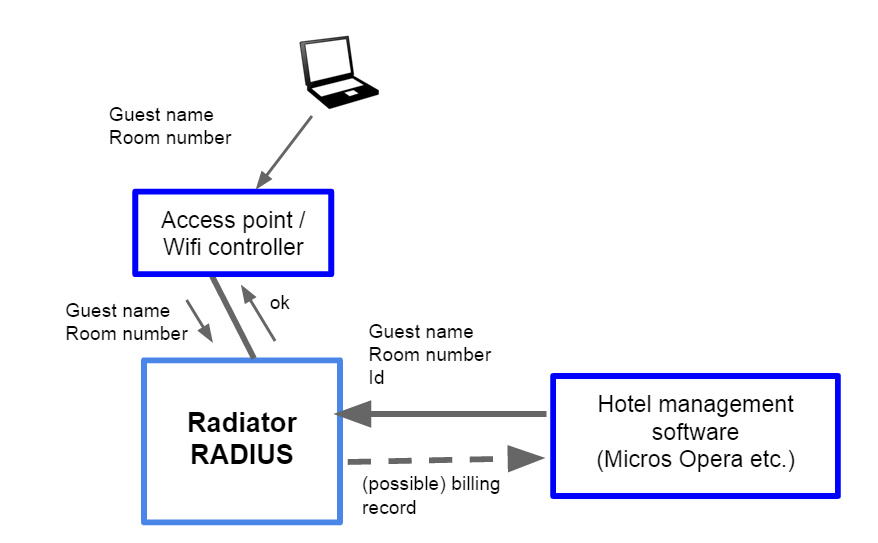
For Opera, we have implemented support in Radiator that is easy to deploy with your own team or with the help of our experts. When Radiator starts up, it will receive hotel customer information from Opera. This information is used for Wifi network authentication. The basic information received from Opera is name, room and customer id of the guest. When the hotel guests check in or check out, the information Radiator maintains is updated by Opera. Radiator support is not limited to Opera: it supports any PMS that provides a FIAS interface.

Many hotels require guests to log in with their name and room number. Radiator then gives access based on customer information it has received from Opera. This functionality is shown in the picture below.


In addition to simply offering unpoliced, complimentary internet access, Radiator provides you more advanced options for revenue generating services. Radiator can, for example, give policy instructions, such as the speed given to the customer - based on the price customer is willing to pay for the internet access. Also, Radiator can pass information to network equipment (such as Mikrotik controllers) about how long the customer can use the internet with their current login without having go through the login process again.

Same need in your own hotel or hotel chain?

If you need a smart and flexible internet access service for your business, just contact our sales team at sales@radiatorsoftware.com. Our experts at Radiator Software can provide you with competitive service package suited just for your needs.

Monday, June 1, 2015

Improving Clustering Support in Radiator with Gossip Protocol

 Our Radiator is deployed in various operating environments, ranging from single server instances to large clusters, sometimes called server farms. Recently, we have developed Radiator support for Gossip protocol framework and Redis based Gossip implementation. The Gossip framework allows clustered Radiator instances to share information and event notifications. The instances can be standalone or part of a Radiator server farm.

One use case for the Gossip framework is co-ordinated detection of unreachable next hop proxies. Multiple Radiator instances can now signal next hop proxy unreachability and reachability information with Gossip messages. The instances may be part of server farm, completely separate processes running on the same or different hosts or any combination of thereof - depending on the customer’s network architecture.

Radiator 1 informs Radiator 2 via Gossip
This allows, for example, one server farm worker to run Status-Server queries when the FarmSize configuration parameter is set. When the member notices that the next hop has become unreachable, it can quickly alert the other members to immediately switch over to an alternate next hop. This provides a method to quickly recover from failures - and also switch back when the failure condition has been resolved.

In general, when the instances can share information, co-operating Radiator instances as a whole can function more efficiently and respond more quickly to configuration and other changes.

As our product development continues, we are planning to develop more clustering functionality to Radiator. Our aim is to provide even more performance to network environment with large amount of end users.

How can I use them as a Radiator customer

If you already use Radiator, see goodies/farmsize.cfg for a configuration example with shared duplicate cache and Gossip and Redis configuration. As our development work continues, more modules will be added and upgraded to use the Gossip framework.

If you are not yet a Radiator customer, please contact our sales team at sales(a)open.com.au with your question about. We are happy to help you with your issues.