Showing posts with label EAP. Show all posts

Monday, March 27, 2023

Radiator team take part in IETF 116 in Yokohama

We at Radiator take pride in applying the latest industry standards into Radiator. Part of these efforts include actively engaging with the relevant IETF working groups. Following up on the widely supported reboot of the RADIUS Extensions working group at IETF 115 in London, Radiator team is flying out to Japan to participate in IETF 116 in person. We’re especially looking forward to these two sessions:

  • RADIUS EXTensions (radextra)
  • EAP Method Update (emu)

    Meet the team

    Staying at the forefront of industry developments is a top priority for Radiator development. As always, we are looking forward to working on RADIUS drafts and standards and implementing them in Radiator. If you’re in Yokohama, come find us at the and say hi! The point of contact is Radiator developer Heikki Vatiainen, who is available to meet at Pacifico venue. Everyone else, please drop us an email!

    Want to know more?

  • IETF 116 Yokohama
  • IETF 116 RADIUS EXTensions meeting
  • IETF EAP Method Update meeting
  • Our blog from IETF 115 highlights
  • info@radiatorsoftware.com
  • Thursday, July 14, 2022

    Radiator supports EAP-TLS 1.3

    One of the most used authentication methods for Radiator users is EAP-TLS. It is widely supported among wireless vendors and the support for EAP-TLS is needed for different certifications for wireless authentication. Radiator has supported different versions of EAP-TLS from the start. As we want to be in the forefront of industry standards, we are happy to announce that Radiator now supports EAP-TLS 1.3 - our team has also been involved in the standardisation work for EAP-TLS and other TLS-based EAP methods.

    What is new in EAP-TLS 1.3?

    The key feature in EAP-TLS 1.3 is increased privacy and security. Like the RFC document says “TLS 1.3 is in large part a complete remodeling of the TLS handshake protocol including a different message flow, different handshake messages, different key schedule, different cipher suites, different resumption mechanism, different privacy protection, and different record padding.” This new remodeled TLS handshake protocol ensures faster TLS connections as well as patches previous security errors TLS 1.2 had.

    Especially important in this new version for EAP-TLS is that no information about the underlying peer identity is disclosed. In other words this means that with EAP-TLS 1.3 the certificate of the user is delivered encrypted. In previous versions of EAP-TLS the client certificate was delivered without encryption, providing a possibility of tracking the users. This has been an issue for some users of EAP-TLS discouraging its deployment. To increase the security of your organization, Radiator configuration allows you to enable EAP-TLS 1.3 for devices that support it, while the earlier versions of EAP-TLS are still available for older devices. Radiator AAA Server Software and its modules are actively developed and updated to support state-of-the-art AAA security features. With the most recent Radiator SIM Pack patch, Radiator now supports IMSI Privacy as well - as one of the few AAA software vendors. So, in short, Radiator is committed to stay in the frontlines of all AAA security features at all times.

    Would you like to know more?

    While the support for TLS v1.3 in some operating systems varies, the Radiator implementation of TLS v1.3 and EAP-TLS is currently available in the testing branch of Radiator, but will be included in the next stable release as well. If ou are interested please test and give us feedback about the implementation.

    If you want to know more about Radiator and EAP-TLS 1.3, please do not hesitate to contact our sales team at info(a)radiatorsoftware.com. For full list of Radiator technical features, you can also visit the Radiator AAA Server Software product page.

    Thursday, April 11, 2019

    Radiator Version 4.23 released - security fixes, new features, enhancements and bug fixes

    We are pleased to announce the release of Radiator version 4.23. This version contains security fixes for EAP-pwd authentication and certain TLS configurations. Other changes include new features, enhancements and bug fixes.

    Selected compatibility notes, enhancements and fixes 
    • Improved AcctLogFILE to support JSON. 
    • Security fixes for EAP-pwd authentication and certain TLS configurations. OSC recommends all users to review OSC security advisory OSC-SEC-2019-01
    Known caveats and other notes
    • TLSv1.3 is not enabled by default for TLS based EAP methods.
    • TLSv1.3 is not enabled by default for Stream based classes, such as RadSec.
    As always, all changes and updates can be found from product history page.

    Thursday, January 24, 2019

    Radiator SIM support 2.4 released

    We are pleased to announce release 2.4 of Radiator SIM support. This release includes support for SCTP multihoming and has a number of smaller enhancements and bug fixes.

    Revision 2.4 detailed updates and fixes
    • 3GPPAutHSS now supports Peer-Auth-Application-Id as DiaPeerDef selector. Requires Carrier module 1.5 or later and Radiator 4.20 or later.
    • Added configuration parameter HSSRealm to 3GPPAuthHSS. This value for this parameter is typically the realm where HSS resides. If not set, messages’ realm is set from DestinationRealm parameter of DiaPeerDef used to forwarding messages to the HSS. Defaults to not set.
    • Subscription-Id AVP is now added to SWm DEA messages to relay MSISDN to ePDG.
    • Updated EAP-SIM, EAP-AKA and EAP-AKA’ permanent, pseudonym (TMSI) and fast re-authentication identity leading characters to match RFC 4186, 4187 and 5448, and 3GPP TS 23.003 suggestions and requirements. Because of historical reasons, EAP-SIM fast re-authentication and EAP-AKA TMSI leading characters were swapped. EAP-AKA’ non-permanent identifiers are now fully separate from the respective EAP-AKA identifiers.
    • Removed obsolete configuration parameters TestNoMAP and GetReauthQueryEAP. Support for TestClient and TestVectorFile were removed from AuthAKA.pm and related files because they are obsolete. Use AuthAKATEST or ServerWXMAP based configurations for testing.
    • A number of code clean up and maintenance changes were done based on Perl::Critic and other tools.
    • SCTP multihoming is now supported. Requires Radiator 4.22 and Radiator Radius::UtilXS package.
    Also, for more information, please do not hesitate to contact us at info@radiatorsoftware.com . See also Radiator SIM Pack product page.

    Wednesday, February 7, 2018

    New feature: OCSP and OCSP stapling support for TLS and EAP

    New Radiator version 4.20 introduces support for OCSP and OCSP stapling for TLS based EAP methods (such as EAP-TLS, EAP-TTLS, and EAP-PEAP) and RadSec (TLS encryption for RADIUS over TCP).

    OCSP (Online Certificate Status Protocol) is a method for checking certificates' revocation status online and is used as an alternative for CRL (Certificate Revocation List) files. Whereas CRL files needs to be updated every now and then, OCSP uses queries sent to CA (Certificate Authority) to obtain the latest revocation status.

    Radiator uses OCSP to query and verify that EAP supplicant's or RadSec peer's certificate has not been revoked and can provide OCSP staple to EAP supplicants and RadSec peers to verify that Radiator's own certificate has not been revoked. More info about OCSP and OCSP staple can be found from the references at the end.

    In order to use OCSP with Radiator, following conditions needs to be met:
    • Radiator version 4.20 or later
    • X.509 certificates and CA used support OCSP
    • OpenSSL library version 1.0.0 or later
    • Perl Net::SSLeay library version 1.83 or later
    • Perl LWP::UserAgent library
    • (Optional) Perl HTTP::Async library for asynchronous OCSP queries (supported only with EAP-TLS)

    In this blog post, we show two configuration examples how to enable and test OCSP support.

    We use demo certificates bundled with Radiator which do support OCSP.
    You can check whether your X.509 certificate contains OCSP URL with the commands shown below.

    Test client certificate:
    % cd path/to/radiator-distribution
    % openssl x509 -noout -issuer -subject -ocsp_uri -in certificates/cert-clt.pem
    issuer= /C=AU/ST=Victoria/L=Melbourne/O=OSC Demo Certificates/OU=Test Certificate Section/CN=OSC Test CA (do not use in production)/emailAddress=mikem@open.com.au
    subject= /C=AU/ST=Victoria/L=Melbourne/O=OSC Demo Certificates/OU=Test Certificate Section/CN=testUser
    http://127.0.0.1:8008
    

    Test server certificate:
    % cd path/to/radiator-distribution
    % openssl x509 -noout -issuer -subject -ocsp_uri -in certificates/cert-srv.pem
    issuer= /C=AU/ST=Victoria/L=Melbourne/O=OSC Demo Certificates/OU=Test Certificate Section/CN=OSC Test CA (do not use in production)/emailAddress=mikem@open.com.au
    subject= /C=AU/ST=Victoria/L=Melbourne/O=OSC Demo Certificates/OU=Test Certificate Section/CN=test.server.some.company.com
    http://127.0.0.1:8008
    

    For testing OCSP, we run OCSP responder provided by OpenSSL library.
    Normally, CA who has signed the certificates runs OCSP responder on the Internet.

    OCSP responder is run with a command shown below (pass phrase for all demo certificates is "whatever"):
    % cd path/to/radiator-distribution/certificates
    % openssl ocsp -rsigner root-CA-crt.pem -rkey root-CA-key.pem -index root-CA-idx.txt -port 8008 -CA root-CA-crt.pem -text
    Enter pass phrase for root-CA-key.pem:
    Waiting for OCSP client connections...
    

    Leave OCSP responder running on http://127.0.0.1:8008/ and waiting for OCSP queries from Radiator.

    EAP-TLS OCSP configuration example


    Radiator configuration which enables OCSP queries and OCSP stapling for EAP-TLS (there is a similar example config in goodies/eap_tls.cfg):
    Foreground
    LogStdout
    LogDir        .
    DbDir         .
    # User a lower trace level in production systems:
    Trace         4
    LogFile       %L/radiator.log
    
    AuthPort 1812
    AcctPort 1813
    
    <Client DEFAULT>
          Secret radius
    </Client>
    
    <Handler>
          <AuthBy FILE>
                # Users must be in this file to get anywhere
                Filename %D/users
                
                EAPType                   TLS
                EAPTLS_CAFile             %D/certificates/demoCA/cacert.pem
                EAPTLS_CertificateFile    %D/certificates/cert-srv.pem
                EAPTLS_CertificateType    PEM
                EAPTLS_PrivateKeyFile     %D/certificates/cert-srv.pem
                EAPTLS_PrivateKeyPassword whatever
                EAPTLS_MaxFragmentSize    1200
                
                # Online Certificate Status Protocol (OCSP) related
                # configuration parameters
    
                # Provide OCSP staple for EAP-TLS clients asking for it.
                EAPTLS_OCSPStapling
    
                # Check OCSP status of EAP-TLS client certificates during TLS handshake
                EAPTLS_OCSPCheck
    
                # Check OCSP status of EAP-TLS client certificates asynchronous after TLS handshake
                # but before authenticating and authorizing the client.
                #EAPTLS_OCSPAsyncCheck
    
                # Reject EAP-TLS client certificate when OCSP responder is unavailable or OCSP status query fails.
                # By default, only a valid OCSP status response can reject EAP-TLS client certificate.
                EAPTLS_OCSPStrict
    
                # Use specified OCSP URI for OCSP queries instead of OCSP URI in EAP-TLS client certificate.
                #EAPTLS_OCSPURI
    
                # If OCSP query to OCSP URI fails, mark OCSP responder failed for 10 minutes.
                EAPTLS_OCSPFailureBackoffTime 600
    
                # Cache OCSP statuses for 1 hour (defaults to 20 minutes)
                EAPTLS_OCSPCacheTime 3600
    
                # Cache OCSP status for max 2000 different certificates (defaults to 1000 entries)
                EAPTLS_OCSPCacheSize 2000
    
                AutoMPPEKeys
          </AuthBy>
    </Handler>
    

    wpa_supplicant / eapol_test configuration for EAP-TLS which requires OCSP staple:
    network={
          ssid="my8021xwpa"
          key_mgmt=WPA-EAP
          eap=TLS
          identity="testUser"
          ca_cert="./certificates/demoCA/cacert.pem"
          client_cert="./certificates/client-crt.pem"
          private_key="./certificates/client-key.pem"
          private_key_passwd="whatever"
          ocsp=2
    }
    

    RadSec OCSP configuration example


    Besides TLS based EAP methods, OCSP can also be used with RadSec peerings, either with or without OCSP stapling.


    Radiator configuration for RadSec client enables OCSP stapling (there is a similar example config in goodies/radsec-client.cfg):
    Foreground
    LogStdout
    LogDir        .
    DbDir         .
    # User a lower trace level in production systems:
    Trace         4
    
    <Client DEFAULT>
          Secret mysecret
    </Client>
    
    <Handler>
          <AuthBy RADSEC>
                ReconnectTimeout        10
                NoreplyTimeout          5
                KeepaliveTimeout        30
                KeepaliveNoreplyTimeout 2
                UseStatusServerForFailureDetect
    
                UseTLS
                TLS_CAFile             %D/certificates/demoCA/cacert.pem
                TLS_CertificateFile    %D/certificates/cert-clt.pem
                TLS_CertificateType    PEM
                TLS_PrivateKeyFile     %D/certificates/cert-clt.pem
                TLS_PrivateKeyPassword whatever
    
                # Online Certificate Status Protocol (OCSP) related
                # configuration parameters
    
                # Request OCSP staple from RadSec server.
                TLS_OCSPStapling
    
                # Alternatively, check OCSP status of RadSec server certificates during TLS handshake.
                #TLS_OCSPCheck
    
                # Reject RadSec server certificate when OCSP staple or
                # OCSP responder is unavailable or OCSP status query
                # fails. By default, only a valid OCSP status
                # response can reject RadSec server certificate.
                TLS_OCSPStrict
    
                <Host localhost>
                </Host>
          </AuthBy>
    </Handler>
    

    Radiator configuration for RadSec server which enables OCSP queries and OCSP stapling (there is a similar example config in goodies/radsec-server.cfg):
    Foreground
    LogStdout
    LogDir        .
    DbDir         .
    # User a lower trace level in production systems:
    Trace         4
    
    # Don't listen on any UDP ports
    AuthPort
    AcctPort
    
    # Listen for AuthBy RADSEC connections from RadSec clients
    <ServerRADSEC>
          UseTLS
          TLS_CAFile ./certificates/demoCA/cacert.pem
          TLS_CertificateFile ./certificates/cert-srv.pem
          TLS_CertificateType PEM
          TLS_PrivateKeyFile ./certificates/cert-srv.pem
          TLS_PrivateKeyPassword whatever
    
          TLS_RequireClientCert
          # Accept any peer with valid cert signed by demoCA for demo
          TLS_ExpectedPeerName .+
    
          # Online Certificate Status Protocol (OCSP) related
          # configuration parameters
    
          # Provide OCSP staple for RadSec client requesting it.
          TLS_OCSPStapling
    
          # Check OCSP status of RadSec client certificates during TLS handshake.
          TLS_OCSPCheck
    
          # Reject RadSec client certificate when OCSP staple or OCSP
          # responder is unavailable or OCSP status query fails. By
          # default, only a valid OCSP status response can reject RadSec
          # client certificate.
          TLS_OCSPStrict
    
          # Use specified OCSP URI for OCSP queries instead of OCSP URI in RadSec client certificate.
          #TLS_OCSPURI
    
          # If OCSP query to OCSP URI fails, mark OCSP responder failed for 10 minutes.
          TLS_OCSPFailureBackoffTime 600
    
          # Cache OCSP statuses for 1 hour (defaults to 20 minutes)
          TLS_OCSPCacheTime 3600
    
          # Cache OCSP status for max 2000 different certificates (defaults to 1000 entries)
          TLS_OCSPCacheSize 2000
    </ServerRADSEC>
    
    <Handler>
          <AuthBy FILE>
                Filename ./users
          </AuthBy>
    </Handler>
    

    Radiator acting as RadSec client (AuthBy RADSEC) will connect to Radiator acting as RadSec server (ServerRADSEC) and will request OCSP staple to be returned during TLS handshake. Server will get OCSP response for its own certificate and return it as OCSP staple to the client and when the client has sent its certificate, the server will query its revocation status with OCSP before accepting it.

    References

    Wednesday, March 23, 2016

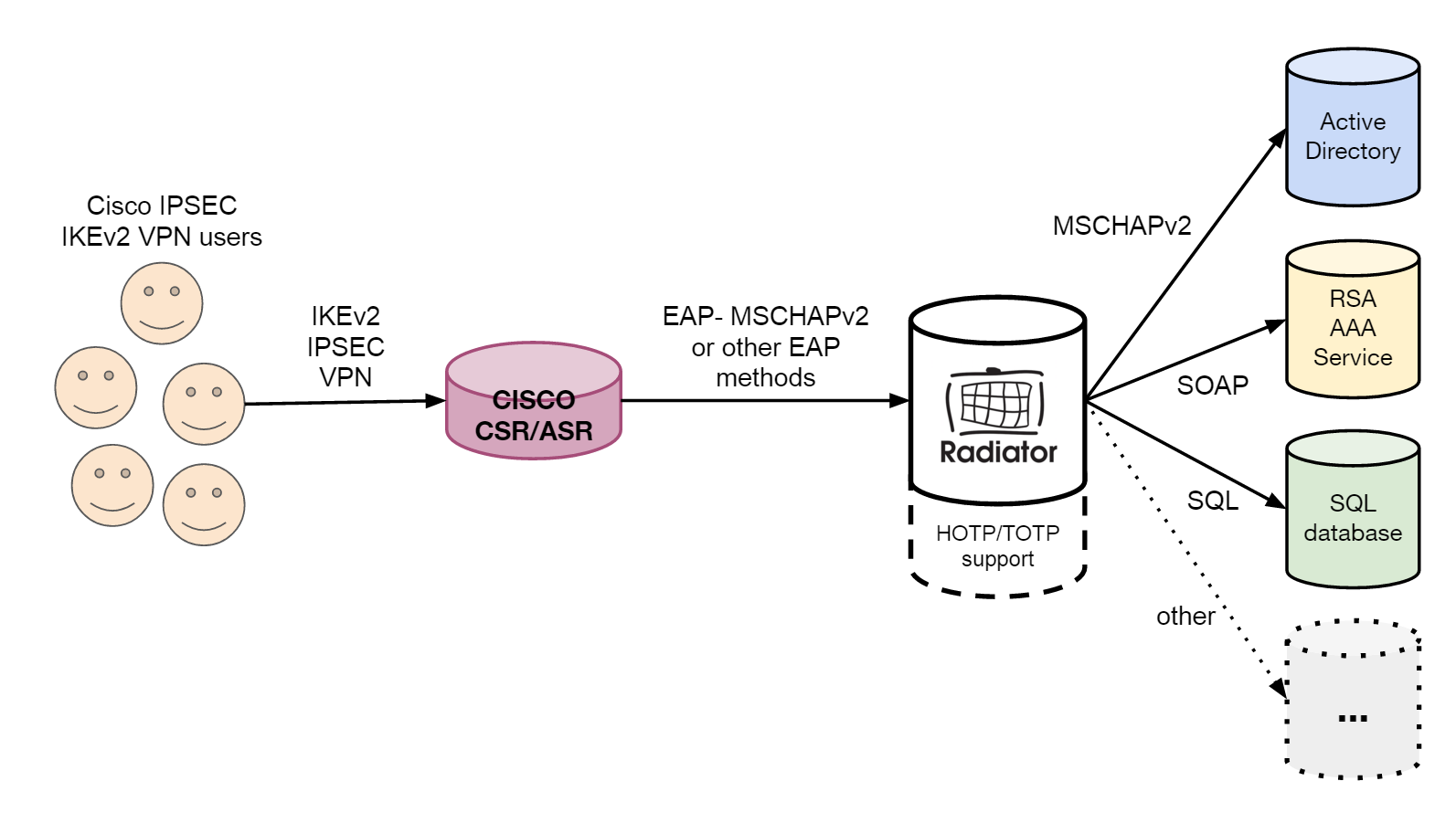
    Deploying flexible Radiator AAA for Cisco ASR/CSR VPN

    The increased use of Cisco ASR/CSR and its IPSEC VPNs with IKEv2 creates new challenges for authentication, authorisation and accounting (AAA) software. The first challenge is interoperability, especially when Cisco’s implementation of IKEv2 requires EAP-MSCHAPv2 to be used for VPN user authentication.

    Most AAA server softwares support MSCHAPv2 for RADIUS authentication, but only few have support also for MSCHAPv2 encapsulated inside EAP protocol. Radiator supports them both. What is more, with Radiator it is possible to separate the MSCHAPv2 from EAP by terminating the EAP tunnel in Radiator and forwarding the inner MSCHAPv2 to other authentication servers or services.

    The Radiator’s ability to separate MSCHAPv2 from EAP protocol makes it possible to use Radiator as a flexible proxy for various authentication sources (see Figure 1) such as Windows Active Directory, One-Time-Password (HOTP/TOTP) services, RSA / Yubikey / Duo Security tokens etc. For some authentication sources, Radiator works as the actual endpoint for AAA service reducing the need of multiple separate authentication servers or appliances sitting in your network.


    EAP_MSCHAPv2.png
    Radiator EAP - MSCHAPv2 Architecture

    Do you want to know more?

    This is a popular use case and we have been been contacted by several customers who need to separate MSCHAPv2 from EAP protocol. This functionality is one reason why Radiator AAA Server is called 'The Swiss Army Knife of AAA Servers'. Radiator provides various protocols and can be used as a proxy in different environments – often with configurations that are provided without additional charge when purchasing the license.

    For more information, please contact our team at sales(a.t.)radiatorsoftware.com