Friday, May 12, 2017

Radiator 4.18 now available!

We have published the updated version of Radiator, please meet brand new Radiator 4.18!

There are lots of enhancements and bugfixes in Radiator 4.18. Some are small, some bigger but nothing really major. The main improvements include:
  • Several security fixes
  • Enhanced logging and debugging features
  • New modules for accounting handling
  • Automatic rejection of empty passwords and some types of invalid user names
  • AuthenProto parameter for setting the allowed authentication methods
  • Several EAP enhancements

The detailed list of changes is available on Radiator revision history.

Thursday, May 4, 2017

Radiator SIM Pack updated - version 2.1 available!

We are happy to announce that new Radiator SIM Pack version 2.1 is now available!

This is mainly an enhancement and bugfix release with some minor new features. We have fixed several small issues and improved all SIM authentication methods, 3GPP AAA Server and SIGTRAN interoperability and compatibility with different vendors’ devices. Many of these improvements are based on customer requests for new features and enhancements. In addition to new interoperability features, SIGTRAN support was updated with a number of configuration options that are useful for making sure Radiator fits your existing SIGTRAN environment.

Radiator SIM Pack 2.1 requires Radiator AAA Server version 4.16 or later. Some features, such as using 3GPP AAA Server and LocalAddress or LocalPort parameters, require Radiator 4.17 or later. The complete list of changes is available on the revision history page.

Tuesday, January 10, 2017

DevOps and Radiator

With the first release of the Radiator VNF coming this year, it is a good time to take a quick look at the DevOps model, how we have embraced it, and how it will be on the center of the stage in Radiator VNF.

This post tells you a bit about DevOps in general and an example of a Chef cookbook follows after it. Radiator VNF's configuration management will be discussed in later blog posts.

What is DevOps?

You get multiple different answers when searching for clues behind the portmanteau: DevOps. Sure, it's a merging of development and operations. Possibly, it's also a bunch of different tools. Or, you might describe it as a change in the processes of an organisation.

Combining all these, DevOps can be described as a cultural change in the organisation. It's not something you purchase from the store and sprinkle on top of your employees.

DevOps emphasises communication between different parts of the organisation and pushes the processes to be more automated and agile. Changes to the software or configuration are planned, made, tested, deployed, and monitored in a continuous, automated way.

DevOps toolchain by Kharnagy, CC BY-SA 4.0, original
Compared to the old way of divided silos and huge, rarely-made releases with massive change logs, this model encourages making smaller changes, testing them swiftly, and deploying often. Stronger collaboration between developers and operators and a faster, automated cycle improve reliability.

Especially in a flexible and distributed cloud environment, this new approach is needed. Otherwise, it is very difficult for a single operator to manually handle thousands of nodes. The tools grant you the possibility of easily having identical environments with slightly different parameters. With automation, there's no more forgetting to run that command and changing those addresses when manually moving from testing to QA to production.

For us, the shift to a DevOps culture in the customer base means that we also support the DevOps tooling and make it easier for our customers to deploy Radiator with automated configuration management systems. In the Radiator VNF, the whole infrastructure is managed automatically.

Chef, tool for DevOps

Chef is a set of tools developed by a company with the same name. There are several similar tools available, such as AnsiblePuppet and SaltStack among others, so you will find suitable a DevOps-tool for your particular use case.

Chef uses Ruby to describe the infrastructure as code. This means that the configuration of the infrastructure, from the operating system level to the running software services, and their configuration, can be written as Ruby code and then tested like any piece of software.

In Chef terms, the user writes cookbooks which consist of recipes. For example, a cookbook describes a software with different recipes for installation, configuration, and starting the services. The power lies in the community that has written thousands of cookbooks for various tasks. For example, you don't have to write your own cookbooks to install nginx and configure a website. Just download ready-made cookbooks like chef_nginx and configure them to suite your needs.

By using cookbooks, you can describe your whole infrastructure. The cookbooks can be unit tested, integration tested, and after deployment you can ensure compliance with rules of your organisation.

Short Chef example

As an example and sneak peek for the next post on this theme, here is a quick introduction on Chef cookbooks. These snippets are not complete, but show some features that are used to describe installing Radiator, creating some necessary directories, and starting the service.

If you want a longer introduction on Chef attributes, recipes, and resources, have a look at the tutorials.

metadata.rb:
name 'radiator'
maintainer 'Arch Red Oy'
version '0.6.2'

depends 'perl', '~> 4.0.0'
depends 'poise-service', '~> 1.4.1'

supports 'ubuntu', '= 16.04'
supports 'centos', '= 7.2'

attributes/default.rb:
default['radiator']['install']['version'] = '4.17'
default['radiator']['install']['method'] = 'archive'
default['radiator']['install']['directory'] = '/opt/radiator'

recipes/install.rb:
install_method = node['radiator']['install']['method']

poise_service_user 'radiator' do
  group 'radiator'
  home node['radiator']['user_home'] unless node['radiator']['user_home'].nil?
  shell node['radiator']['user_shell'] unless node['radiator']['user_shell'].nil?
end

%w(/var/run/radiator /var/log/radiator).each do |dir|
  directory dir do
    owner 'radiator'
    group 'radiator'
  end
end

unless install_method.nil? || install_method == 'skip'
  include_recipe "radiator::install_#{install_method}"
end

recipes/service.rb:
case install_method
when 'package'
  radiusd_bin = '/usr/bin/radiusd'
  dictionary_files << '/etc/radiator/dictionary'
when 'archive', 'evaluation'
  radiusd_bin = '/usr/local/bin/radiusd'
  radiusd_includes << node['radiator']['install']['directory']
  dictionary_files << node['radiator']['install']['directory'] + '/dictionary'
end

unless node['radiator']['options']['dictionary_source'].empty?
  dictionary_files << '/etc/radiator/' + node['radiator']['options']['dictionary_file']
end

radiusd_params = ['-foreground', '-config_file /etc/radiator/' + node['radiator']['options']['config_file'],
                  '-dictionary ' + dictionary_files.flatten.join(','),
                  node['radiator']['options']['radiusd_params']]

radiusd_includes = [node['radiator']['options']['radiusd_includes'], radiusd_includes].flatten.map { |inc| "-I #{inc}" }

perl_bin = '/usr/bin/env perl'
radiusd_command = [perl_bin, radiusd_includes, radiusd_bin, radiusd_params].flatten.join(' ')

poise_service 'radiator' do
  command radiusd_command
  user 'radiator'
  directory '/etc/radiator'
  subscribes :restart, "template[/etc/radiator/#{node['radiator']['options']['config_file']}]"
end

Thursday, September 29, 2016

Make your Radiator log data searchable, part 2

This is the second part of blog series that helps you to use the log data that Radiator generates.

In the first part of blog series, we configured Radiator to export data in JSON format. This part shows some basic examples about utilising that data.

The setup introduced in blog series part 1 is running and it produces log data in JSON format. The JSON data is forwarded to an analysis tool. In this case, we use Elastic Stack and its visualisation tool Kibana for analysing the sample data. For more information about Elastic Stack, see the Elastic Stack website, or an open source fork of Elastic Stack, OpenSearch. Configuring the data forwarding depends on the chosen tool and it is not discussed in this blog post.

This image shows how the log data is processed when using Elastic Stack for analysing:

radpwtst to Elastic stack.png

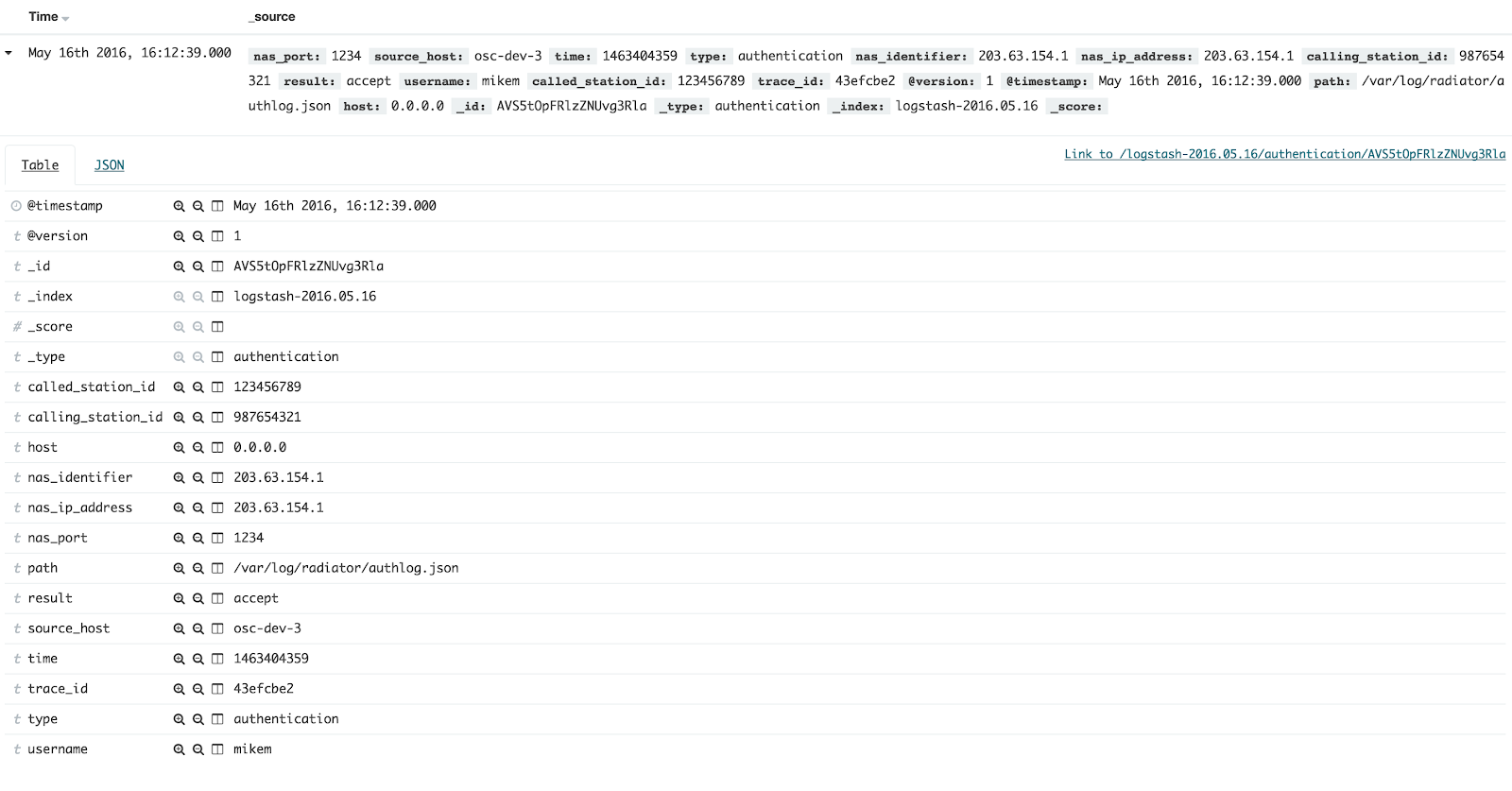
radpwtst tool, which is included in Radiator distribution, is used as a RADIUS client. Thus, it authenticates via RADIUS and Radiator logs authentication attempts as entries to authlog.json file. Here is a sample of one authentication entry as shown in the JSON file:


{"nas_port":"1234","source_host":"osc-dev-3","time":"1463404359","type":"authentication","timestamp":"2016-05-16T16:12:39Z","nas_identifier":"203.63.154.1","nas_ip_address":"203.63.154.1","calling_station_id":"987654321","result":"accept","username":"mikem","called_station_id":"123456789","trace_id":"43efcbe2"}


The name-value pairs are not ordered in any way so they are hard to read as such. To get a better idea of the data, it must be parsed. One option is to use configuration variable for the plaintext output, it is feasible to use, at least in the testing phase. This helps to verify that the data is correctly interpreted by Elastic Stack.

Visualising log data with Kibana

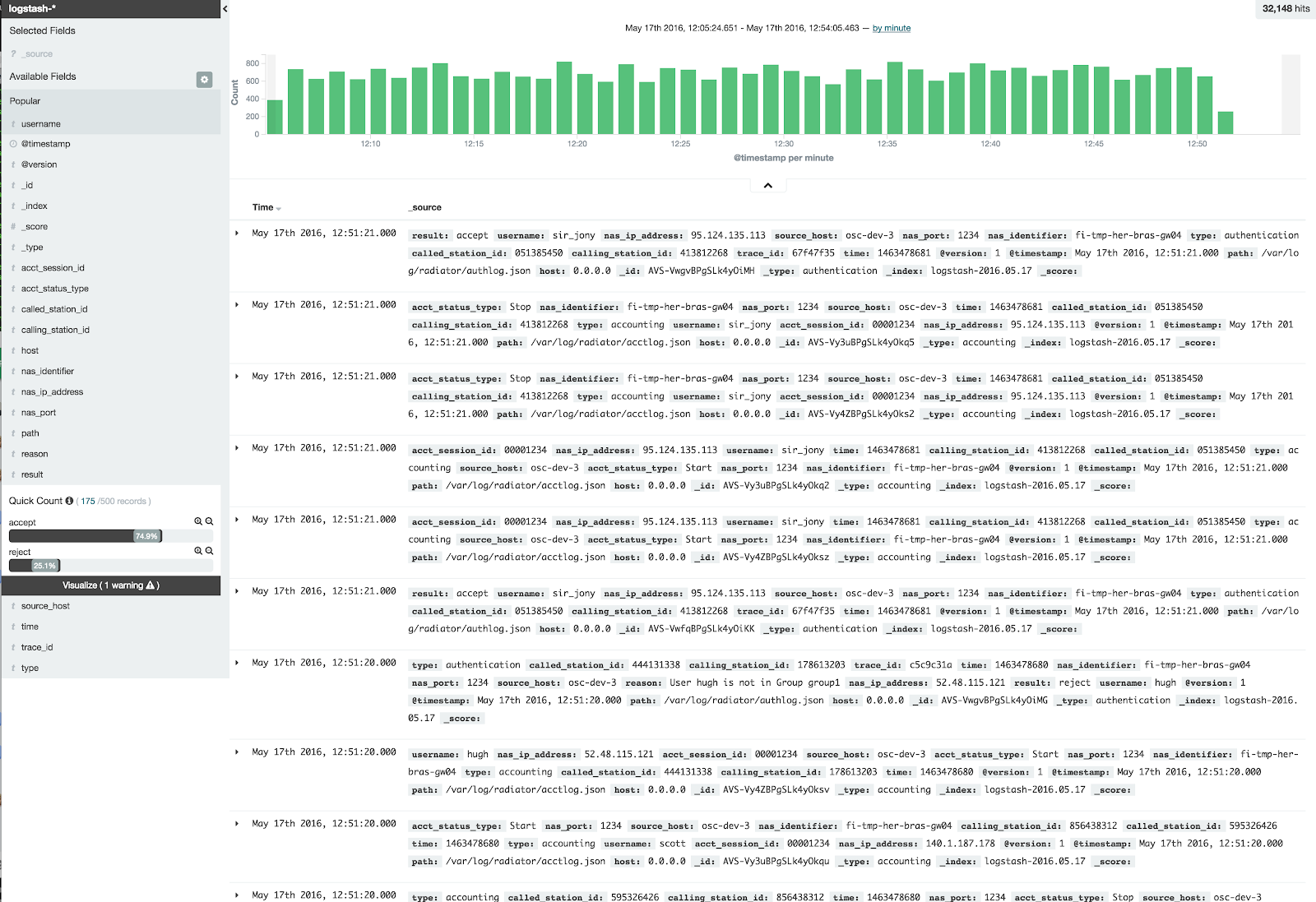
Elastic Stack parses the data so we can explore the contents in Kibana. Part of our sample data looks like this in Kibana:


By clicking each entry open, we can verify that all name-value pairs are distinguished. By default, each name-value pair is indexed and searchable, and if you add new fields to the JSON data, Elastic Stack indexes them automatically. They are parsed and usable in your searches without need for other modifications. This enables searching of wide variety of name-value pairs and their combinations.


Kibana shows the amount of entries in each time window. By filtering everything else but authentication-related entries, we see trends in amount of authentication attempts.


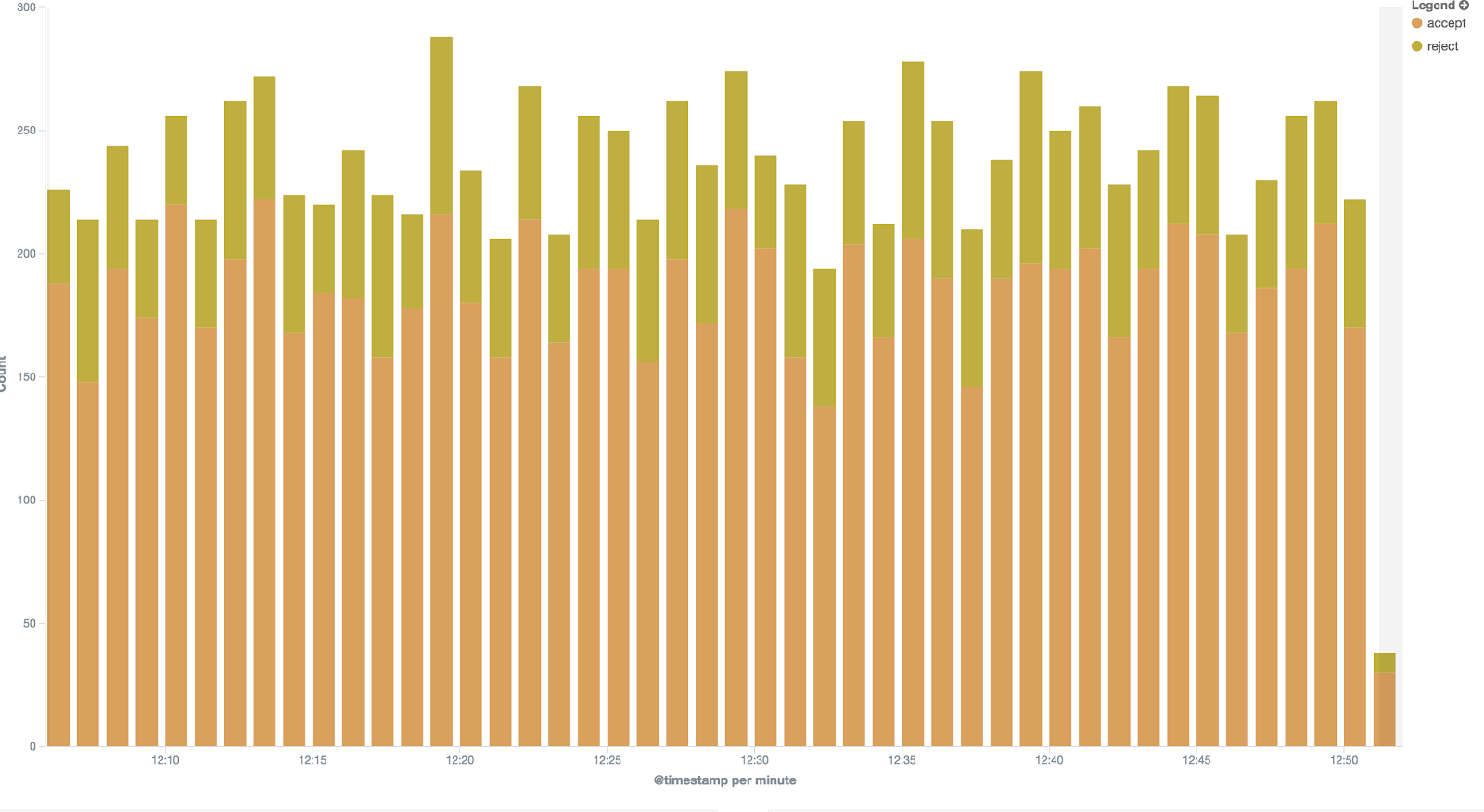
Similarly, we can create visualisation of access/reject rate within a certain time frame.


Do you want to know more?

There will be examples of more detailed JSON use cases in the blog. If you have questions, contact Radiator team at sales(a.t.)radiatorsoftware.com – we are happy to help you to have more benefits of your log data.

Monday, September 12, 2016

Utilising Radiator when evolving to 4G/LTE

One of the Radiator use cases is evolving your infrastructure for 4G/LTE features. Some of our customers already provide prepaid data plans in 3G/CDMA network but now they need to provide also 4G/LTE features for their subscribers. At the same time, being able to use the parts of the current infrastructure saves network operator’s money and time.

Radiator’s flexibility has a lot to offer for this kind of use case. You can choose any vendor for your LTE core network and Radiator will work seamlessly with it, thanks to Radiator’s multi-vendor support.

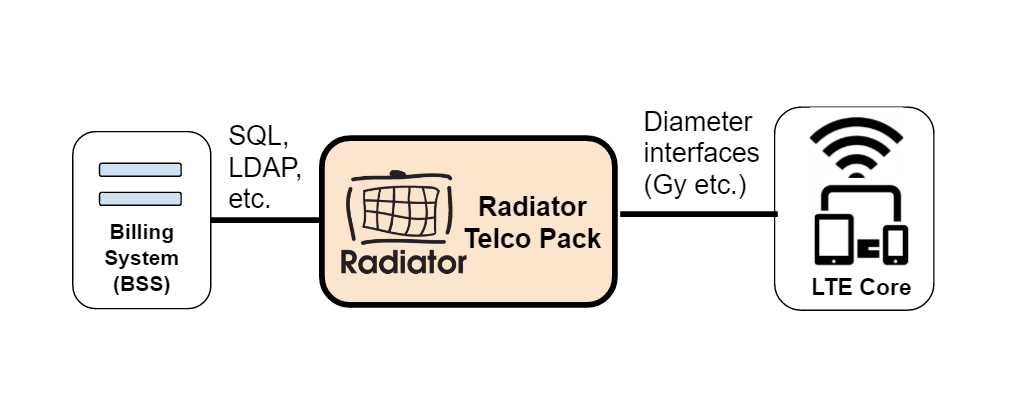
With Radiator, the same functionalities that have been implemented in 3G/CDMA network with RADIUS interfaces before, can now be implemented in 4G/LTE network with Diameter interfaces. You only need to replace your current RADIUS server with Radiator Telco Pack that provides all the needed features.

Radiator makes it also possible to use the existing customer data plans and business logic when updating for example from CDMA to LTE. For this integration, Radiator communicates with the original billing system using SQL or LDAP interfaces, among others. At the same time, Radiator uses Diameter interfaces, such as Gy, for integrating with LTE network infrastructure. See the picture below for basic layout.

Do you want to know more?

If you are interested in this kind of solution for your network, please do not hesitate to contact our sales team sales(a.t.)radiatorsoftware.com. We and our worldwide partner network are happy to provide you assistance in your project.