Showing posts with label use case. Show all posts

Thursday, May 2, 2024

WiFi offloading vs VoWiFi

In recent years we have encountered a lot of customers wanting to utilize their networks more efficiently, and provide premium service for their subscribers. WiFi offloading and VoWiFi are popular ways to to extend the mobile operator’s network coverage into wifi, free bandwidth from congested cellular networks and improve user experience with better connectivity. The technologies share many similarities and both use a 3GPP AAA server for SIM based authentication.

WiFi offloading offers some flexibility in the supported authentication backends and the SIM authentication can be done through various HSS and HLR interfaces depending on what the mobile operator has available. This is especially important in roaming scenarios where the WiFi provider has agreements with multiple MNOs to offload their subscribers.

WiFi calling is more strictly standardised to support high QoS for the voice call, and also the handover between VoWiFi and VoLTE. This allows users to move outside the range of the WiFi hotspot and seamlessly continue the call over VoLTE, and vice versa.

Let’s take a look at the key differences between the two related technologies:

Comparison WiFi offloading VoWiFi
Purpose Ease network congestion, Network CAPEX savings, Roaming cost savings, Secure authentication to private wireless networks: carrier, industrial, in-flight, underground, IoT Ease network congestion, Indoor coverage extension, Combat OTT apps, Roaming cost savings
Relationship between MNO and access network provider Agreement required between MNO and wifi provider No relationship between MNO and wifi provider
Access network Carrier or partner wifi Any public or private wifi
Traffic Data only Voice and video calls
SIM authentication protocol EAP-SIM, EAP-AKA, or EAP-AKA’ EAP-AKA
Supported HSS interfaces SWx, Wx, Cx, S6a SWx required
Supported HLR interfaces MAP, SIGTRAN Not supported
ePDG Not applicable ePDG mandatory
Security WPA Enterprise IPSec tunnel between UE and ePDG
IMSI Privacy Yes, supported by Radiator Yes, supported by Radiator

What is different?

The main difference between WiFi offloading and VoWiFi is the relationship between the mobile operator and the wifi provider: operator controlled data offloading always requires a prior agreement between the MNO and the WISP. WiFi offloading is often done in high traffic areas such as airports, sports stadiums and concert venues, since offloading users to WiFi is cheaper than adding microcells to boost the mobile signal. MNOs can invest in carrier wifi hotspots themselves, or make offloading agreements with wireless ISPs.

VoWiFi requires the mobile device to be connected to a wifi before attempting a VoWiFi call, but any type of wifi can be used for WiFi calling, including consumer home wifi. Therefore no relationship between the mobile operator and WiFi provider is required. However VoWiFi has specific technical requirements for the MNO: a HSS with SWx interface and ePDG are required.

Private network authentication

WiFi offloading technology is also applicable to private network offerings, such as industrial and IoT networks. SIM authentication provides a secure method to authenticate users into a private network using their SIM credentials and eliminates the human element of reusing and sharing passwords. In high security deployments the SIM authentication can be further combined with device IMEI check, to make sure that only authorised users and devices are able to access the private wifi network. VoWiFi is also possible in private networks, and can enable voice calls in challenging environments such as underground.

Interested in WiFi offloading or VoWiFi?

Radiator SIM Pack provides a fully featured 3GPP AAA server solution, with superb flexibility to connect with your environment. Please contact the Radiator team at sales (at) radiatorsoftware.com to get a quote.

Thursday, April 20, 2023

Radiator as Steel-Belted RADIUS Replacement

Recently we have received many inquiries on whether Radiator AAA would be a good solution for replacing Juniper’s Steel-Belted RADIUS. As the aforementioned SBR has reached End of Engineering date in February, its support ending in September and with seemingly no alternative from the OEM, many operators are looking to replace their existing SBR setups with alternative established robust AAA solution. If you are among these companies, Radiator AAA is the solution for you.

Why choose Radiator AAA?

Known for its reliability and flexibility, Radiator AAA has been in the market for decades. Radiator is an actively developed and support AAA server with RADIUS and TACACS+ functionalities. With modules, Radiator AAA can also be complemented with Diameter relay, SIM-based authentication and other mobile network functionalities.

Like SBR, Radiator AAA Server offers support for both Linux, Windows and Solaris installations with various different operating systems (See our Supported Platforms for more information. Radiator has extensive support for different databases and authentication backends (SQL-based, LDAP, AD etc.) as well as support for MFA solutions with TOTP capable authenticators and tokens (Google and MS authenticator, Yubikey, DIGIPASS etc.)

The Radiator technical team consists of experts with vast experience in migration from other AAA solutions. We offer migration support and configuration assistance so you do not need to worry about meeting project schedule before SBR EoSL. Radiator can integrate with existing database and in nearly all cases no changes to schema are needed.

Like Steel-Belted RADIUS, Radiator AAA has multi-vendor support and can be installed flexibly on different platforms on physical or virtual machines. With Radiator, you can compile your AAA use cases under one product: RADIUS, Diameter, TACACS+, SIGTRAN, you name it, we have it!

Want to know more?

For any questions or other inquiries about Radiator as SBR replacement, please contact sales@radiatorsoftware.com

Tuesday, April 4, 2023

Enterprise network authentication with Radiator

Is your Wi-Fi password written on the conference room wall? Can your guests just plug a cable in and be connected to your enterprise network? These are situations where Radiator could help your network security. Once a company grows out of the founder’s garage, gains some employees and takes up an office space, this office in most cases needs a networking solution for both the company internal network and access to the internet for employees. At the beginning these might be resolved with one router with open Wi-Fi and a shared folder over the internet. However, companies should implement some form of security for their enterprise network. The goal for these implementations is that the right people have access to the right networks and other people do not. And once these basic needs are met, then flexibility and user experience should also be taken into account.

Radiator as enterprise network AAA Server

Enterprise network authentication is a bread-and-butter use case for Radiator. The key differentiator in the market for Radiator is flexibility. Radiator offers a variety of options for when it comes to what the users are authenticated against (SQL database, LDAP or Active Directory, REST etc.), as well as what hardware your enterprise uses for their network. Radiator also offers multi-vendor support for network devices.

This is a basic setup which can be altered depending on your organisation’s needs. Multi-factor authentication with TOTP or HOTP can also be added to the solution for enterprises who want to add another layer of security to their network. Radiator supports a great variety of options for TOTP and HOTP implementations. On the other hand, Radiator can also be used for network device administration as a TACACS+ server (more information about this use case in our previous blog post). Another key differentiator for Radiator is access to active and competent support. Both Radiator email and telephone support grant you straight access to experienced Radiator developers so you can be sure your issues are resolved swiftly. While many company flagship RADIUS server products like Cisco’s ACS and Junipers Steel Belted RADIUS have been announced End-of-Life, Radiator is actively developed and supported.

Managed solution for Wi-Fi Authentication

Radiator also offers enterprise Wi-Fi authentication as a service: Radiator Auth.Fi. Radiator Auth.fi is a RADIUS based Wi-Fi authentication cloud service for authenticating network users and guests. It provides user authentication as a service for Wi-Fi, wired network and VPN. Subscription based cloud service works globally, one service covering all customer locations. Radiator Auth.fi also provides an easy way to connect to eduroam and govroam. The starting requirements for this service is RADIUS capable Wi-Fi controller. The starting solution enables simple username-password authentication for both employees and guests. This solution can be customised to include certificate authentication in collaboration with certificate provisioning solutions and PKIs such as for example SCEPman, Microsoft NDES, Intune. For more information about the managed solution for Wi-Fi authentication Radiator Auth.Fi, please see the previous blog post and our Radiator Auth.Fi product presentation.

Want to know more?

If you would like to know more about how Radiator can help your organisations enterprise network AAA needs, please contact our sales team via e-mail sales@radiatorsoftware.com or via our contact form.

Friday, October 28, 2022

Using Radiator as the flexible, powerful AAA for FTTH service providers

 
Recently, we have seen a big rise in the number with projects where service providers are implementing new FTTH (Fibre to the Home) services – using different PON (Passive optical network) technologies, such as GPON, XG-PON1, XGS-PON. Based on different estimates for consumer services in the industry, high-performance fibre access is needed more than ever.

Because of this, one the most common new use cases for Radiator AAA server software, and especially to our Radiator Service Provider Pack is the flexible and high-powered AAA for FTTH operators – that may also run fixed line and WiFi hotspot operations at the same time. With our flexible licensing options, these Radiator installations can be run either by service providers themselves, or they can use a managed service provided by a 3rd party.


Often these enterprise use cases also include private APN (Access Point Name) service for their enterprise customers. We are happy to tell more about our experiences on providing Radiator to different environments and use cases.

With the experience from a wide range of use cases, the key benefit of Radiator is flexibility in different network infrastructures – especially when integrating AAA with different technological generations. Readymade configurations are available, as well as support for different back-ends and logging and management solutions. As we are actively participating in different standardisation efforts, Radiator is always up-to-date with the latest industry practices and security developments.

Would you like to know more? 

We are always happy to help you with your use case. Please contact our sales team at sales(a)radiatorsoftware.com for more information.

Tuesday, September 27, 2022

Radiator Policy and Charging Pack - apply credit control for your prepaid and postpaid data plans

One of our key products for service providers is Radiator Policy and Charging Pack.

Radiator Policy and Charging Pack extends Radiator by allowing direct connections to your 3GPP infrastructure through Diameter interfaces - a protocol commonly used in telecommunication networks.

The existing authentication, authorization and accounting features in Radiator are available for Diameter – RADIUS integration in Radiator Policy of Charging Pack. With this, examples of use include Wi-Fi offloading, integrating Diameter online and offline charging with RADIUS based infrastructure, integrating RADIUS accounting with Diameter online and offline charging - and much more.

How it is used by our customers

In many use cases operators and carriers have a need to expand their mobile data coverage with Wi-Fi hotspots and other Wi-Fi networks where authentication can be connected to their infrastructure with roaming. This way they can complement their mobile service with for example Wi-Fi offloading or Voice over WiFi  - at the same time keeping in track the data use of their subscribers.

With its RADIUS to Diameter conversion, Radiator Policy and Charging pack enables you to apply credit control in your network using RADIUS accounting, both with prepaid and postpaid data plans. When using prepaid data plans, the credit control features will enforce that subscriber data is limited to the amount they have paid.

Also, the credit control policies can be done in a way that the end of quota will be handled based on your business needs. For example, the customer network access can be throttled and directed to purchase additional data for renewed access. 

On more technical level, the functionality is shown in the flowchart below. Please note, how Radiator Policy and Charging Pack is situated to integrate RADIUS and Diameter interfaces, and is connected to WiFi controllers or BNG devices and with Online Charging System (OCS) or with Policy and Charging Rules Function (PCRF).

Flow chart showing the credit control functionality of Radiator Policy and Charging Pack
 

As Radiator Policy and Charging Pack is highly extensible for different customer cases, we are happy to tell you more about how your use case can be implemented. In addition, it can be integrated with other Radiator products (such Radiator SIM Pack for EAP-SIM, EAP-AKA and EAP-AKA' authentication), and we are happy to share our expertise in this as well.

Woud you like to know more?

If you would like to know more about Radiator Policy and Charging Pack and how it can be used in your use case, please contact our team at info(a)radiatorsoftware.com


Thursday, September 29, 2016

Make your Radiator log data searchable, part 2

This is the second part of blog series that helps you to use the log data that Radiator generates.

In the first part of blog series, we configured Radiator to export data in JSON format. This part shows some basic examples about utilising that data.

The setup introduced in blog series part 1 is running and it produces log data in JSON format. The JSON data is forwarded to an analysis tool. In this case, we use Elastic Stack and its visualisation tool Kibana for analysing the sample data. For more information about Elastic Stack, see the Elastic Stack website, or an open source fork of Elastic Stack, OpenSearch. Configuring the data forwarding depends on the chosen tool and it is not discussed in this blog post.

This image shows how the log data is processed when using Elastic Stack for analysing:

radpwtst to Elastic stack.png

radpwtst tool, which is included in Radiator distribution, is used as a RADIUS client. Thus, it authenticates via RADIUS and Radiator logs authentication attempts as entries to authlog.json file. Here is a sample of one authentication entry as shown in the JSON file:


{"nas_port":"1234","source_host":"osc-dev-3","time":"1463404359","type":"authentication","timestamp":"2016-05-16T16:12:39Z","nas_identifier":"203.63.154.1","nas_ip_address":"203.63.154.1","calling_station_id":"987654321","result":"accept","username":"mikem","called_station_id":"123456789","trace_id":"43efcbe2"}


The name-value pairs are not ordered in any way so they are hard to read as such. To get a better idea of the data, it must be parsed. One option is to use configuration variable for the plaintext output, it is feasible to use, at least in the testing phase. This helps to verify that the data is correctly interpreted by Elastic Stack.

Visualising log data with Kibana

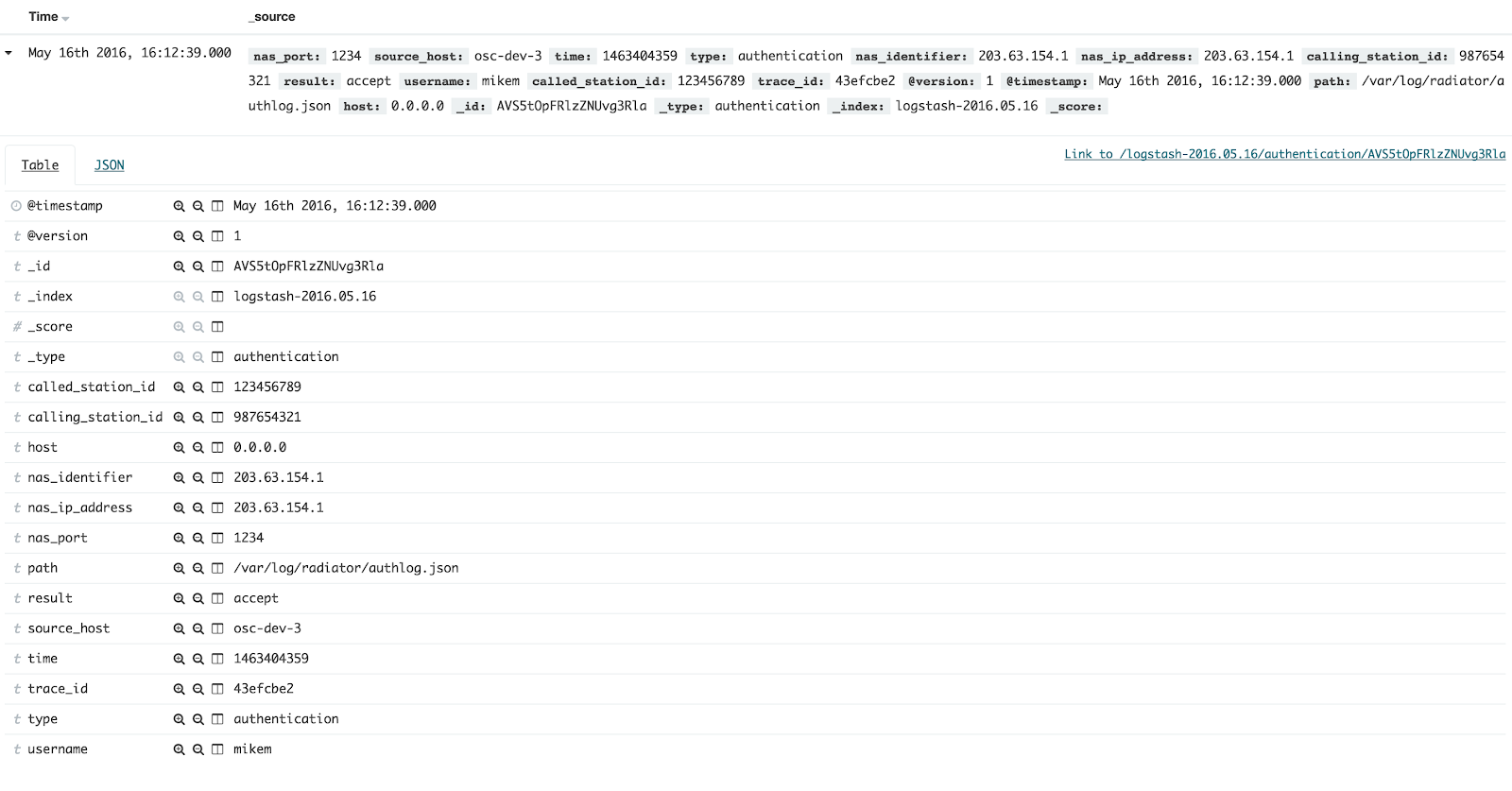
Elastic Stack parses the data so we can explore the contents in Kibana. Part of our sample data looks like this in Kibana:


By clicking each entry open, we can verify that all name-value pairs are distinguished. By default, each name-value pair is indexed and searchable, and if you add new fields to the JSON data, Elastic Stack indexes them automatically. They are parsed and usable in your searches without need for other modifications. This enables searching of wide variety of name-value pairs and their combinations.


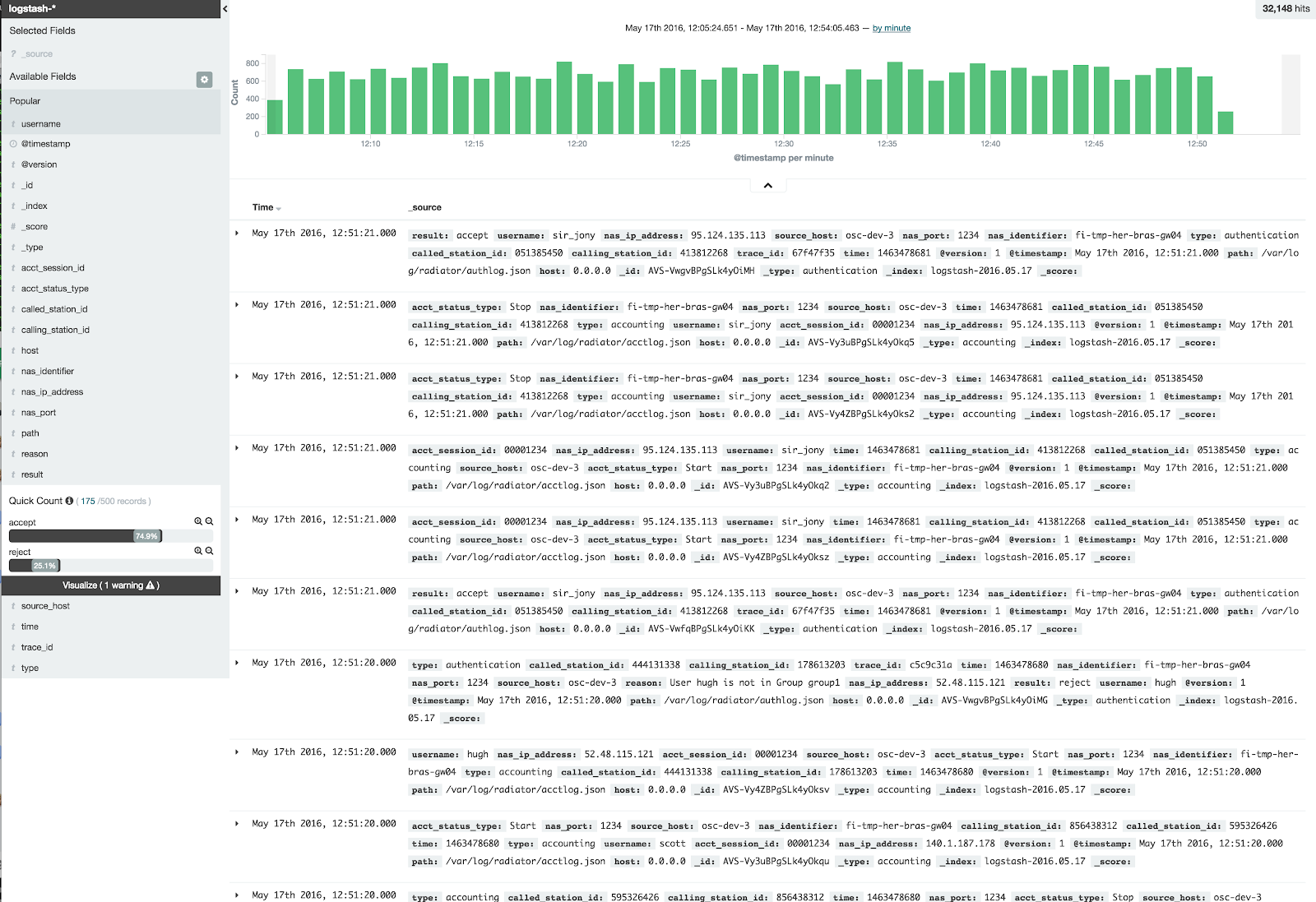
Kibana shows the amount of entries in each time window. By filtering everything else but authentication-related entries, we see trends in amount of authentication attempts.


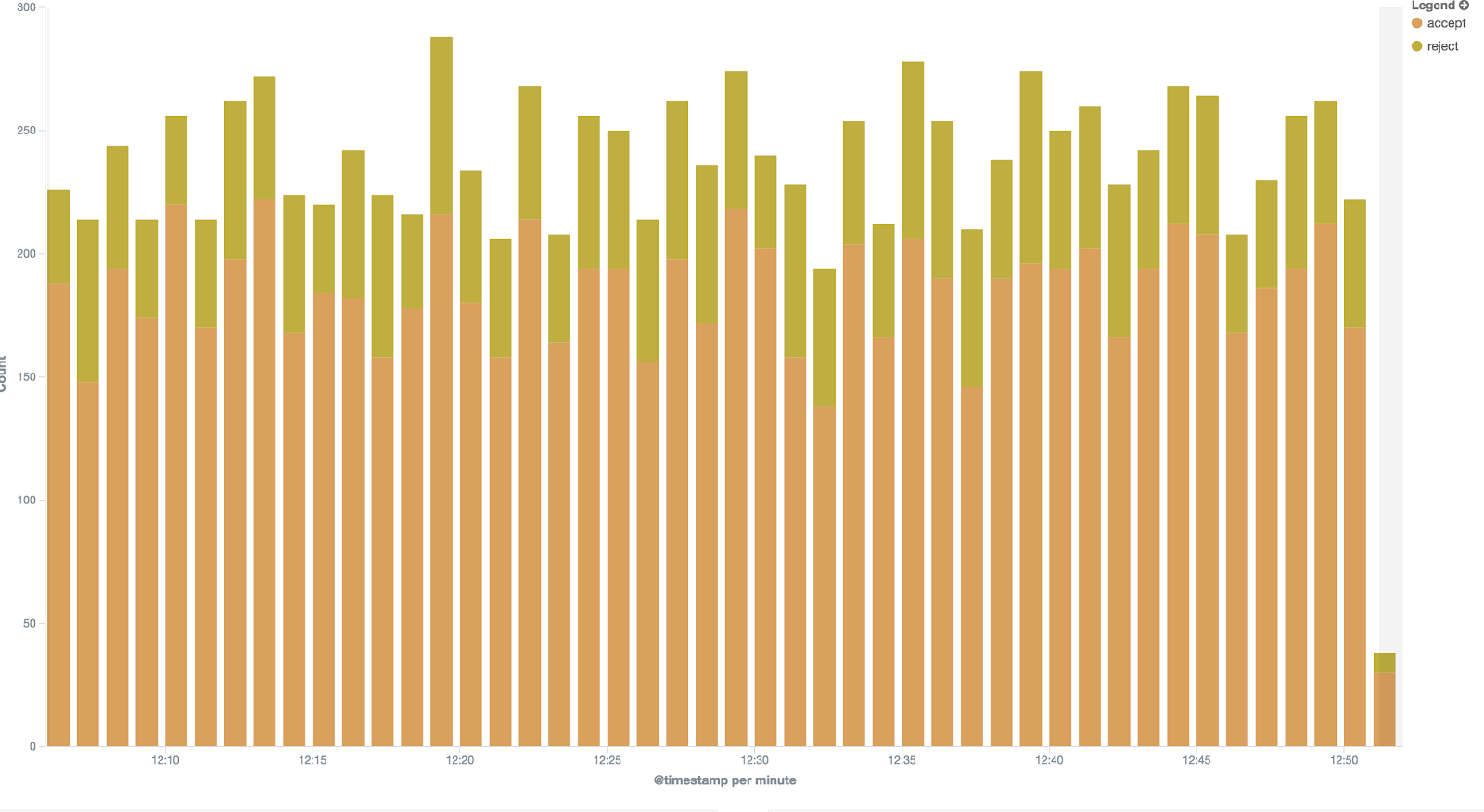
Similarly, we can create visualisation of access/reject rate within a certain time frame.


Do you want to know more?

There will be examples of more detailed JSON use cases in the blog. If you have questions, contact Radiator team at sales(a.t.)radiatorsoftware.com – we are happy to help you to have more benefits of your log data.

Tuesday, August 2, 2016

Secure your network and services with Radiator two-factor authentication

Modern services all around the Internet offer different two-factor authentication solutions. They provide stronger security than using only username and password. Two-factor authentication requires a combination of something the user knows and something the user possesses. One common combination is the username and PIN or password with a physical token, such as a specific device, smart card, or mobile phone. The two-factor secured service may range from a web service to a network device to a remote VPN (Virtual Private Network) access – wherever stronger security is needed.

Figure 1: Radiator based two-factor authentication and authorisation architecture

Radiator AAA Server Software provides flexible, interoperable, and scalable two-factor AAA (Authentication, Accounting, and Authorisation) service for any device or service, which can use RADIUS, TACACS, or TACACS+ interface for AAA. The VPN devices can authenticate remote employees, the network devices can authorise administrators, and the web services can identify the users with secure two-factor authentication. All you need is Radiator-based two-factor AAA service and a free mobile phone app, such as Google Authenticator, Microsoft Authenticator, or some other OTP/TOTP/HOTP app. The authenticator app is paired with Radiator two-factor AAA service and particular user credentials, and two-factor authentication are ready to be used.

Another major benefit of using Radiator is its legendary interoperability. Radiator can combine complementary AAA information and functions from Active Directory, LDAP, and even 3rd party two-factor services, such as RSA SecurID, YubiKey, Duo Security, and Vasco Digipass. It can check existence and validity of a user from Active Directory, retrieve a proper VPN group, perform two-factor authentication using TOTP (Time-based One-time Password Algorithm), and then combine the results to a RADIUS authentication and authorisation response, which is sent back to a Cisco ASA VPN device.

Radiator can also extend the functionalities of 3rd party two-factor authentication services by translating and complementing AAA interactions between services and devices. For example, Radiator combines fine-grained TACACS(+)- or RADIUS-based network device configuration authorisation with existing user directories and two-factor authentication. The two-factor authentication data may be retrieved from Radiator itself or some 3rd party service. With the help of Radiator’s extendable two-factor modules, Radiator also supports SMS transfer of one-time-passwords, when using tokens or authenticator app is not feasible.

Radiator and its two-factor authentication functionalities have already been deployed in several different environments such as:
  • Fortune 250 company uses Radiator for two-factor authentication of their global VPN network.
  • IT departments of world’s two top universities provide VPN service for their employees, partners, and students utilising Radiator’s capability to combine Duo Security two-factor authentication service to additional LDAP directory checks.
  • Nordic operator provides multi-function (RSA SecurID, SMS) two-factor authentication service to their enterprise customers.

Would you like to know more?

Contact our team at info@open.com.au to set up a meeting, where we can discuss how Radiator could help you in securing access to your services or network with two-factor authentication.

Monday, July 18, 2016

Flexible M2M/IoT service with Radiator and Private APN

M2M (Machine to Machine) communications, IoT (Internet of Things), and Industrial Internet are constantly bringing new connected devices, things, to the Internet. Operators and other companies already use Radiator AAA Server Software to create M2M, IoT, and Industrial Internet services to customers. Using Radiator with Private APN (access point name) is an important use case.

Figure 1: Radiator RADIUS server and Private APN service architecture

Most mobile operators provide, in addition to their own APNs, also a Private APN service for companies interested of separating their data traffic from operators’ generic subscriptions. The Private APN service utilises operator’s SIM cards for radio network access, but separates the data traffic in operator’s GGSN (gateway GPRS support node) by the access point name (e.g. internet.company instead of operator’s own access point name). These separate private access points may have their own parameters for authentication, accounting, IP networks, IP address allocation, connection parameters, traffic accounting, priorities, and other functionalities. Depending on the GGSN capabilities, it is possible to move some of these functionalities and information to a separate RADIUS service, which is provided either by the operator or company utilising the Private APN.

With the Private APN and Radiator AAA Server Software as a RADIUS service, our customers have successfully deployed M2M, IoT, and Industrial Internet solutions. Some examples are:
  • Fixed IPv4 and IPv6 address allocation for mobile operator M2M/IoT service based on MSISDN (phone number) with the option of returning any GGSN-supported subscription parameters from RADIUS to GGSN
  • Ensuring that the Australian state-wide network of water measurement devices are active and sending measurement data, and working as AAA service for VPN connection authentication for devices
  • Tracking truck locations, and authenticating, accounting, and authorising GPS tracking devices for fleet tracking service operating across several operators and European countries

Would you like to know more?

This use case is one of the many, where Radiator can be used to provide additional and complementary functionality to mobile network and Internet of Things/Industrial Internet solutions. Contact our team at sales(a.t.)radiatorsoftware.com to set up a meeting, where we can discuss how Radiator could help you in building and deploying mobile network or IoT/Industrial Internet services and solutions.

Monday, June 6, 2016

Make your Radiator log data searchable

This is the first part of blog series that helps you to use log data that Radiator generates. Jump to second part.


Radiator exports AAA (authentication, authorisation, accounting) data to various formats. You can process the log data further by other log collection systems, such as Splunk and Elasticsearch. In this article, we briefly describe how to export data in JSON format. The common use case is to record the metrics that best describe your environment, for example, authentication, and authorisation messages.

The image below shows you an example of visualised Radiator worker statistics. The graphics were created with Grafana. Click the image for a larger view.


Adding a new field
With Radiator, it is possible to export log data in JSON format (for more information, see JSON.org). Basically, JSON is a set of name-value pairs. The values can also be ordered lists and it is possible to nest lists inside other lists. This makes it possible to express complex data structures in an universal manner with JSON.

Usually, the hardest part in modifying configuration is to figure out how to synchronise modifications everywhere, especially if the logs are centrally collected and parsed. For example, if Client-Identifier or some other RADIUS attribute is added to a log message when authentication fails, you have to ensure the log parser engine understands the new field.

This is an example of AuthLog FILE, which has date, username, and result.

Wed May 18 15:48:44 2016:mikem:FAIL

If you add a new field, the log entry looks like this:

Wed May 18 15:48:44 2016:mikem:client-1:FAIL

Here is the same information as a default JSON message without the new field:

{"timestamp":"2016-05-18T15:48:44Z","result":"reject","source_host":"osc-dev-3","username":"mikem","type":"authentication"}

Here is the JSON message with the new field: {"timestamp":"2016-05-18T15:48:44Z","result":"reject","source_host":"osc-dev-3","username":"mikem","type":"authentication", “client”:”client-1”}
With JSON, it is easy to add the new field to Radiator log message. Usually, there is no need to modify the parser configuration since the fields are just a group of name-value pairs and not fixed together in any way.

Configuring Radiator

The configuration process is straightforward: add Log <FILE, SYSLOG, ...> clause and use it in the same way as existing ones to your Radiator config and you are done. With Radiator, you can customise your own LogFormatHook and add, remove, or modify the fields. This is how Radiator extends the log usage possibilities even further.

Note: The following configuration example needs Radiator 4.16 with latest patches. You must have JSON module installed. JSON::XS module is recommended (see https://metacpan.org/pod/JSON and https://metacpan.org/pod/JSON::XS).


Configuration example: JSON output to radius.cfg (source goodies/logformat.cfg):


# This logger logs events in JSON format. It requires the Perl JSON
# module. Note the specific requirement for loading the logger module.
<Log FILE>
       Identifier mylogger-json
       Trace 4
       Filename %L/logfile.json
       LogFormatHook sub { Radius::LogFormat::format_log_json(@_); }
</Log>


# This auth logger logs both successes and failures to a JSON file.
<AuthLog FILE>
       Identifier myauthlogger-json
       Filename %L/authlog.json
       LogFormatHook sub { Radius::LogFormat::format_authlog_json(@_); }
       LogSuccess 1
       LogFailure 1
</AuthLog>


# This is the Handler-clause.
<Handler>
   <AuthBy FILE>
       Filename %D/users
   </AuthBy>
   AuthLog myauthlogger-json
   # Log accounting messages in JSON format.
   AcctLogFileName %L/acctlog.json
   AcctLogFileFormatHook sub { Radius::LogFormat::format_acctlog_json(@_); }
</Handler>


In this example configuration, all log data is saved into a single file. This may cause problems in the real configuration because of increasing log data file size. You can avoid this by using log rotation tools, for example, logrotate in Unix-based systems. Rotating log files can safely be done without restarting Radiator. Radiator also supports the special characters in the file names.

Do you want to know more?
Your JSON files are now ready, the next step is to use them efficiently. In the next part of the series, we will introduce the more detailed use cases, which will help you get the most out of Radiator logging.

Wednesday, May 6, 2015

Preventing Bill Shock with Radiator

Photo by Thomas Fano
Unexpected bill shock - a huge bill accumulated from roaming - can be a nasty surprise for your customers. It is also one that can be avoided, both in domestic and in global use. One of the most known use cases is based on EU roaming regulations.

When your client uses mobile phone in other EU countries to go online, there's a limit on what an operator can charge them. The limit is based on EU regulations. To protect the client against excessive data roaming bills, the monthly cost of downloaded data on mobile device is capped, worldwide, at €50, unless something else has been agreed on. Following the EU regulations, a warning is sent when the usage reaches 80 % of the quota.

In addition to EU regulations, a system for warning and limiting data use is needed for global roaming to ensure that your clients will not have a bill shock from their worldwide data usage.

With Radiator, we have already done these kind of solutions for our operator customers who have in turn provided it for their virtual operators. In this post, we will tell you how to do it.

How to use Radiator to prevent Bill Shock

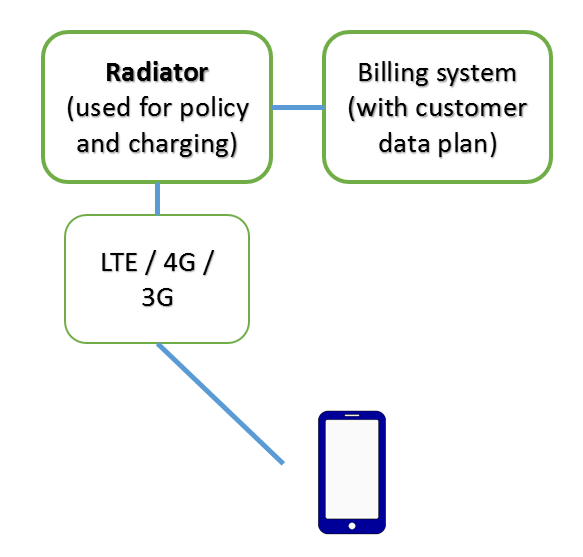
The basic layout of operator infrastructure

Radiator keeps track on the data used by the customer. To do so, Radiator interacts with the billing system where the data plans and client information is stored.

Customer's SIM is used to lookup information about the customer’s current quota usage, data plan, phone number for SMS alerts and possible other information, such as custom limit for data usage. One data plan is typically used for most of the customers, another for enterprise customers and another for customers of a virtual operator.

The client’s updated quota is then stored in the database. When the quota limit is reached, an automated SMS message is sent to the customer. After each month, the data quota is reset in the database and the usage monitoring will start from the beginning.

Customers are happy when their roaming quota is monitored reliably, and operator does not have to allocate any resources to this task. 

What do you need?

The functionality can be done with Radiator Policy and Charging Support. Contact our sales team at sales (a.t) radiatorsoftware.com.